

Ping NetTool
Ping NetTool is made and published by TLM Software Design, Inc. AppBrain is an independent app data site and isn't affiliated with TLM Software Design, Inc. The app name, icon, screenshots and description belong to TLM Software Design, Inc. and are shown as published on the App Store.
AppBrain's verdict
- Last updated
- August 13, 2026
- Size
- 61.2 MB
User feedback
Ratings and reviews on the App StoreComments on Ping NetTool for iOS
We don't have enough comments to show example comments. Please check back later.
Store listing
By TLM Software Design, Inc., from the App Store


Description by TLM Software Design, Inc. Written by the developer, not by AppBrain. Click to read.
SIMPLE MODE — ONE TAP IS ALL IT TAKES
Open the app and you are greeted by a single, friendly screen: "Is my internet working?" Tap the button. Within seconds, Ping Network Tool sends a probe to a reliable server, interprets the result, and answers in plain language — "Internet is available. Your connection is working normally." or an equally clear explanation of what went wrong and what you might try. No jargon, no numbers to decode.
If you are curious about the underlying data, tap "See technical details" to reveal the raw ping output, or tap "Switch to Advanced" to unlock the full toolkit.
ADVANCED MODE — LINUX-FAITHFUL PING OUTPUT IN YOUR POCKET
Power users and professionals get a streamlined terminal-style interface with three tabs: Ping, History, and Network.
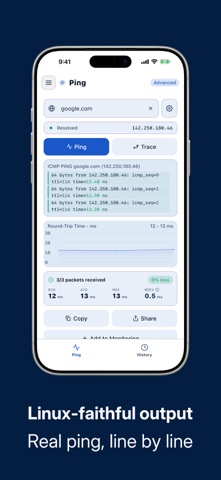
The Ping tab lets you enter any hostname or IP address, choose your packet size, interval, and count, then press Ping to watch results stream in line by line — exactly as you would see them in a Linux terminal. A live RTT graph plots each round-trip time as responses arrive, giving you an instant visual of jitter and packet loss. When you are done, tap Trace to run a full traceroute to the same host and see every hop between your device and the destination, with per-hop latency. Copy the entire session output to the clipboard with one tap for sharing or logging.
The History tab preserves every ping and traceroute session automatically. Browse past runs, review RTT statistics — min, avg, max, and mdev — and compare connectivity over time. Sessions persist across restarts so you always have a record.
The Network tab shows a live snapshot of this device: your Wi-Fi IP address, external IP (via ipify.org), DNS server, and detected country. Tap Refresh at any time to update the external IP or country information. It is ideal for quickly verifying VPN connectivity, confirming your external address, or checking which DNS resolver your device is using.
HOST BOOK — SAVE AND REUSE YOUR TARGETS
The Host book stores up to five hosts in the free plan so you can jump straight to the targets you care about without retyping them. Each saved host can also be enrolled in background monitoring, which silently pings it at regular intervals and alerts you when it becomes unreachable.
PREMIUM — ONE-TIME PURCHASE, NO SUBSCRIPTION
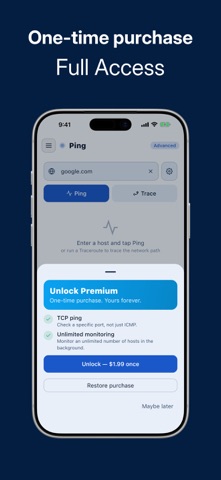
Ping Network Tool is free to use with no time limit. A single optional in-app purchase of $1.99 unlocks the full feature set permanently:
• TCP Ping: probe a specific port number instead of relying on ICMP alone. Useful for checking whether a web server, mail server, or game server is actually accepting connections on the relevant port.
• Unlimited hosts and monitoring: remove the 5-host limit in the host book and enable background monitoring for as many targets as you need.
• No upsell banners: permanently removes the promotional banner and weekly reminder that appear in the free plan.
• Family Sharing: the purchase is shared automatically with everyone in your Family Sharing group on iOS at no extra cost.
There is no subscription, no auto-renewal, and no hidden fees. Pay once and the unlock is yours forever, even after reinstalls.
PRIVACY AND PERMISSIONS
Ping Network Tool does not collect personal information. Network requests are limited to the hosts you explicitly choose to probe and a single call to ipify.org to retrieve your external IP address when you open the Network tab. No account is required. No data is uploaded to any server.
Whether you are a home user troubleshooting a slow connection, a network engineer checking infrastructure from your phone, or a developer verifying that a deployment is reachable — Ping Network Tool is the fast, clean tool you have been looking for.
Safety and technology
Found in the app by AppBrain- Price
- Free
- App size
- 61.2 MB
- Content rating
- Everyone
Technologies used by Ping NetTool
Releases
Updates seen on the App Store- Version
- 1.2.0
- Launched
- July 2026
No changelog data
Alternatives
Similar apps and more from TLM Software Design, Inc.


Rankings
App Store top chartsApp Store Rankings for Ping NetTool
About the app and developer
About Ping NetTool
Ping NetTool is an utilities app developed by TLM Software Design, Inc.
What is the rating of Ping NetTool?
Ping NetTool has no ratings yet.
Is Ping NetTool free?
Ping NetTool is free. The app size is 61.22 MB. The latest version available is 1.2.0. The last update was on August 13, 2026.
What are the requirements for Ping NetTool?
The app has a content rating of Everyone. The app has been available on the App Store since July 2026.
Developer information for TLM Software Design, Inc.
Address:
Frequently asked questions about Ping NetTool
Is Ping NetTool free?
Yes. Ping NetTool is free on the App Store.
Is Ping NetTool still available?
Yes. Ping NetTool is on the App Store, and the last update we saw was on August 13, 2026.
How large is Ping NetTool?
Ping NetTool is 61.22 MB.
Is Ping NetTool suitable for children?
App Store rates the content of Ping NetTool as suitable for everyone.
Who made Ping NetTool?
Ping NetTool was developed by TLM Software Design, Inc. It is listed in the utilities category on the App Store.
What are the best alternatives to Ping NetTool?
People looking at Ping NetTool also look at these utilities apps: Signal - Uptime Monitoring, WiFi Scanner: Network Analyzer, TrueDash, NetMaster-X Network tools, NetTools - IP Toolbox.