

Ping – Network Tools
Ping – Network Tools is made and published by Pankaj Gaikar. AppBrain is an independent app data site and isn't affiliated with Pankaj Gaikar. The app name, icon, screenshots and description belong to Pankaj Gaikar and are shown as published on the App Store.
AppBrain's verdict
Loved by users- Rating on App Store
- 4.78
- 109 ratings
- Last updated
- September 23, 2026
- Size
- 41.6 MB
Users love it: 4.8 stars from 109 ratings.
User feedback
Ratings and reviews on the App StoreComments on Ping – Network Tools for iOS
We don't have enough comments to show example comments. Please check back later.
Store listing
By Pankaj Gaikar, from the App Store



Description by Pankaj Gaikar Written by the developer, not by AppBrain. Click to read.
Run a fast connectivity check to any hostname or IP address, trace routes hop-by-hop, perform DNS lookups, scan open ports, check WHOIS records, calculate subnets, and monitor your connection in real time.
No ads. No tracking. No data collection. Completely free.
7 NETWORK TOOLS IN ONE APP
Ping goes far beyond a basic ping app — it’s a complete mobile network toolkit for Wi-Fi troubleshooting, LAN diagnostics, and server monitoring on the go.
PING TEST & MONITOR
• Ping test (ICMP) for any hostname or IP address (IPv4 + IPv6)
• Live latency chart with last-point highlight and smooth visualization
• Packet loss detection — instantly identify unstable connections
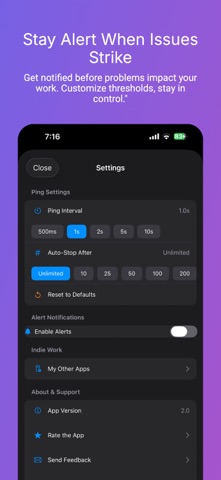
• Smart alerts for latency spikes, packet loss thresholds, or connection drops
• Advanced metrics — jitter, standard deviation, stability score, p50/p95/p99 percentiles
• Quality grade (A+ to F) for instant connection health assessment
• Insights like Stable, Spiking, or Degraded to explain results
• Terminal-style console log with colored status indicators
• Configurable interval, timeout, and count limit for precise ping tests
SERVICE PULSE
• At-a-glance reachability for popular services on the Monitor tab
• Live latency with trend arrows and mini charts
LOOKS & APP ICONS
• Curated Looks — CRT, Windows 95, VHS, Arcade, and more
• Alternate app icons to match your style
• Optional Icon Pack, Theme Pack, or Bundle — network tools stay free
NETWORK TOOLS
• DNS Lookup — resolve A, AAAA, and reverse PTR records
• Traceroute — hop-by-hop route tracing with per-hop latency and timeout detection
• Port Scanner — TCP connect scan with common presets and custom ranges
• WHOIS Lookup — domain registration, registrar, expiry, and name server info
• Network Snapshot — find my IP address, public IP, DNS servers, network type, IPv6 status
• Subnet Calculator — CIDR ranges, masks, broadcast, host count
• Wake on LAN — send magic packets to power on devices remotely
HISTORY & EXPORT
• Auto-saved ping sessions with searchable history
• Session detail with full chart replay and complete console log
• Share connection quality summaries for faster troubleshooting
BUILT FOR GAMERS & PROFESSIONALS
• Gamers — monitor ping and latency before it costs you the match
• Remote workers — diagnose Wi-Fi issues affecting VPN and video calls
• IT & DevOps — server monitor for uptime, DNS propagation, port scanning
• Network engineers — subnet calculations, WHOIS lookup, LAN utilities
• Streamers & creators — detect packet loss and connection instability
Download Ping Network Tools — your network scanner, ping monitor, and connectivity check in one app.
MULTI-HOST PING & PRESET GROUPS
Compare several hosts at once with multi-host ping: live Radar view, detailed packet Timeline, and side-by-side metrics. Organize favorites into groups and launch them together from the Favorites tab.
• Curated preset groups ready to ping — Social, Streaming, Gaming, DNS, and Cloud & Work
• Multipurpose host packs for different audiences; launch a whole group in one tap
Safety and technology
Found in the app by AppBrain- Price
- Free
- App size
- 41.6 MB
- Content rating
- Everyone
Technologies used by Ping – Network Tools
Releases
Updates seen on the App Store- Version
- 4.3.0
- Launched
- April 2025
No changelog data
Alternatives
Similar apps and more from Pankaj GaikarAlternatives to Ping – Network Tools


More from Pankaj Gaikar


Rankings
App Store top chartsApp Store Rankings for Ping – Network Tools
About the app and developer
About Ping – Network Tools
Ping – Network Tools is an utilities app developed by Pankaj Gaikar.
User Ratings
Ping – Network Tools is rated 4.78 out of 5 stars. The rating is based on 110 ratings.
App Information
Ping – Network Tools is freely available from the App Store. The app size is 41.61 MB. The latest version available is 4.3.0. The last update was on September 23, 2026.
Technical Requirements
The app has a content rating of Everyone. The app has been available on the App Store since April 2025.
Developer information for Pankaj Gaikar
Address: