AppBrain
AppBrain
  • Apps
  • Apps being viewed right now Trending apps today Most popular apps All-time most installed apps Top rated apps iPhone and iPad apps
  • Intelligence ▾
    Intelligence overview → Track any Android app or your whole market
    Track & analyze
    Keyword Tracker & OptimizerTrack & improve Play rankings App Performance ReportOne-off PDF for any app StatisticsFree Android & Play market stats
    Promote your app
    Featured Apps App Links
  • Intelligence
  • Pricing
  • Dashboard
  • Sign up
  • Log in
App Store Apps > Productivity > Pinote — Lock Screen Note
App profile & analytics · Productivity · Data updated 2026-10-06
Pinote — Lock Screen Note icon

Pinote — Lock Screen Note

by OKMIN LEE · Free · Version 1.18.0
Availability On the App Store since April 2026 ↗
Rating on App Store
–
Rating
–
0 reviews
Best rank
–
not in the top lists
Last updated
September 20, 2026
1.18.0

Pinote — Lock Screen Note is made and published by OKMIN LEE. AppBrain is an independent app data site and isn't affiliated with OKMIN LEE. The app name, icon, screenshots and description belong to OKMIN LEE and are shown as published on the App Store.

About Pinote — Lock Screen Note

Pinote — Lock Screen Note is a productivity app developed by OKMIN LEE.

User Ratings

The app has no ratings yet.

App Information

Pinote — Lock Screen Note is freely available from the App Store. The app size is 27.80 MB. The latest version available is 1.18.0. The last update was on September 20, 2026.

Technical Requirements

The app has a content rating of Everyone. The app has been available on the App Store since April 2026.

Description by OKMIN LEE (from the App Store)
Your next task. On your Lock Screen.

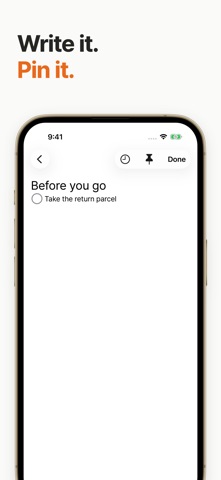
A parcel to return before you leave. A question to ask at your next meeting. Write it in Pinote and pin it, so you can see your next task without opening the app.

• Notes and checklists
Write freely, then focus on the next item in your checklist.

• Pin now or schedule a time
Pin a note from the editor or choose when it should appear automatically. Lock Screen availability and updates depend on system settings and device conditions.

• Continue across devices
Use iCloud to keep your notes across iPhone, iPad, Mac and Apple Watch. Each device displays notes in its own way.

• Recover deleted notes
Recently Deleted keeps copies on this device for 30 days. After restoring a note, you can turn its pin and automatic schedule back on yourself.

• Keep a file backup
Export a Pinote JSON backup and import it later without overwriting existing notes. Export as text to read your notes in other apps. Recently Deleted is stored separately on each device.

No separate Pinote account is required. Cross-device sync uses iCloud. No ads appear on your Lock Screen.
Show more Show less

More data about Pinote — Lock Screen Note

Price Free
Rating No ratings
Ranking Not ranked
Version 1.18.0
App size 27.8 MB
Suitable for Everyone

Screenshots

Pinote — Lock Screen Note Screenshot 1 of 5
Pinote — Lock Screen Note Screenshot 2 of 5
Pinote — Lock Screen Note Screenshot 3 of 5
Pinote — Lock Screen Note Screenshot 4 of 5
Pinote — Lock Screen Note Screenshot 5 of 5
Screenshots by OKMIN LEE, from the the App Store listing
Official page on the App Store

Alternatives to Pinote — Lock Screen Note

MojiDo icon MojiDo
Michael Wildermuth
5.0
Free
1 ratings
Copa - Clipboard Manager icon Copa - Clipboard Manager
Jeongsep Lee
0.0
Free
Streaktor: Daily Habit Tracker icon Streaktor: Daily Habit Tracker
Alvin Sosangyo
0.0
Free
Onside: All Events, Now Onside icon Onside: All Events, Now Onside
YoungHo Kim
5.0
Free
2 ratings
Simple Shopping CheckList icon Simple Shopping CheckList
Ryuga Hashimoto
0.0
Free
Todo Checklist - TodayDo icon Todo Checklist - TodayDo
jeongwon Cheong
5.0
Free
1 ratings
Nagger - Couple Todo Sharing icon Nagger - Couple Todo Sharing
ReleCompany
0.0
Free
Talking Reminder Lite icon Talking Reminder Lite
方 沈
1.0
Free
2 ratings

More from OKMIN LEE

Totine: Daily Habit Tracker icon Totine: Daily Habit Tracker
OKMIN LEE
2.5
Free
2 ratings
Marginalia: Book Quotes icon Marginalia: Book Quotes
OKMIN LEE
4.5
Free
2 ratings
Sharp - My Diary icon Sharp - My Diary
OKMIN LEE
5.0
Free
1 ratings
StamPhoto - Stamp Your Moments icon StamPhoto - Stamp Your Moments
OKMIN LEE
0.0
Free
indexx icon indexx
OKMIN LEE
0.0
Free
Tapeee - Music Player icon Tapeee - Music Player
OKMIN LEE
0.0
Free
MeStoryMaker icon MeStoryMaker
OKMIN LEE
0.0
Free

Changelog of Pinote — Lock Screen Note

No changelog data

Developer information for OKMIN LEE

OKMIN LEE

Address:

Share Pinote — Lock Screen Note

Comments on Pinote — Lock Screen Note for iOS

We don't have enough comments to show example comments. Please check back later.

App Store Rankings for Pinote — Lock Screen Note

This app is not ranked

Technologies used by Pinote — Lock Screen Note

Frequently asked questions about Pinote — Lock Screen Note

Is Pinote — Lock Screen Note free?

Yes. Pinote — Lock Screen Note is free on the App Store.

Is Pinote — Lock Screen Note still available?

Yes. Pinote — Lock Screen Note is on the App Store, and the last update we saw was on September 20, 2026.

How large is Pinote — Lock Screen Note?

Pinote — Lock Screen Note is 27.80 MB.

Is Pinote — Lock Screen Note suitable for children?

App Store rates the content of Pinote — Lock Screen Note as suitable for everyone.

Who made Pinote — Lock Screen Note?

Pinote — Lock Screen Note was developed by OKMIN LEE. It is listed in the productivity category on the App Store.

What are the best alternatives to Pinote — Lock Screen Note?

People looking at Pinote — Lock Screen Note also look at these productivity apps: MojiDo, Copa - Clipboard Manager, Streaktor: Daily Habit Tracker, Onside: All Events, Now Onside, Simple Shopping CheckList.

Top new apps Today's trending apps Popular Productivity Apps Price drops on Google Play Apps other people are watching
MojiDo icon MojiDo
Copa - Clipboard Manager icon Copa - Clipboard Manager
Streaktor: Daily Habit Tracker icon Streaktor: Daily Habit Tracker
Onside: All Events, Now Onside icon Onside: All Events, Now Onside
Simple Shopping CheckList icon Simple Shopping CheckList
Todo Checklist - TodayDo icon Todo Checklist - TodayDo
Nagger - Couple Todo Sharing icon Nagger - Couple Todo Sharing
Talking Reminder Lite icon Talking Reminder Lite
Overview Alternatives Reviews Rankings Technology
AppBrain Intelligence premium content

Subscribe now to get full and unlimited access to AppBrain Intelligence. You'll have access to:

  • App Intelligence dashboard (performance timeline, competitor comparison, country rankings, insight cards)
  • Detailed ranking data per app
  • Full timeline per developer
  • Device market shares data per country
  • Unlimited keyword tracking
1 Month

$75/mo
(billed every month)

SAVE 0%
Subscribe
3 Months

$65/mo
($195 billed every 3 months)

SAVE 13%
Subscribe
1 Year

$57.50/mo
($690 billed every year)

SAVE 23%
Subscribe
Each subscription will automatically renew 3 days before the expiration date for the same time period. Subscriptions can be cancelled at any time before the renewal.

AppBrain is an app data site, we track rankings, ratings, installs for all apps and games on Google Play and the App Store. AppBrain doesn't host app files or APKs, all install links go directly to the official store. All trademarks are owned by their respective owners.

More apps

  • Top Android apps being viewed
  • QTrak Internal Logistic System
  • Lotto Prophet for Android
  • Talab Go for Android

App statistics

  • Android statistics
  • Google Play Developer stats
  • Trending Android Apps
  • Trending iOS apps
  • Top popular Apps
  • Buy the best Android phone
  • Buy & sell app businesses

About AppBrain

  • Contact
  • Privacy
  • Documentation
  • DMCA takedowns
  • Articles
  • Blog
  • The AppBrain advertising system
© 2010-2026 - AppBrain