Download Android Apps and Games
AppBrain
  • Apps
  • Apps being viewed right now Trending apps today Most popular apps All-time most downloaded apps Top rated apps iPhone and iPad apps
  • Intelligence ▾
    Intelligence overview → Track any Android app or your whole market
    Track & analyze
    Keyword Tracker & OptimizerTrack & improve Play rankings App Performance ReportOne-off PDF for any app StatisticsFree Android & Play market stats
    Promote your app
    Featured Apps App Links
  • Intelligence
  • Pricing
  • Dashboard
  • Sign up
  • Log in
Last updated on: 2026-09-19
App Store Apps > Utilities > Pinyin Keyboard Learn Chinese
Pinyin Keyboard  Learn Chinese icon

Pinyin Keyboard Learn Chinese

7.7.7
善康 梁
5.00
2 reviews
Free

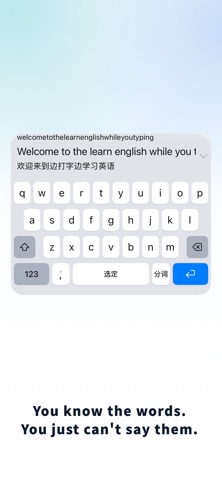
Pinyin Keyboard  Learn Chinese Screenshot 1 of 10
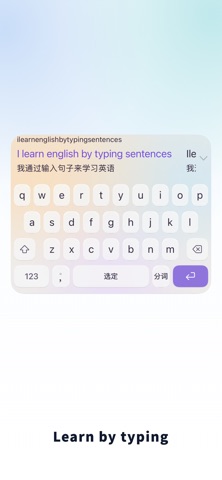
Pinyin Keyboard  Learn Chinese Screenshot 2 of 10
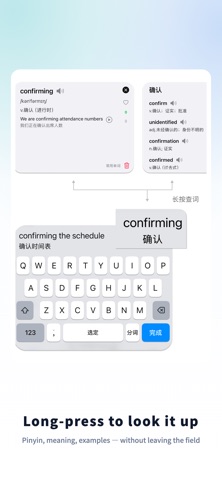
Pinyin Keyboard  Learn Chinese Screenshot 3 of 10
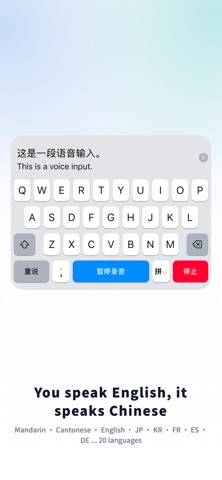
Pinyin Keyboard  Learn Chinese Screenshot 4 of 10
Pinyin Keyboard  Learn Chinese Screenshot 5 of 10
Pinyin Keyboard  Learn Chinese Screenshot 6 of 10
Pinyin Keyboard  Learn Chinese Screenshot 7 of 10
Pinyin Keyboard  Learn Chinese Screenshot 8 of 10
Pinyin Keyboard  Learn Chinese Screenshot 9 of 10
Pinyin Keyboard  Learn Chinese Screenshot 10 of 10
Download from the App Store

About Pinyin Keyboard Learn Chinese

Pinyin Keyboard Learn Chinese is an utilities app developed by 善康 梁.

What is the rating of Pinyin Keyboard Learn Chinese?

Pinyin Keyboard Learn Chinese is rated 5.00 out of 5 stars, based on 2 ratings.

Is Pinyin Keyboard Learn Chinese free?

Pinyin Keyboard Learn Chinese is free to download. The download size is 273.96 MB. The latest version available is 7.7.7. The last update was on September 19, 2026.

What are the requirements for Pinyin Keyboard Learn Chinese?

The app has a content rating of Everyone. The app has been available on the App Store since December 2025.

Description
Learn Chinese While You Type

Type "I want to learn Chinese" and instantly see the Pinyin and Chinese translation right in your keyboard. Instead of switching to a separate study app, just type in English and let the keyboard convert your thoughts into Chinese — a fun challenge that builds real skills!

Can't remember the right character? No problem. Type the Pinyin as best you can — even if it's a little off, like “nihai" for "nǐhǎo" — and the keyboard will suggest the closest matches, complete with English translations so you can confirm the meaning. Grammar not quite right? Long-press to send your sentence to the built-in AI, which can fix your grammar or suggest a more natural way to say it in Chinese.

It may feel a little unfamiliar at first — after all, you're changing the way you type. But the more you practice, the faster it clicks. Imagine texting your friends on iMessage or WhatsApp in Chinese to exercise your language brain — how cool is that!

Every Chinese word and phrase you type or select is automatically saved to your word history — far more relevant to you than a generic flashcard deck. Syncs via iCloud across iPhone, iPad, and Mac.

Input Methods
Full QWERTY Pinyin, Shuangpin (Xiaohe / Ziranma / Pinyin Jiajia / Smart ABC), 9-key Pinyin, 9-key Stroke, Cangjie (3rd gen), Quick Cangjie, and Wubi 86.

Flexible Candidate Display
Show candidates in dual rows (Chinese and English on separate lines), single row (side by side), or switch to Translation Mode for full-sentence conversion. Row count, display style, and output priority are all customizable.

Voice Input
Over 20 languages including English, Mandarin, Cantonese, and Japanese. After speech-to-text, see both the original and the Chinese translation, then hear the Chinese read aloud automatically.

Bring Your Own AI
Supports custom API configurations — connect your preferred AI model directly inside the keyboard.

Fully Offline Capable
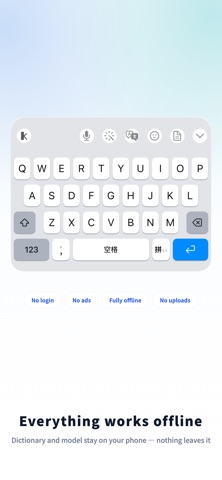
Local dictionaries, offline text-to-speech, and a built-in on-device AI for expression assistance. Import custom word lists in multiple formats. No server dependency.

Privacy First
No account required. No ads. No third-party SDKs. No analytics or tracking. Nothing you type is ever uploaded. Dictionary lookups, translations, and learning history all stay on your device.

About Full Access
iOS keyboards run in a sandbox by default. Enabling Full Access allows the keyboard to save your word history and personal dictionary, sync via iCloud, use local dictionaries and translation, play audio, and call your own custom API.

Free Plan Includes:
— 7 input methods: Pinyin / 9-Key / Shuangpin / Wubi / Cangjie / Quick / Stroke
— Chinese auto-correction, fuzzy Pinyin, smart sentence composition, custom word list import
— Mixed Chinese-English input, Pinyin reverse lookup
— English-Chinese dictionary
— 10 AI translations / polish per day
— All keyboard layouts and basic color themes, ad-free

Pro Unlocks:
— Advanced auto-correction, prefix completion, long-sentence auto-segmentation, extended dictionary lookup
— Unlimited AI translation / polish / voice optimization
— All keyboard themes + save custom color schemes
— Full vocabulary notebook with categories, unlimited lookup history, cloud sync

Pricing
Monthly $0.99 / Yearly $7.99 / Lifetime $5
Subscriptions auto-renew and can be canceled anytime in System Settings.

Terms of Use: https://www.apple.com/legal/internet-services/itunes/dev/stdeula/
Privacy Policy: https://app.shankindness.top/inputmethod_privacy.html
Show more Show less

More data about Pinyin Keyboard Learn Chinese

Price Free to download
Rating 5.00 based on 2 ratings
Ranking Not ranked
Version 7.7.7
App download size 274.0 MB
Suitable for Everyone

More from 善康 梁

OneDayAgain icon OneDayAgain
善康 梁
0.0
Free
Idle Isle: Focus & Relax icon Idle Isle: Focus & Relax
善康 梁
0.0
$0.99

Changelog of Pinyin Keyboard Learn Chinese

No changelog data

Developer information for 善康 梁

善康 梁

Address:

Share Pinyin Keyboard Learn Chinese

Comments on Pinyin Keyboard Learn Chinese for iOS

We don't have enough comments to show example comments. Please check back later.

App Store Rankings for Pinyin Keyboard Learn Chinese

This app is not ranked

Technologies used by Pinyin Keyboard Learn Chinese

Frequently asked questions about Pinyin Keyboard Learn Chinese

Is Pinyin Keyboard Learn Chinese free?

Yes. Pinyin Keyboard Learn Chinese is free to download from the App Store.

Is Pinyin Keyboard Learn Chinese still available?

Yes. Pinyin Keyboard Learn Chinese is on the App Store, and the last update we saw was on September 19, 2026.

How large is the Pinyin Keyboard Learn Chinese download?

Pinyin Keyboard Learn Chinese is 273.96 MB to download.

Is Pinyin Keyboard Learn Chinese suitable for children?

App Store rates the content of Pinyin Keyboard Learn Chinese as suitable for everyone.

How do people rate Pinyin Keyboard Learn Chinese?

Pinyin Keyboard Learn Chinese scores 5.00 out of 5 stars, from 2 ratings on the App Store.

Who made Pinyin Keyboard Learn Chinese?

Pinyin Keyboard Learn Chinese was developed by 善康 梁. It is listed in the utilities category on the App Store.

Apps on sale Apps other people are watching Top new apps Today's trending apps Popular Utilities Apps
Overview Reviews Rankings Technology
More hot apps 🔥
AppBrain Intelligence premium content

Subscribe now to get full and unlimited access to AppBrain Intelligence. You'll have access to:

  • App Intelligence dashboard (performance timeline, competitor comparison, country rankings, insight cards)
  • Detailed ranking data per app
  • Full timeline per developer
  • Device market shares data per country
  • Unlimited keyword tracking
1 Month

$75/mo
(billed every month)

SAVE 0%
Subscribe
3 Months

$65/mo
($195 billed every 3 months)

SAVE 13%
Subscribe
1 Year

$57.50/mo
($690 billed every year)

SAVE 23%
Subscribe
Each subscription will automatically renew 3 days before the expiration date for the same time period. Subscriptions can be cancelled at any time before the renewal.

AppBrain is a directory focused on discovering great apps and games. We give statistics, rankings and search options that Google Play and the App Store don't have. All trademarks are owned by their respective owners. AppBrain doesn't offer APKs or binaries, and always lets users install the official version from Google Play or the App Store.

More apps

  • Top Android apps being viewed
  • View Polyhedra Live Wallpaper
  • Pawn Shop Master
  • CallApp: Caller ID & Block for Android

App statistics

  • Android statistics
  • Google Play Developer stats
  • Trending Android Apps
  • Trending iOS apps
  • Top popular Apps
  • Buy the best Android phone

About AppBrain

  • Contact
  • Privacy
  • Documentation
  • DMCA takedowns
  • Articles
  • Blog
  • Free App-Ads.Txt Validation
© 2010-2026 - AppBrain