

PivotClock
PivotClock is made and published by TAKAYOSHI YOSHIKAWA. AppBrain is an independent app data site and isn't affiliated with TAKAYOSHI YOSHIKAWA. The app name, icon, screenshots and description belong to TAKAYOSHI YOSHIKAWA and are shown as published on the App Store.
AppBrain's verdict
- Last updated
- March 27, 2026
Rankings
App Store top chartsApp Store Rankings for PivotClock
Competitors
Similar apps and more from TAKAYOSHI YOSHIKAWAAlternatives to PivotClock


More from TAKAYOSHI YOSHIKAWA


Releases
Updates seen on the App Store- Version
- 1.0
- Launched
- March 2026
No changelog data
User feedback
Ratings and reviews on the App StoreComments on PivotClock for iOS
We don't have enough comments to show example comments. Please check back later.
Technology
Found in the app by AppBrain- Price
- Free
- App size
- 1.40 MB
- Content rating
- Everyone
Technologies used by PivotClock
About the app and developer
About PivotClock
PivotClock is an utilities app developed by TAKAYOSHI YOSHIKAWA.
What is the rating of PivotClock?
PivotClock has no ratings yet.
Is PivotClock free?
PivotClock is free. The app size is 1.40 MB. The latest version available is 1.0. The last update was on March 27, 2026.
What are the requirements for PivotClock?
The app has a content rating of Everyone. The app has been available on the App Store since March 2026.
Developer information for TAKAYOSHI YOSHIKAWA
Address:
Store listing
By TAKAYOSHI YOSHIKAWA, from the App Store


Description by TAKAYOSHI YOSHIKAWA Written by the developer, not by AppBrain. Click to read.
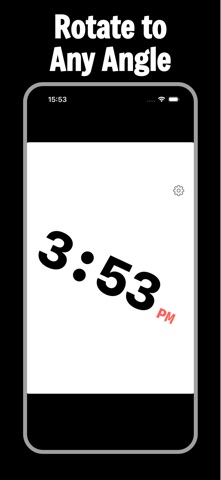
Unlike your phone's auto-rotation, PivotClock works independently. Set it to 0, 90, 180, 270 degrees, or any custom angle. Once locked, the clock stays exactly where you need it.
FEATURES
- Free Rotation
Rotate the clock to any angle using the intuitive dial editor. Drag to rotate, release to snap - just like editing a photo.
- Quick Presets
One tap to snap to 0 / 90 / 180 / 270 degrees. Perfect for landscape bedside or upside-down mounting.
- Digital and Analog
Switch between a clean digital display and a classic analog face. Seconds, date, and 12/24-hour format all configurable.
- 4 Themes
Minimal, Bold, Retro (green glow), and Soft - each with 5 accent color options.
- OLED-Optimized
Pure black background saves battery on OLED screens. Burn-in protection slowly drifts the display so no pixel stays static.
- Ultra Dim Mode
Swipe up/down to darken the screen beyond the system minimum - ideal for bedrooms at night.
- HUD Mirror Mode
Horizontal flip for windshield projection or reverse-mounted displays.
- Screen Always On
The screen stays on as long as PivotClock is open.
PERFECT FOR
- Bedside clock - lay your phone flat or prop it at any angle
- Desk clock - portrait, landscape, or anything between
- Car mount - rotate to match your dashboard angle
- Overhead mount - 180 degree flip when phone is upside down
- HUD mode - mirror the display onto your windshield