AppBrain
AppBrain
  • Apps
  • Apps being viewed right now Trending apps today Most popular apps All-time most installed apps Top rated apps iPhone and iPad apps
  • Intelligence ▾
    Intelligence overview → Track any Android app or your whole market
    Track & analyze
    Keyword Tracker & OptimizerTrack & improve Play rankings App Performance ReportOne-off PDF for any app StatisticsFree Android & Play market stats
    Promote your app
    Featured Apps App Links
  • Intelligence
  • Pricing
  • Dashboard
  • Sign up
  • Log in
App Store Apps > Photo & Video > PixBatch: Batch Resize Photos
PixBatch: Batch Resize Photos icon

PixBatch: Batch Resize Photos

1.0.2
Sompal Arya
0.00
0 reviews
Free

PixBatch: Batch Resize Photos Screenshot 1 of 9
PixBatch: Batch Resize Photos Screenshot 2 of 9
PixBatch: Batch Resize Photos Screenshot 3 of 9
PixBatch: Batch Resize Photos Screenshot 4 of 9
PixBatch: Batch Resize Photos Screenshot 5 of 9
PixBatch: Batch Resize Photos Screenshot 6 of 9
PixBatch: Batch Resize Photos Screenshot 7 of 9
PixBatch: Batch Resize Photos Screenshot 8 of 9
PixBatch: Batch Resize Photos Screenshot 9 of 9
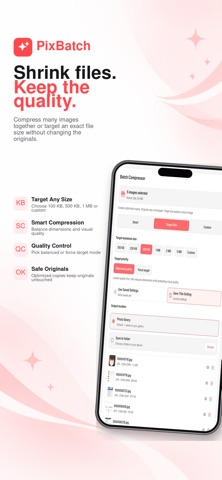
Screenshots by Sompal Arya, from the the App Store listing
View on the App Store

AppBrain's verdict

Last updated
November 7, 2026
Size
58.8 MB
Official page on the App Store

User feedback

Ratings and reviews on the App Store

Comments on PixBatch: Batch Resize Photos for iOS

We don't have enough comments to show example comments. Please check back later.

Store listing

By Sompal Arya, from the App Store
Description by Sompal Arya Written by the developer, not by AppBrain. Click to read.
PixBatch is an all-in-one image toolkit for artists, creators, photographers, designers, and anyone who works with lots of images.

Resize, compress, convert, watermark, and rename whole batches of photos at once, then export clean, ready-to-share copies. Crop and resize for social media, blur private details, remove metadata, turn images into PDFs, and build comic pages, all in one simple app.

Key features:

Batch Resize
Resize many photos to exact dimensions in one go. Choose fit or fill, and add padding when you need a fixed canvas.

Batch Compressor
Reduce photo size for sharing, storage, uploads, and portfolio delivery. Use Smart compression, set a target file size, or pick your own quality.

Batch Converter
Convert images between JPG, PNG, WebP, and more. Convert HEIC to JPG so your iPhone photos open everywhere.

Batch Watermark
Add text or logo watermarks across many photos. Tile a watermark over the whole image for extra protection, and save your designs to reuse.

Batch Rename
Rename many images with custom names, numbering, dates, separators, and sorting. Add more photos and drag them into the order you want.

Batch Actions
Create reusable workflows and run several steps in one go. Combine resize, rename, convert, compress, watermark, and metadata cleanup.

Social Media Resize
Turn one photo into every size you need: square, portrait, and tall posts, stories and reel covers, video thumbnails, and profile pictures.

Crop Image
Crop to 1:1, 4:5, 3:4, 2:3, 9:16, 16:9, and more, or crop freely.

Comic Page Builder
Create comic pages with panel layouts, your own artwork, speech balloons, captions, and lettering. Choose whether to add page numbers, then export a single page or the whole comic as images or a PDF, a CBZ file for comic reader apps, a vertical scrolling strip, carousel or story slides, or lettering only on a transparent background.

Images to PDF
Turn image sets, artwork, comics, portfolios, or reference pages into clean PDF files in the page order you choose.

Blur Tool
Hide faces, text, license plates, and private information with blur, mosaic, frosted effects, or emoji overlays. Zoom in for detail and work across several photos.

Metadata Cleanup
Remove hidden metadata such as camera, GPS location, and author information before you share.

Collage Maker
Arrange photos with customizable layouts, frames, backgrounds, and styles. Adjust and reframe each image inside its cell.

Text and Design Tools
Add styled text, speech bubbles, stickers, emojis, and other visual elements to images.

Private by design
Image processing happens on your device. Your photos are not uploaded to a server for editing.

PixBatch helps you prepare finished, export-ready image copies faster while keeping your original images safe.

Terms of Use (EULA): https://www.apple.com/legal/internet-services/itunes/dev/stdeula/

Safety and technology

Found in the app by AppBrain
Price
Free
App size
58.8 MB
Content rating
Everyone

Technologies used by PixBatch: Batch Resize Photos

Releases

Updates seen on the App Store
Version
1.0.2
Launched
July 2026

No changelog data

Alternatives

Similar apps and more from Sompal Arya

Alternatives to PixBatch: Batch Resize Photos

Renamely: Batch Rename icon Renamely: Batch Rename
Jhomar Maravillas
0.0
Free
Image Converter - convertX icon Image Converter - convertX
Calymex Ventures LLP
0.0
Free
Image Rotator – Batch Photos icon Image Rotator – Batch Photos
Koji Watanabe
0.0
Free
TalkVideo - AI Video Generator icon TalkVideo - AI Video Generator
Shutter Technology Co., Ltd.
5.0
Free
1 ratings
AI Photo Enhancer & Face Swap icon AI Photo Enhancer & Face Swap
HYPER SOFT TECH
5.0
Free
3 ratings
Camera HD & Pro Raw Photo HDR icon Camera HD & Pro Raw Photo HDR
Pixaro Studio
3.0
Free
2 ratings
AI Photo & Video Editor: Vidoo icon AI Photo & Video Editor: Vidoo
Sanket Rola
3.7
Free
3 ratings
Photo AI: Image & Video Maker icon Photo AI: Image & Video Maker
Alex Gameli Heyman
4.7
Free
9 ratings

More from Sompal Arya

Still Block Apps / Sites icon Still Block Apps / Sites
Sompal Arya
0.0
Free

Rankings

App Store top charts

App Store Rankings for PixBatch: Batch Resize Photos

This app is not ranked

About the app and developer

About PixBatch: Batch Resize Photos

PixBatch: Batch Resize Photos is a photo & video app developed by Sompal Arya.

User Ratings

The app has no ratings yet.

App Information

PixBatch: Batch Resize Photos is freely available from the App Store. The app size is 58.80 MB. The latest version available is 1.0.2. The last update was on November 7, 2026.

Technical Requirements

The app has a content rating of Everyone. The app has been available on the App Store since July 2026.

PixBatch: Batch Resize Photos is made and published by Sompal Arya. AppBrain is an independent app data site and isn't affiliated with Sompal Arya. The app name, icon, screenshots and description belong to Sompal Arya and are shown as published on the App Store.

Developer information for Sompal Arya

Sompal Arya

Address:

Share PixBatch: Batch Resize Photos

Price drops on Google Play Today's trending apps Top new apps Popular Photo & Video Apps Apps other people are watching
Renamely: Batch Rename icon Renamely: Batch Rename
Image Converter - convertX icon Image Converter - convertX
Image Rotator – Batch Photos icon Image Rotator – Batch Photos
TalkVideo - AI Video Generator icon TalkVideo - AI Video Generator
AI Photo Enhancer & Face Swap icon AI Photo Enhancer & Face Swap
Camera HD & Pro Raw Photo HDR icon Camera HD & Pro Raw Photo HDR
AI Photo & Video Editor: Vidoo icon AI Photo & Video Editor: Vidoo
Photo AI: Image & Video Maker icon Photo AI: Image & Video Maker
Overview Alternatives Reviews Rankings Technology
AppBrain Intelligence premium content

Subscribe now to get full and unlimited access to AppBrain Intelligence. You'll have access to:

  • App Intelligence dashboard (performance timeline, competitor comparison, country rankings, insight cards)
  • Detailed ranking data per app
  • Full timeline per developer
  • Device market shares data per country
  • Unlimited keyword tracking
  • AI assistant access via MCP (Claude, Cursor or any MCP client)
1 Month

$75/mo
(billed every month)

SAVE 0%
Subscribe
3 Months

$65/mo
($195 billed every 3 months)

SAVE 13%
Subscribe
1 Year

$57.50/mo
($690 billed every year)

SAVE 23%
Subscribe
Each subscription will automatically renew 3 days before the expiration date for the same time period. Subscriptions can be cancelled at any time before the renewal.

AppBrain is an app data site, we track rankings, ratings, installs for all apps and games on Google Play and the App Store. AppBrain doesn't host app files or APKs, all install links go directly to the official store. All trademarks are owned by their respective owners.

More apps

  • Top Android apps being viewed
  • OG.com: Rip Cards,Trade Events
  • Doodraw: Animated Drawing
  • ArrowX: Arrow Escape & Tap Out

App statistics

  • Android statistics
  • Google Play Developer stats
  • Trending Android Apps
  • Trending iOS apps
  • Top popular Apps
  • Buy the best Android phone
  • Buy & sell app businesses

About AppBrain

  • Contact
  • Privacy
  • Documentation
  • DMCA takedowns
  • Blog
  • The best curated Android app categories
© 2010-2026 - AppBrain