




AppBrain's verdict
- Rating on App Store
- 4.55
- 11 ratings
- Last updated
- July 9, 2026
- Size
- 32.8 MB
It doesn't have enough ratings yet to judge what users think.
User feedback
Ratings and reviews on the App StoreComments on PixBoost - AI Photo Enhancer for iOS
We don't have enough comments to show example comments. Please check back later.
Store listing
By Pic Slideshow Maker Limited, from the App StoreDescription by Pic Slideshow Maker Limited Written by the developer, not by AppBrain. Click to read.
Enhance quality, restore old pictures, remove backgrounds, erase unwanted objects, upscale resolution, and explore creative AI styles — all in one simple photo editing app.
Whether you want to improve a blurry photo, remove an unwanted object, restore an old picture, change your background, or try a new AI style, PixBoost gives you powerful editing tools in a simple, beautiful experience.
With smart AI editing, you can enhance details, boost image quality, create clean cutouts, apply creative filters, and fine-tune your photos with ease.
Key Features:
AI Photo Enhance
Improve clarity, color, sharpness, and details with one tap. Make your photos look more vivid and polished instantly.
Background Remover
Remove photo backgrounds automatically and create clean, professional-looking cutouts.
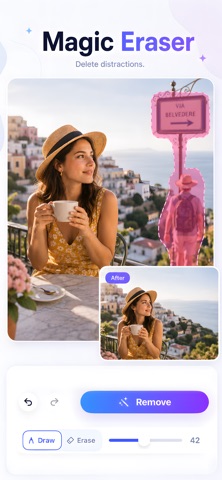
Magic Eraser
Erase unwanted objects, people, stickers, or distractions from your photos in just a few taps.
Old Photo Restore
Bring old, faded, or damaged photos back to life with AI-powered restoration.
Image Upscale
Boost photo resolution and sharpness to make low-quality images look clearer.
Photo Adjustment Tools
Fine-tune brightness, contrast, color, detail, and more to get the perfect look.
Easy Photo Editor
Crop, adjust, apply filters, add stickers, and insert text directly inside the editor.
AI Filters & Creative Styles
Explore trendy AI photo styles, including portrait looks, hairstyle templates, anime-inspired filters, sports-themed styles, and more.
Why PixBoost?
PixBoost combines powerful AI photo enhancement with an easy-to-use editor, helping you turn everyday photos into clean, vibrant, share-ready images.
Perfect for portraits, selfies, travel photos, old family pictures, social media posts, profile photos, product images, and creative edits.
Subscription Information
PixBoost offers auto-renewable subscription plans for PixBoost Pro. Subscribing gives you access to premium AI photo editing features, including AI Enhance, Background Remover, Magic Eraser, AI Filters, Image Upscale, Old Photo Restore, and other advanced editing tools.
Available subscription plans:
• PixBoost Pro Weekly: $5.99 per week
• PixBoost Pro Monthly: $9.99 per month
Payment will be charged to your Apple ID account at confirmation of purchase. Your subscription automatically renews unless it is canceled at least 24 hours before the end of the current subscription period. Your account will be charged for renewal within 24 hours prior to the end of the current period.
You can manage or cancel your subscription at any time in your App Store account settings after purchase. Any unused portion of a free trial period, if offered, will be forfeited when you purchase a subscription.
Prices may vary by country or region and are displayed clearly in the app before purchase.
Privacy Policy:
https://r2-app-aiphoto.picslideshowmaker.com/privacy-policy.html
Terms of Use / EULA:
https://r2-app-aiphoto.picslideshowmaker.com/terms-of-use.html
Contact us:
pixboost@user-supports.com
Safety and technology
Found in the app by AppBrain- Price
- Free
- App size
- 32.8 MB
- Content rating
- Everyone
Technologies used by PixBoost - AI Photo Enhancer
Releases
Updates seen on the App Store- Version
- 1.1
- Launched
- June 2026
No changelog data
Alternatives
Similar apps and more from Pic Slideshow Maker LimitedMore from Pic Slideshow Maker Limited




Rankings
App Store top chartsApp Store Rankings for PixBoost - AI Photo Enhancer
About the app and developer
About PixBoost - AI Photo Enhancer
PixBoost - AI Photo Enhancer is a photo & video app developed by Pic Slideshow Maker Limited.
User Ratings
PixBoost - AI Photo Enhancer is rated 4.55 out of 5 stars. The rating is based on 11 ratings.
App Information
PixBoost - AI Photo Enhancer is freely available from the App Store. The app size is 32.79 MB. The latest version available is 1.1. The last update was on July 9, 2026.
Technical Requirements
The app has a content rating of Everyone. The app has been available on the App Store since June 2026.
PixBoost - AI Photo Enhancer is made and published by Pic Slideshow Maker Limited. AppBrain is an independent app data site and isn't affiliated with Pic Slideshow Maker Limited. The app name, icon, screenshots and description belong to Pic Slideshow Maker Limited and are shown as published on the App Store.
Developer information for Pic Slideshow Maker Limited
Address: