AppBrain
AppBrain
  • Apps
  • Apps being viewed right now Trending apps today Most popular apps All-time most installed apps Top rated apps iPhone and iPad apps
  • Intelligence ▾
    Intelligence overview → Track any Android app or your whole market
    Track & analyze
    Keyword Tracker & OptimizerTrack & improve Play rankings App Performance ReportOne-off PDF for any app StatisticsFree Android & Play market stats
    Promote your app
    Featured Apps App Links
  • Intelligence
  • Pricing
  • Dashboard
  • Sign up
  • Log in
App Store Apps > Graphics & Design > Pixel Art Converter
Pixel Art Converter icon

Pixel Art Converter

by Hon Ching Li · Graphics & Design · Free
On the App Store since March 2025 · Data updated 2026-10-16
App Store

Pixel Art Converter is made and published by Hon Ching Li. AppBrain is an independent app data site and isn't affiliated with Hon Ching Li. The app name, icon, screenshots and description belong to Hon Ching Li and are shown as published on the App Store.

AppBrain's verdict

Rating on App Store
5.00
9 ratings
Last updated
April 13, 2025

It doesn't have enough ratings yet to judge what users think.

Rankings

App Store top charts

App Store Rankings for Pixel Art Converter

This app is not ranked

Competitors

Similar apps and more from Hon Ching Li

Alternatives to Pixel Art Converter

Dotcam - Photo Pixel Art Maker icon Dotcam - Photo Pixel Art Maker
kota tada
0.0
Free
PXLBIT: Pixel art maker icon PXLBIT: Pixel art maker
Subtlabs
0.0
Free
Image Painter - Picture to Art icon Image Painter - Picture to Art
Blue EdgeZ LLC
5.0
Free
1 ratings
Brush AI – Sketch to Art icon Brush AI – Sketch to Art
Mudasir Hussain
0.0
Free
Gridify - Pixel Art Maker icon Gridify - Pixel Art Maker
镇 王
0.0
$0.99
ColorCrafter: Paint by Numbers icon ColorCrafter: Paint by Numbers
MyLogix Studio LLC
3.3
Free
3 ratings
Pixel Art Kit icon Pixel Art Kit
harry bloch
5.0
Free
4 ratings
Photo To Art Maker: PixelPic icon Photo To Art Maker: PixelPic
Stephen Fung
4.5
Free
37 ratings

Releases

Updates seen on the App Store
Version
2.4
Launched
March 2025

No changelog data

User feedback

Ratings and reviews on the App Store

Comments on Pixel Art Converter for iOS

We don't have enough comments to show example comments. Please check back later.

Technology

Found in the app by AppBrain
Price
Free
App size
33.4 MB
Content rating
Everyone

Technologies used by Pixel Art Converter

About the app and developer

About Pixel Art Converter

Pixel Art Converter is a graphics & design app developed by Hon Ching Li.

What is the rating of Pixel Art Converter?

Pixel Art Converter is rated 5.00 out of 5 stars, based on 9 ratings.

Is Pixel Art Converter free?

Pixel Art Converter is free. The app size is 33.43 MB. The latest version available is 2.4. The last update was on April 13, 2025.

What are the requirements for Pixel Art Converter?

The app has a content rating of Everyone. The app has been available on the App Store since March 2025.

Developer information for Hon Ching Li

Hon Ching Li

Address:

Share Pixel Art Converter

Store listing

By Hon Ching Li, from the App Store
Pixel Art Converter Screenshot 1 of 8
Pixel Art Converter Screenshot 2 of 8
Pixel Art Converter Screenshot 3 of 8
Pixel Art Converter Screenshot 4 of 8
Pixel Art Converter Screenshot 5 of 8
Pixel Art Converter Screenshot 6 of 8
Pixel Art Converter Screenshot 7 of 8
Pixel Art Converter Screenshot 8 of 8
Screenshots by Hon Ching Li, from the the App Store listing
Description by Hon Ching Li Written by the developer, not by AppBrain. Click to read.
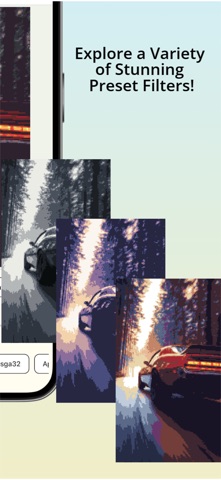
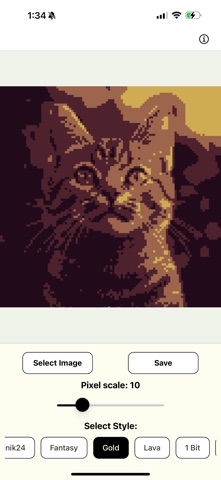
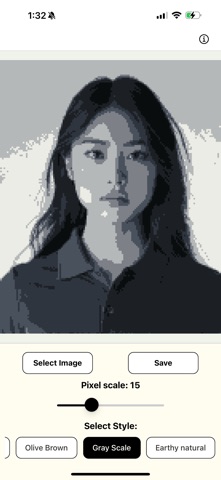
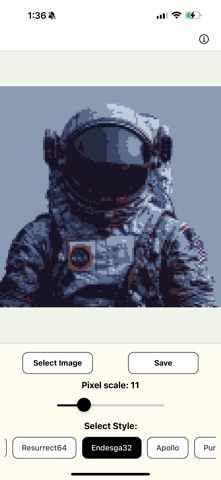
Pixel Art Converter transforms your photos into beautiful pixel art masterpieces with just a few simple taps. Whether you're a digital artist, game developer, or just love the retro aesthetic, our app makes creating pixel art effortless and fun.

KEY FEATURES:
• Transform any photo into pixel art instantly
• Adjust pixelation scale (1-50) for precise control
• Choose from 20 stunning color palettes including Resurrect64, Endesga32, Fantasy, Gold, Retro, and more
• "Original" mode preserves your photo's colors while applying pixelation
• Real-time preview as you adjust settings
• Save your creations directly to your photo library
• Beautiful, intuitive interface optimized for both iPhone and iPad
• Dedicated layouts for iPad in both portrait and landscape orientations

PERFECT FOR:
• Creating unique social media posts
• Designing retro-style game assets
• Digital art projects
• Adding a nostalgic touch to your favorite photos
• Experimenting with different artistic styles

Our powerful pixelation engine processes everything locally on your device, ensuring your photos remain private and secure. The simple, clean interface makes it easy for anyone to create stunning pixel art, regardless of artistic experience.

SUBSCRIPTION INFORMATION:
• Pixelation Monthly Subscription: 1.99 USD per month
• Pixelation Yearly Subscription: 9.99 USD per year
• Subscription is optional and not required to use the basic features of the app
• Payment will be charged to your Apple ID account at the confirmation of purchase
• Subscription automatically renews unless auto-renew is turned off at least 24 hours before the end of the current period
• Account will be charged for renewal within 24 hours prior to the end of the current period
• Auto-renewal can be turned off at any time by going to your Apple ID Account Settings. If auto-renewal is turned off, your subscription will expire at the end of the current billing period
• No refunds will be provided for the active subscription period if canceled before the subscription ends

Privacy Policy: https://www.termsfeed.com/live/eed15514-ea09-464e-ad05-06c629ac47d9
Terms of Use (EULA): https://www.apple.com/legal/internet-services/itunes/dev/stdeula/

Download Pixel Art Converter today and discover how easy it is to transform your photos into pixel art masterpieces!
Official page on the App Store
Popular Graphics & Design Apps Today's trending apps Apps other people are watching Price drops on Google Play Top new apps
Dotcam - Photo Pixel Art Maker icon Dotcam - Photo Pixel Art Maker
PXLBIT: Pixel art maker icon PXLBIT: Pixel art maker
Image Painter - Picture to Art icon Image Painter - Picture to Art
Brush AI – Sketch to Art icon Brush AI – Sketch to Art
Gridify - Pixel Art Maker icon Gridify - Pixel Art Maker
ColorCrafter: Paint by Numbers icon ColorCrafter: Paint by Numbers
Pixel Art Kit icon Pixel Art Kit
Photo To Art Maker: PixelPic icon Photo To Art Maker: PixelPic
Overview Alternatives Reviews Rankings Technology
AppBrain Intelligence premium content

Subscribe now to get full and unlimited access to AppBrain Intelligence. You'll have access to:

  • App Intelligence dashboard (performance timeline, competitor comparison, country rankings, insight cards)
  • Detailed ranking data per app
  • Full timeline per developer
  • Device market shares data per country
  • Unlimited keyword tracking
1 Month

$75/mo
(billed every month)

SAVE 0%
Subscribe
3 Months

$65/mo
($195 billed every 3 months)

SAVE 13%
Subscribe
1 Year

$57.50/mo
($690 billed every year)

SAVE 23%
Subscribe
Each subscription will automatically renew 3 days before the expiration date for the same time period. Subscriptions can be cancelled at any time before the renewal.

AppBrain is an app data site, we track rankings, ratings, installs for all apps and games on Google Play and the App Store. AppBrain doesn't host app files or APKs, all install links go directly to the official store. All trademarks are owned by their respective owners. As an Amazon Associate AppBrain earns from qualifying purchases.

More apps

  • Top Android apps being viewed
  • CASIO fx Calculator
  • Stickture: AI Sticker Maker
  • LibreTV Player

App statistics

  • Android statistics
  • Google Play Developer stats
  • Trending Android Apps
  • Trending iOS apps
  • Top popular Apps
  • Buy the best Android phone
  • Buy & sell app businesses

About AppBrain

  • Contact
  • Privacy
  • Documentation
  • DMCA takedowns
  • Articles
  • Blog
  • The AppBrain advertising system
© 2010-2026 - AppBrain