

PixelCute
PixelCute is made and published by TOKEN POCKET INC. AppBrain is an independent app data site and isn't affiliated with TOKEN POCKET INC. The app name, icon, screenshots and description belong to TOKEN POCKET INC. and are shown as published on the App Store.
AppBrain's verdict
- Last updated
- September 4, 2025
Rankings
App Store top chartsApp Store Rankings for PixelCute
Competitors
Similar apps and more from TOKEN POCKET INC.









Releases
Updates seen on the App Store- Version
- 1.0.3
- Launched
- August 2025
No changelog data
User feedback
Ratings and reviews on the App StoreComments on PixelCute for iOS
We don't have enough comments to show example comments. Please check back later.
Technology
Found in the app by AppBrain- Price
- Free
- App size
- 40.8 MB
- Content rating
- Low
Technologies used by PixelCute
About the app and developer
About PixelCute
PixelCute is a photo & video app developed by TOKEN POCKET INC.
What is the rating of PixelCute?
PixelCute has no ratings yet.
Is PixelCute free?
PixelCute is free. The app size is 40.76 MB. The latest version available is 1.0.3. The last update was on September 4, 2025.
What are the requirements for PixelCute?
The app has a content rating of Low Maturity. The app has been available on the App Store since August 2025.
Developer information for TOKEN POCKET INC.
Address:
Store listing
By TOKEN POCKET INC., from the App Store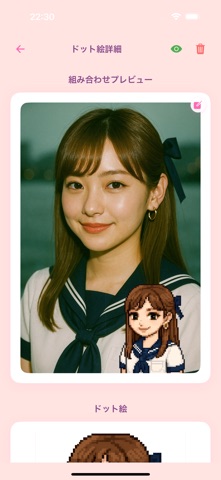


Description by TOKEN POCKET INC. Written by the developer, not by AppBrain. Click to read.
Key Features
• AI Auto-Conversion: Analyzes your photo and recreates outlines and colors in pixel style
• Multiple Styles: Retro / Fantasy / Monochrome and many pixel filters
• Real-Time Preview: Instantly preview results after selecting a style
• High-Resolution Export: Save in sizes optimized for social media and profile pictures
• One-Tap Sharing: Seamlessly share to Twitter, Instagram, LINE
• Gallery Feature: Browse, like, and comment on your own and others’ works
How to Use
1. Launch the app → Upload a photo
2. Choose your preferred pixel art style
3. Tap “Generate” to let AI convert automatically
4. Preview and select “Save” or “Share”
With PixelCute, turn your memories into unique pixel art!