

PixelHex: Color Analysis & RGB
PixelHex: Color Analysis & RGB is made and published by Jai Nijhawan. AppBrain is an independent app data site and isn't affiliated with Jai Nijhawan. The app name, icon, screenshots and description belong to Jai Nijhawan and are shown as published on the App Store.
AppBrain's verdict
- Last updated
- February 4, 2026
- Size
- 14.9 MB
User feedback
Ratings and reviews on the App StoreComments on PixelHex: Color Analysis & RGB for iOS
We don't have enough comments to show example comments. Please check back later.
Store listing
By Jai Nijhawan, from the App Store
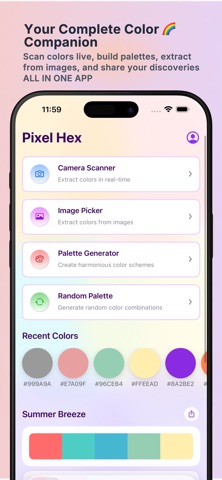


Description by Jai Nijhawan Written by the developer, not by AppBrain. Click to read.
Turn your camera into a powerful color picker and extract HEX, RGB, and color values from anything around you such as paint, fabric, walls, objects, screens, or images.
Identify Colors Instantly
Point your camera or upload a photo to detect colors in real time. Pixel Hex instantly recognizes the dominant color and provides precise values so you can reuse them anywhere.
Advanced Color Analysis
Understand colors beyond just picking them:
- HEX and RGB values
- Color names and shades
- Palette generation
- Color harmony and contrast insights
Perfect for branding, UI and UX design, digital art, painting, and home decor.
Designed for Color Blind Users
Pixel Hex includes accessibility-first features to support users with color vision deficiency:
- Clear color naming
- High-contrast previews
- Distinct palette visualization
- Easy-to-read values
Know exactly what color you are looking at without guessing.
Match and Recreate Colors
Trying to match a paint color or digital shade? Pixel Hex helps you compare and match colors with precision so your projects stay consistent.
Works With Camera and Photos
- Live camera detection
- Import from gallery
- Zoom for better accuracy
Who Is Pixel Hex For
- Designers and developers
- Artists and illustrators
- Students and teachers
- Home painters and DIY users
- Anyone who works with color
Fast. Simple. Accurate.
No complicated setup. No clutter. Just open Pixel Hex and start picking colors.
Key Features
- Real-time color picker
- HEX and RGB color codes
- Color analysis and palettes
- Color identifier
- Accessibility support for color blind users
- Save and reuse colors
- Clean and intuitive interface
If you work with color or struggle to identify it, Pixel Hex is the tool you need.
Download Pixel Hex and turn everything you see into perfect color.
Safety and technology
Found in the app by AppBrain- Price
- Free
- App size
- 14.9 MB
- Content rating
- Everyone
Technologies used by PixelHex: Color Analysis & RGB
Releases
Updates seen on the App Store- Version
- 1.1
- Launched
- January 2026
No changelog data
Alternatives
Similar apps and more from Jai NijhawanAlternatives to PixelHex: Color Analysis & RGB


More from Jai Nijhawan


Rankings
App Store top chartsApp Store Rankings for PixelHex: Color Analysis & RGB
About the app and developer
About PixelHex: Color Analysis & RGB
PixelHex: Color Analysis & RGB is a graphics & design app developed by Jai Nijhawan.
What is the rating of PixelHex: Color Analysis & RGB?
PixelHex: Color Analysis & RGB has no ratings yet.
Is PixelHex: Color Analysis & RGB free?
PixelHex: Color Analysis & RGB is free. The app size is 14.94 MB. The latest version available is 1.1. The last update was on February 4, 2026.
What are the requirements for PixelHex: Color Analysis & RGB?
The app has a content rating of Everyone. The app has been available on the App Store since January 2026.
Developer information for Jai Nijhawan
Address:
Frequently asked questions about PixelHex: Color Analysis & RGB
Is PixelHex: Color Analysis & RGB free?
Yes. PixelHex: Color Analysis & RGB is free on the App Store.
Is PixelHex: Color Analysis & RGB still available?
Yes. PixelHex: Color Analysis & RGB is on the App Store, and the last update we saw was on February 4, 2026.
How large is PixelHex: Color Analysis & RGB?
PixelHex: Color Analysis & RGB is 14.94 MB.
Is PixelHex: Color Analysis & RGB suitable for children?
App Store rates the content of PixelHex: Color Analysis & RGB as suitable for everyone.
Who made PixelHex: Color Analysis & RGB?
PixelHex: Color Analysis & RGB was developed by Jai Nijhawan. It is listed in the graphics & design category on the App Store.
What are the best alternatives to PixelHex: Color Analysis & RGB?
People looking at PixelHex: Color Analysis & RGB also look at these graphics & design apps: Color Picker X, Image Palette - ColorPicker, Colix: Palette from Images, Create Color Palettes, Color Wheel: Palette ColorGear.