Download Android Apps and Games
AppBrain
  • Apps
  • Apps being viewed right now Trending apps today Most popular apps All-time most downloaded apps Top rated apps
  • Intelligence ▾
    Intelligence overview → Track any Android app or your whole market
    Track & analyze
    Keyword Tracker & OptimizerTrack & improve Play rankings App Performance ReportOne-off PDF for any app StatisticsFree Android & Play market stats
    Promote your app
    Featured Apps App Links
  • Intelligence
  • Pricing
  • Dashboard
  • Sign up
  • Log in
Last updated on: 2026-07-21
App Store Apps > Graphics & Design > PixelPencil - Pixel art editor
PixelPencil - Pixel art editor icon

PixelPencil - Pixel art editor

1.11.10
Yosuke Seki
4.57
110 reviews
Free

PixelPencil - Pixel art editor Screenshot 1 of 7
PixelPencil - Pixel art editor Screenshot 2 of 7
PixelPencil - Pixel art editor Screenshot 3 of 7
PixelPencil - Pixel art editor Screenshot 4 of 7
PixelPencil - Pixel art editor Screenshot 5 of 7
PixelPencil - Pixel art editor Screenshot 6 of 7
PixelPencil - Pixel art editor Screenshot 7 of 7
4.57 · 110 reviews
Download from the App Store

About PixelPencil - Pixel art editor

PixelPencil - Pixel art editor is an overall app developed by Yosuke Seki.

Download Statistics

User Ratings

PixelPencil - Pixel art editor is rated 4.57 out of 5 stars. The rating is based on 110 ratings.

App Information

PixelPencil - Pixel art editor is FREE to download. The APK download size is 5.82 MB. The latest version available is 1.11.10. The last update was on August 9, 2024.

Technical Requirements

The app has a content rating of Everyone. The app has been available on Google Play September 2021.

Description
PixelPencil is an app that was created to comfortably draw pixel art.

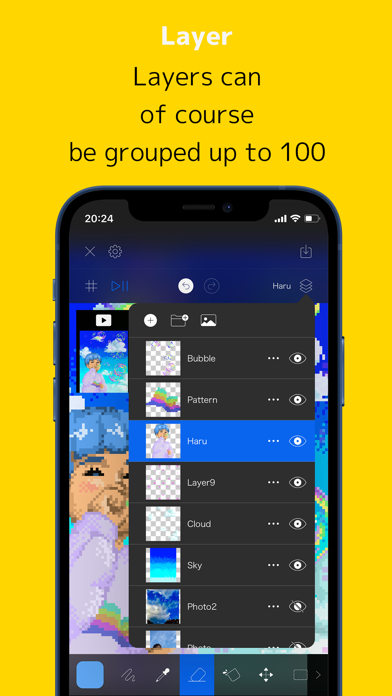
In addition to the layer function, there are also functions such as layer grouping and blend mode.
You can pinch in and out to zoom in and out, and you can rotate the canvas for intuitive operation.

The main functions are as follows.

・ Layer editing
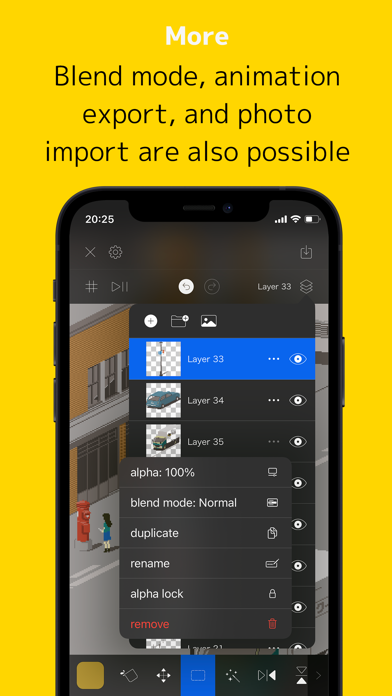
Add, delete, duplicate, show / hide, sort, transparent, blend, group
There are abundant functions such as.

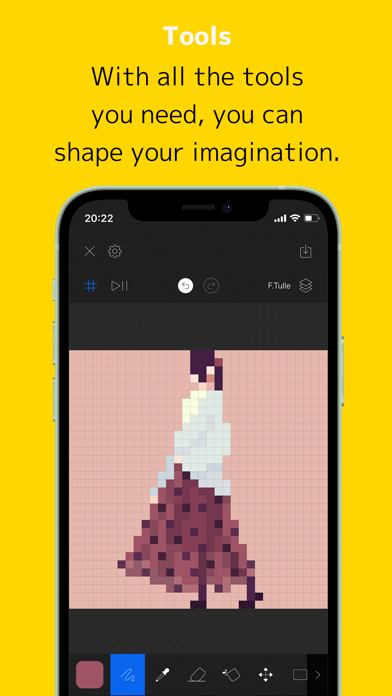
・ Various tools
Pen, eyedropper, eraser, fill, move, selection, flip, rotate, scale, shape
We have all the basic tools.

・ UndoRedo
Of course you can also undo redo.

・ Animated GIF export function
Each layer becomes one frame and you can create an animation.

・ Color creation
You can easily create your own favorite color.

・ Pinch in / out
You can zoom in and out and rotate by pinching in and out.

・ Saving multiple works
Since it uses a file system, you can save multiple projects.
You can also save it on iCloud.

・ Canvas size setting
You can set any size from 5 * 5 to 512 * 512.
Show more Show less

More data about PixelPencil - Pixel art editor

Price Free to download
Rating 4.57 based on 110 ratings
Ranking Not ranked
Version 1.11.10
App download size 5.82 MB
Suitable for Everyone

Alternative downloads for the PixelPencil - Pixel art editor app

Pixaki 4 Intro icon Pixaki 4 Intro
Rizer Creative Ltd
3.7
Free
34 ratings
Pixel Brush: 8 bit hobby gifs icon Pixel Brush: 8 bit hobby gifs
Jaween Ediriweera
4.7
Free
375 ratings
Resprite: pixel art studio icon Resprite: pixel art studio
Fengeon
4.7
Free
1.3K ratings
Pixaki 4 Pro icon Pixaki 4 Pro
Rizer Creative Ltd
4.1
$20.00
133 ratings
Pixel Studio for pixel art icon Pixel Studio for pixel art
Farida Yarullina
4.7
Free
5.7K ratings
Texture maker for Minecraft PE icon Texture maker for Minecraft PE
PAMG
4.1
Free
740 ratings
Sprite Catalog icon Sprite Catalog
256 Arts
4.8
Free
40 ratings
Pixel Art Studio for drawing icon Pixel Art Studio for drawing
Roman Kotov
4.3
Free
268 ratings

More from Yosuke Seki

Onion Cam2 - StopMotion camera icon Onion Cam2 - StopMotion camera
Yosuke Seki
4.5
Free
5.5K ratings
Pixelable - Pixel Art Editor icon Pixelable - Pixel Art Editor
Yosuke Seki
4.7
Free
3.4K ratings
Pixel art editor - Dottable - icon Pixel art editor - Dottable -
Yosuke Seki
4.6
Free
1.5K ratings
PhotoFrame Simple icon PhotoFrame Simple
Yosuke Seki
4.7
Free
411 ratings
Pop Calendar - HolidayCalendar icon Pop Calendar - HolidayCalendar
Yosuke Seki
4.7
Free
283 ratings
PhotoCollage Simple icon PhotoCollage Simple
Yosuke Seki
4.8
Free
73 ratings
Icony icon Icony
Yosuke Seki
4.4
Free
23 ratings
DateCam icon DateCam
Yosuke Seki
4.8
Free
15 ratings

Changelog of PixelPencil - Pixel art editor

No changelog data

Developer information for Yosuke Seki

Yosuke Seki

Address:

Share PixelPencil - Pixel art editor

Comments on PixelPencil - Pixel art editor for iOS

We don't have enough comments to show example comments. Please check back later.

App Store Rankings for PixelPencil - Pixel art editor

This app is not ranked

Technologies used by PixelPencil - Pixel art editor

Popular Overall Top new apps Today's trending apps Apps on sale Apps other people are watching
Pixaki 4 Intro icon Pixaki 4 Intro
Pixel Brush: 8 bit hobby gifs icon Pixel Brush: 8 bit hobby gifs
Resprite: pixel art studio icon Resprite: pixel art studio
Pixaki 4 Pro icon Pixaki 4 Pro
Pixel Studio for pixel art icon Pixel Studio for pixel art
Texture maker for Minecraft PE icon Texture maker for Minecraft PE
Sprite Catalog icon Sprite Catalog
Pixel Art Studio for drawing icon Pixel Art Studio for drawing

Back to top
AppBrain Intelligence premium content

Subscribe now to get full and unlimited access to AppBrain Intelligence. You'll have access to:

  • App Intelligence dashboard (performance timeline, competitor comparison, country rankings, insight cards)
  • Detailed ranking data per app
  • Full timeline per developer
  • Device market shares data per country
  • Unlimited keyword tracking
1 Month

$75/mo
(billed every month)

SAVE 0%
Subscribe
3 Months

$65/mo
($195 billed every 3 months)

SAVE 13%
Subscribe
1 Year

$57.50/mo
($690 billed every year)

SAVE 23%
Subscribe
Each subscription will automatically renew 3 days before the expiration date for the same time period. Subscriptions can be cancelled at any time before the renewal.

AppBrain is a directory focused on discovering great apps and games. We give statistics, rankings and search options that Google Play and the App Store don't have. All trademarks are owned by their respective owners. AppBrain doesn't offer APKs or binaries, and always lets users install the official version from Google Play or the App Store.

More apps

  • Top Android apps being viewed
  • View Fetch
  • Touch Lock Screen Touch Photo
  • BBC iPlayer stats

Android Statistics

  • Android statistics
  • Google Play Developer stats
  • Trending Android Apps
  • Top popular Apps
  • Buy the best Android phone

About AppBrain

  • Contact
  • Privacy
  • Documentation
  • DMCA takedowns
  • Articles
  • Blog
  • Android Interstitial Ads: Best practices to optimize your app's earnings
© 2010-2026 - AppBrain