

PixelPoint - Photo Editor
PixelPoint - Photo Editor is made and published by Iconic Digital. AppBrain is an independent app data site and isn't affiliated with Iconic Digital. The app name, icon, screenshots and description belong to Iconic Digital and are shown as published on the App Store.



AppBrain's verdict
EstablishedLoved by users- Rating on App Store
- 4.56
- 459 ratings
- Last updated
- September 29, 2026
- Size
- 6.83 MB
Users love it: 4.6 stars from 459 ratings.
User feedback
Ratings and reviews on the App StoreComments on PixelPoint - Photo Editor for iOS
We don't have enough comments to show example comments. Please check back later.
Store listing
By Iconic Digital, from the App StoreDescription by Iconic Digital Written by the developer, not by AppBrain. Click to read.
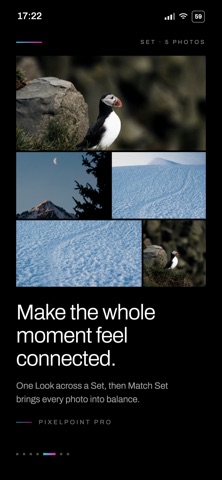
Now rebuilt for a new generation, PixelPoint is a private, focused photo editor combining curated Looks, precise editing tools and PixelPoint Sets—a powerful way to give a group of photographs a consistent finish.
Whether you are refining one favourite photograph, preparing a social carousel or editing an entire trip, PixelPoint helps every photo from the moment feel like it belongs together.
— CURATED LOOKS —
Transform your photographs with a growing collection of carefully designed PixelPoint Looks.
• Explore distinctive Free and Pro Looks
• Preview every Look using your own photograph
• Adjust the intensity of your selected Look
• Keep your favourites together for quick access
• Create reusable Custom Looks with PixelPoint Pro
— PRECISE PHOTO EDITING —
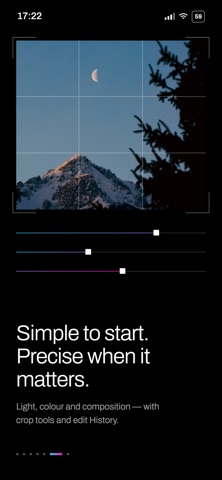
Fine-tune every detail while keeping your original photograph untouched.
• Exposure
• Contrast
• Highlights and shadows
• Whites and blacks
• Saturation and vibrance
• Temperature and tint
• Sharpen and vignette
• Crop, straighten, rotate and flip
PixelPoint Pro adds precision tools including luminance and RGB curves, background blur, and subject or background adjustments.
All edits are nondestructive, so you can revisit your work, change direction or return to the original whenever you like.
— PIXELPOINT SETS —
Bring a consistent visual style to a complete group of photographs.
With PixelPoint Pro, you can:
• Apply one shared Look across an entire Set
• Match exposure and white balance between photographs
• Fine-tune individual photos without losing the shared style
• Reorder and review your complete Set
• Batch export the finished photographs
Sets are ideal for trips, events, celebrations, social carousels and any group of photographs that should feel connected.
— CREATE YOUR OWN LOOKS —
Turn an edit you love into a reusable Custom Look.
Save your Look, colour and tonal adjustments together, give your creation a name and apply it to other photographs whenever you want. Image-specific changes such as cropping remain with the original photo.
Custom Looks are included with PixelPoint Pro.
— EDIT HISTORY —
Every meaningful change creates a clear History checkpoint.
Compare your latest edit with the previous version, restore an earlier result or return to the original photograph without having to start again.
— FULL-RESOLUTION EXPORT —
Export your finished photographs as JPEG or HEIF files. Save them directly to Photos or share them using your favourite apps.
Free exports are full resolution and never include a watermark.
— PRIVATE BY DESIGN —
PixelPoint works without an account, advertising profile or social network. Your photographs, projects and editing recipes remain on your device.
— PIXELPOINT PRO —
PixelPoint Pro includes:
• The complete Pro Look library
• Luminance and RGB curves
• Subject and background selective editing
• Background blur
• Reusable Custom Looks
• PixelPoint Sets, Match and batch export
• Advanced export controls
• New Pro Looks as they are released
Eligible new subscribers can begin with a three-day free trial. Your local subscription price is always shown in the app before purchase.
Payment is charged to your Apple Account after the free trial, where available. PixelPoint Pro renews monthly unless cancelled at least 24 hours before the end of the current subscription period. You can manage or cancel your subscription through your App Store account settings. Any unused portion of a free trial is forfeited when a subscription is purchased, where applicable.
Privacy Policy:
https://orstudios.co.uk/pixelpoint/privacy
Terms of Use:
https://www.apple.com/legal/internet-services/itunes/dev/stdeula/
Safety and technology
Found in the app by AppBrain- Price
- Free
- App size
- 6.83 MB
- Content rating
- Everyone
Technologies used by PixelPoint - Photo Editor
Releases
Updates seen on the App Store- Version
- 10.0.2
- Launched
- April 2013
No changelog data
Alternatives
Similar apps and more from Iconic DigitalAlternatives to PixelPoint - Photo Editor


More from Iconic Digital


Rankings
App Store top chartsApp Store Rankings for PixelPoint - Photo Editor
About the app and developer
About PixelPoint - Photo Editor
PixelPoint - Photo Editor is a photo & video app developed by Iconic Digital.
User Ratings
PixelPoint - Photo Editor is rated 4.56 out of 5 stars. The rating is based on 460 ratings.
App Information
PixelPoint - Photo Editor is freely available from the App Store. The app size is 6.83 MB. The latest version available is 10.0.2. The last update was on September 29, 2026.
Technical Requirements
The app has a content rating of Everyone. The app has been available on the App Store since April 2013.
Developer information for Iconic Digital
Address: