

PixWork: Business Card Scanner
PixWork: Business Card Scanner is made and published by Yosuke Suzuki. AppBrain is an independent app data site and isn't affiliated with Yosuke Suzuki. The app name, icon, screenshots and description belong to Yosuke Suzuki and are shown as published on the App Store.
AppBrain's verdict
- Last updated
- September 14, 2026
- Size
- 24.3 MB
User feedback
Ratings and reviews on the App StoreComments on PixWork: Business Card Scanner for iOS
We don't have enough comments to show example comments. Please check back later.
Store listing
By Yosuke Suzuki, from the App Store

Description by Yosuke Suzuki Written by the developer, not by AppBrain. Click to read.
PixWork uses AI to organize the cards you photograph and turns them into customer data you can actually work with, right inside your own Google Sheet. There's no new CRM to roll out. The spreadsheet you already use becomes your customer list.
Built for individual sales reps, freelancers, recruiters, anyone who often attends trade shows and networking events, and small teams.
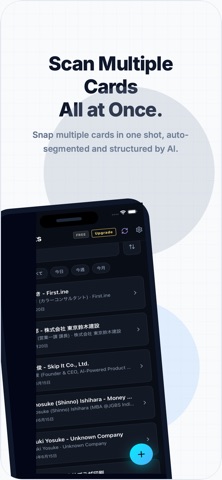
■ Snap it, check it, and it's customer data Capture a business card, or any image with contact details on it, and AI sorts out the name, company, job title, email address, phone number and more, field by field.
■ A customer list you can use right away, in Google Sheets Once you've checked the data, sync it to your own Google Sheet. Sales fields like follow-up status, owner, next action date, labels and the event where you met all live in the sheet too, and edits you make in the sheet come back to the app. Use a shared spreadsheet and it doubles as a customer list for a small team.
■ Pre-meeting company research, in the same app For companies in your saved contacts, AI pulls together a company overview, recent news and conversation starters based on web search, and shows you the sources it used. Even a short stretch of travel time is enough to prepare for the meeting.
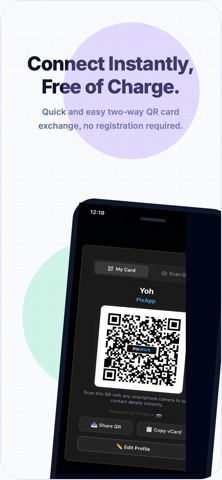
■ Main features • Capture business cards and contact details, or import images already on your device • AI extraction of contact information, field by field • Review and correct before saving • Browse, search and edit your contacts • Duplicate contact detection and merging • Save to your device's contacts app • Create a new Google Sheet or pick an existing one • Two-way sync with Google Sheets • Company overview, recent news and conversation starters • Show your own digital business card as a QR code • Read vCard QR codes • View and edit saved contacts offline
■ Plans The core features are free to use. The Free plan shows banner ads. PixWork Plus, an auto-renewable subscription, removes the ads and raises the monthly AI scan limit. Some features, such as company research, have usage limits or use in-app purchases (ticket packs).
■ Your data stays yours By default, contact data is stored on your device, and when you sync, the destination is a spreadsheet in your own Google account. PixWork does not collect your card images or contact data into a customer database of its own. Connecting Google Sheets is optional. Even without it, you can scan, review, save, search and edit business cards. AI card analysis and company research may send the images and company information needed for processing to external services. See the Privacy Policy for details.
Turn business cards into customer data you can use. Start with the one you were handed today.
Terms of Use (EULA): https://pixapps.ai/pixwork/terms.html
Privacy Policy: https://pixapps.ai/pixwork/privacy.html
Safety and technology
Found in the app by AppBrain- Price
- Free
- App size
- 24.3 MB
- Content rating
- Everyone
Technologies used by PixWork: Business Card Scanner
Releases
Updates seen on the App Store- Version
- 1.3.3
- Launched
- August 2026
No changelog data
Alternatives
Similar apps and more from Yosuke SuzukiAlternatives to PixWork: Business Card Scanner


More from Yosuke Suzuki


Also available on Google Play

Rankings
App Store top chartsApp Store Rankings for PixWork: Business Card Scanner
About the app and developer
About PixWork: Business Card Scanner
PixWork: Business Card Scanner is a business app developed by Yosuke Suzuki.
User Ratings
The app has no ratings yet.
App Information
PixWork: Business Card Scanner is freely available from the App Store. The app size is 24.29 MB. The latest version available is 1.3.3. The last update was on September 14, 2026.
Technical Requirements
The app has a content rating of Everyone. The app has been available on the App Store since August 2026.
Developer information for Yosuke Suzuki
Address:
Frequently asked questions about PixWork: Business Card Scanner
Is PixWork: Business Card Scanner free?
Yes. PixWork: Business Card Scanner is free on the App Store.
Is PixWork: Business Card Scanner still available?
Yes. PixWork: Business Card Scanner is on the App Store, and the last update we saw was on September 14, 2026.
How large is PixWork: Business Card Scanner?
PixWork: Business Card Scanner is 24.29 MB.
Is PixWork: Business Card Scanner suitable for children?
App Store rates the content of PixWork: Business Card Scanner as suitable for everyone.
Who made PixWork: Business Card Scanner?
PixWork: Business Card Scanner was developed by Yosuke Suzuki. It is listed in the business category on the App Store.
What are the best alternatives to PixWork: Business Card Scanner?
People looking at PixWork: Business Card Scanner also look at these business apps: CanopyChat, TATTOO CRM: Studio Manager, KotaDex: Card/Document Scanner, Sharick Attentive AI Assistant, Card Action – Card Scanner.