

Plain Markdown is made and published by Yongmin Ji. AppBrain is an independent app data site and isn't affiliated with Yongmin Ji. The app name, icon, screenshots and description belong to Yongmin Ji and are shown as published on the App Store.
AppBrain's verdict
- Best rank
- #64
- Top Paid, Germany
- Last updated
- May 5, 2026
Rankings
App Store top charts- Highest rank
- #64
- Chart
- Top Paid
- Productivity
- Country
- Germany
App Store Rankings for Plain Markdown
Top rankings
| Rank | Country | Category | List |
|---|---|---|---|
| 64 | Germany | Productivity | Top Paid |
Ranking history in Germany
Competitors
Similar apps and more from Yongmin JiMore from Yongmin Ji

Releases
Updates seen on the App Store- Version
- 1.0
- Launched
- May 2026
No changelog data
User feedback
Ratings and reviews on the App StoreComments on Plain Markdown for iOS
We don't have enough comments to show example comments. Please check back later.
Technology
Found in the app by AppBrain- Price
- $2.99
- App size
- 3.79 MB
- Content rating
- Everyone
Technologies used by Plain Markdown
About the app and developer
About Plain Markdown
Plain Markdown is a productivity app developed by Yongmin Ji.
User Ratings
The app has no ratings yet.
App Information
Plain Markdown costs $2.99. The app size is 3.79 MB. The latest version available is 1.0. The last update was on May 5, 2026.
Technical Requirements
The app has a content rating of Everyone. The app has been available on the App Store since May 2026.
Developer information for Yongmin Ji
Address:
Store listing
By Yongmin Ji, from the App Store

Screenshots by Yongmin Ji, from the the App Store listing
Description by Yongmin Ji Written by the developer, not by AppBrain. Click to read.
Plain Markdown
Read your .md files in place.
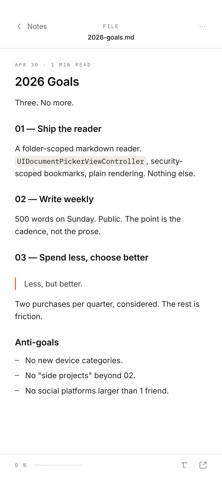
Pick a folder on your iPhone or in iCloud Drive. The app lists every .md file inside — nothing more, nothing less. Tap a file to read it; the markdown is rendered with quiet, weight-driven typography that gets out of the way.
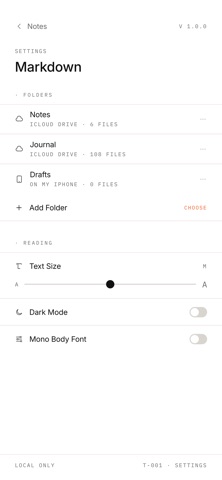
The app uses Apple's standard folder picker, so it works with iCloud Drive, On My iPhone, and any third-party Files app provider (Dropbox, Google Drive, Working Copy, etc.). Pick once, and the app remembers — drill into subfolders, come back, switch folders.
No accounts. No sync engine. No editor. Just a reader.
· Folder picker with iCloud Drive and Files-app provider support
· Drill into subfolders — back-button navigation
· Inline images (jpg, png, gif, webp, svg, heic, heif, bmp, avif)
· GitHub-flavored markdown: tables, blockquotes, code blocks, task lists, strikethrough
· Adjustable text size (5 steps)
· Light & dark mode
· Mono body font option for code-style reading
· Local only — your files never leave your device
Privacy
This app does not collect data, display ads, or communicate with any server. The folder picker is Apple's. Files are read on-device only. There are no analytics, no third-party SDKs, no telemetry.
Less, but better.
Read your .md files in place.
Pick a folder on your iPhone or in iCloud Drive. The app lists every .md file inside — nothing more, nothing less. Tap a file to read it; the markdown is rendered with quiet, weight-driven typography that gets out of the way.
The app uses Apple's standard folder picker, so it works with iCloud Drive, On My iPhone, and any third-party Files app provider (Dropbox, Google Drive, Working Copy, etc.). Pick once, and the app remembers — drill into subfolders, come back, switch folders.
No accounts. No sync engine. No editor. Just a reader.
· Folder picker with iCloud Drive and Files-app provider support
· Drill into subfolders — back-button navigation
· Inline images (jpg, png, gif, webp, svg, heic, heif, bmp, avif)
· GitHub-flavored markdown: tables, blockquotes, code blocks, task lists, strikethrough
· Adjustable text size (5 steps)
· Light & dark mode
· Mono body font option for code-style reading
· Local only — your files never leave your device
Privacy
This app does not collect data, display ads, or communicate with any server. The folder picker is Apple's. Files are read on-device only. There are no analytics, no third-party SDKs, no telemetry.
Less, but better.