

PlanetLoopTimer is made and published by Tatsuro Saito. AppBrain is an independent app data site and isn't affiliated with Tatsuro Saito. The app name, icon, screenshots and description belong to Tatsuro Saito and are shown as published on the App Store.
AppBrain's verdict
- Last updated
- August 9, 2026
Rankings
App Store top chartsApp Store Rankings for PlanetLoopTimer
Competitors
Similar apps and more from Tatsuro SaitoAlternatives to PlanetLoopTimer


More from Tatsuro Saito


Releases
Updates seen on the App Store- Version
- 1.0.3
- Launched
- May 2026
No changelog data
User feedback
Ratings and reviews on the App StoreComments on PlanetLoopTimer for iOS
We don't have enough comments to show example comments. Please check back later.
Technology
Found in the app by AppBrain- Price
- Free
- App size
- 31.1 MB
- Content rating
- Everyone
Technologies used by PlanetLoopTimer
About the app and developer
About PlanetLoopTimer
PlanetLoopTimer is an utilities app developed by Tatsuro Saito.
User Ratings
The app has no ratings yet.
App Information
PlanetLoopTimer is freely available from the App Store. The app size is 31.08 MB. The latest version available is 1.0.3. The last update was on August 9, 2026.
Technical Requirements
The app has a content rating of Everyone. The app has been available on the App Store since May 2026.
Developer information for Tatsuro Saito
Address:
Frequently asked questions about PlanetLoopTimer
Is PlanetLoopTimer free?
Yes. PlanetLoopTimer is free on the App Store.
Is PlanetLoopTimer still available?
Yes. PlanetLoopTimer is on the App Store, and the last update we saw was on August 9, 2026.
How large is PlanetLoopTimer?
PlanetLoopTimer is 31.08 MB.
Is PlanetLoopTimer suitable for children?
App Store rates the content of PlanetLoopTimer as suitable for everyone.
Who made PlanetLoopTimer?
PlanetLoopTimer was developed by Tatsuro Saito. It is listed in the utilities category on the App Store.
What are the best alternatives to PlanetLoopTimer?
People looking at PlanetLoopTimer also look at these utilities apps: PianetaClock, Basic Calculator With BIDMAS, Dice Roller — Tap & Roll, Big Timer: Countdown & Repeat, Fremo: Income & Time Tracker.
Store listing
By Tatsuro Saito, from the App Store

Description by Tatsuro Saito Written by the developer, not by AppBrain. Click to read.
"Just a quick break"—and 30 minutes are gone.
Open a comic, and the rest of the day is over.
The harder you say "do it," the more they freeze.
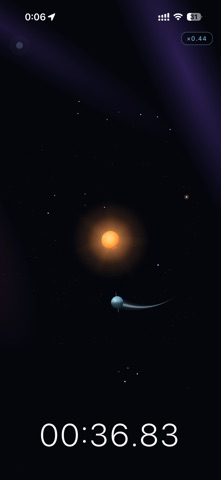
PlanetLoopTimer is a visual timer that turns the break itself into your child's "next motivation switch."
Launch a planet, orbit the sun—the orbit is the break time.
Pulled into the sun, it ends.
"I want another shot, and a better one"—that feeling pulls the next small step out of them.
■ Not "5 minutes ticking by," but "you launch your own break"
A normal timer starts counting down the second you press the button.
For a kid, time is leaving without their say—it just feels unfair.
That's why "just a little more!" never stops.
In PlanetLoopTimer, the break length is decided by your launch.
Eye the angle and power on the guide line, then release at the right moment.
Launch well: longer orbit. Miss: much shorter.
Because they made the time themselves, the end feels easier to accept too.
■ Planets, around the sun, round and round
Each planet has a different break length.
The farther from the sun, the longer it orbits.
"It's far, so it goes longer"—that's intuitive for kids.
As the target time gets closer, the sun's gravity slowly grows, and the planet spirals in.
Watching a planet stay in orbit feels nothing like a forced 5-minute countdown.
It's a timer, but it plays a bit like a game. That's how "fun breaks" are born.
■ Three easy steps
① Pick a planet
The number on each planet on the start screen is the break time guide.
② Look at the guide line, and launch
Picture the angle and power, then fire.
A clean launch orbits long, a miss falls short—
it's a timer, but you'll find yourself wanting to get better.
③ When it's pulled into the sun, the break ends
The moment it's swallowed up, "what's next?" rises naturally.
■ Pluto only: ∞ Challenge mode
Pluto has no rising-gravity setup.
With a clean enough launch, it just keeps orbiting.
Use it as a "personal record" treat for your kid.
■ A great fit for these kids and families
[For kids who…]
· "5 more minutes" stretches on forever
· Open a comic or a game and can't put it down
· Have a strong sense of their own pace
· Move on "I want to try" more than on reasons
· Love breaks, but can't quite catch the cue to end one
· Have ADHD, ASD, or time blindness traits
[For families where…]
· "Do it!" has become a daily refrain
· You want kids to move because they're convinced, not because they're told
· Timers tend to turn into arguments
· You'd like a fun mechanism for daily routines
"Launch" instead of "scold."
Change the word that moves them, and the day gets a little lighter.
■ About ads
To avoid disturbing the timer, the main planet modes (Mercury through Neptune) show no ads at all.
Ads appear only once, at the end of the Pluto (∞ Challenge) bonus mode.
· Regular planet modes are fully ad-free — during and after the timer
· One ad only at the end of Pluto ∞ mode
· No ads during the timer or while you're operating the screen
· We configure AdMob not to receive the advertising identifier (IDFA)
· Data stays on your device, never sent externally
May your daily breaks become a little space adventure.
■ Sister apps
"LastDays" — counts down the time left with your kid, in "how many more times."
"TodoGatya" — for slow mornings — kids draw the next task from a gacha and start with a surprise.