

Plankly: Woodworking Planner
Plankly: Woodworking Planner is made and published by Matvey Pirogov. AppBrain is an independent app data site and isn't affiliated with Matvey Pirogov. The app name, icon, screenshots and description belong to Matvey Pirogov and are shown as published on the App Store.
AppBrain's verdict
- Last updated
- October 23, 2026
Rankings
App Store top chartsApp Store Rankings for Plankly: Woodworking Planner
Competitors
Similar apps and more from Matvey PirogovMore from Matvey Pirogov


Releases
Updates seen on the App Store- Version
- 1.0.0
- Launched
- October 2026
No changelog data
User feedback
Ratings and reviews on the App StoreComments on Plankly: Woodworking Planner for iOS
We don't have enough comments to show example comments. Please check back later.
Technology
Found in the app by AppBrain- Price
- Free
- App size
- 57.2 MB
- Content rating
- Everyone
Technologies used by Plankly: Woodworking Planner
About the app and developer
About Plankly: Woodworking Planner
Plankly: Woodworking Planner is a reference app developed by Matvey Pirogov.
User Ratings
The app has no ratings yet.
App Information
Plankly: Woodworking Planner is freely available from the App Store. The app size is 57.19 MB. The latest version available is 1.0.0. The last update was on October 23, 2026.
Technical Requirements
The app has a content rating of Everyone. The app has been available on the App Store since October 2026.
Developer information for Matvey Pirogov
Address:
Store listing
By Matvey Pirogov, from the App Store



Description by Matvey Pirogov Written by the developer, not by AppBrain. Click to read.
WHAT YOU GET
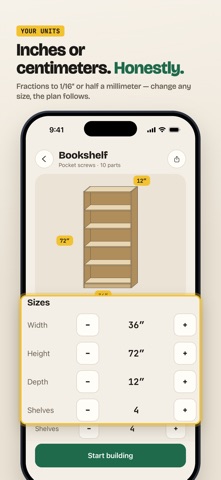
• Real sizes in inches (to 1/16″) or centimeters — switch any time, the whole plan follows.
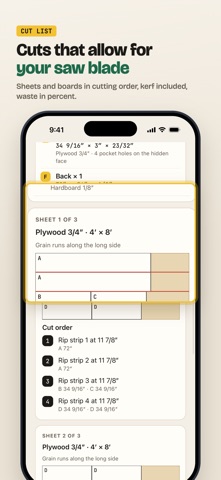
• A cut list that leaves room for your saw blade: sheet and board layouts in cutting order, kerf and waste in percent.
• A shopping list in your store’s sizes — 2x4s and 4×8 ft sheets in the US, 18 × 95 mm boards and 2500 × 1250 mm sheets in Europe — with screws, glue and finish.
• A 3D view: turn it, explode it, watch each step come together.
• Life-size AR: place the piece in your room before you cut a single board.
• Step-by-step building in 3D: every part labeled A, B, C, every screw shown where it goes — and a PDF to take to the workshop.
HOW IT WORKS
AI recognizes the kind of piece and its main sizes. Everything after that — parts, joints, cuts, the shopping list — is calculated by the app, not guessed. Change the width, height, depth or the number of shelves and it all recalculates instantly.
19 READY DESIGNS
Bookshelves, cube shelves, a nightstand, a shoe rack, a TV stand, coffee and dining tables, a desk, a workbench, a platform bed, benches, a raised bed, planter boxes, wall shelves and more — each one adjustable to your space.
MADE FOR HOME WORKSHOPS
Pocket screws, dowels, dados or plain screws — pick the joints you can do with the tools you have. Tall pieces come with a reminder to anchor them to the wall.
PLANKLY PRO
Your first plan is free and complete. Plankly Pro adds unlimited new plans from photos, ideas and templates. Pro is available as a yearly subscription with a free trial, a monthly subscription or a one-time lifetime purchase. Subscriptions renew automatically unless cancelled at least 24 hours before the end of the period; manage them in your Apple Account settings.
No account. No ads. Your projects and photos stay on your iPhone.
Terms of Use: https://plankly.pirog.app/terms
Privacy Policy: https://plankly.pirog.app/privacy