

PlanThat: Shared Planner
PlanThat: Shared Planner is made and published by Zackery Griffin. AppBrain is an independent app data site and isn't affiliated with Zackery Griffin. The app name, icon, screenshots and description belong to Zackery Griffin and are shown as published on the App Store.
AppBrain's verdict
- Rating on App Store
- 5.00
- 6 ratings
- Last updated
- October 18, 2026
It doesn't have enough ratings yet to judge what users think.
Rankings
App Store top chartsApp Store Rankings for PlanThat: Shared Planner
Competitors
Similar apps and more from Zackery GriffinAlternatives to PlanThat: Shared Planner


Releases
Updates seen on the App Store- Version
- 8.0.1
- Launched
- June 2026
No changelog data
User feedback
Ratings and reviews on the App StoreComments on PlanThat: Shared Planner for iOS
We don't have enough comments to show example comments. Please check back later.
Technology
Found in the app by AppBrain- Price
- Free
- App size
- 28.5 MB
- Content rating
- Everyone
Technologies used by PlanThat: Shared Planner
About the app and developer
About PlanThat: Shared Planner
PlanThat: Shared Planner is a productivity app developed by Zackery Griffin.
User Ratings
PlanThat: Shared Planner is rated 5.00 out of 5 stars. The rating is based on 6 ratings.
App Information
PlanThat: Shared Planner is freely available from the App Store. The app size is 28.55 MB. The latest version available is 8.0.1. The last update was on October 18, 2026.
Technical Requirements
The app has a content rating of Everyone. The app has been available on the App Store since June 2026.
Developer information for Zackery Griffin
Address:
Frequently asked questions about PlanThat: Shared Planner
Is PlanThat: Shared Planner free?
Yes. PlanThat: Shared Planner is free on the App Store.
Is PlanThat: Shared Planner still available?
Yes. PlanThat: Shared Planner is on the App Store, and the last update we saw was on October 18, 2026.
How large is PlanThat: Shared Planner?
PlanThat: Shared Planner is 28.55 MB.
Is PlanThat: Shared Planner suitable for children?
App Store rates the content of PlanThat: Shared Planner as suitable for everyone.
How do people rate PlanThat: Shared Planner?
PlanThat: Shared Planner scores 5.00 out of 5 stars, from 6 ratings on the App Store.
Who made PlanThat: Shared Planner?
PlanThat: Shared Planner was developed by Zackery Griffin. It is listed in the productivity category on the App Store.
What are the best alternatives to PlanThat: Shared Planner?
People looking at PlanThat: Shared Planner also look at these productivity apps: Daylo: Birthday Reminder, Later | Simple Task Management, DoneAgo: Task & Habit Tracker, TimeBoxer Daily Planner, Lemon Reminder.
Store listing
By Zackery Griffin, from the App Store




Description by Zackery Griffin Written by the developer, not by AppBrain. Click to read.
Plan your events and to-dos on one simple timeline. No more group chat mess. No more "what time again?" No more plans that fall apart.
FOCUS ON WHAT'S NEXT
A busy mind loses track fast. PlanThat shows you one simple timeline, not a long list. Focus Mode cuts through the noise and shows only what matters next. Less stress. More done.
ON EVERY SCREEN YOU USE
iPhone, iPad, Mac, and Apple Watch. Your timeline follows you, so the plan is always a glance away. The Mac app is built natively for the desktop, with room to see your whole week at once.
GREAT FOR GROUPS
You shouldn't be the only one who remembers. Share a plan and everyone sees the same thing at the same time. The people you invite don't even need the app.
WORKS WITH YOUR CALENDARS
The events you already keep in Apple Calendar and Google Calendar show up right on your PlanThat timeline, so everything lives in one place. They stay read-only until you choose to turn one into a full PlanThat plan you can edit and share.
MEET AVA
Ava is your planning assistant. Ask for what you need in plain words and she suggests plans you can accept or skip. Nothing lands on your timeline until you say so.
GET A REAL RSVP
Tired of "maybe" and no reply? Send a link and let people RSVP in seconds. No account needed. Now you know who's coming.
NEVER MISS A DUE DATE
Give any to-do a deadline and PlanThat reminds you before time runs out. A quick "Due soon" or "Overdue" tag keeps the important things in view.
KNOW WHEN TO LEAVE
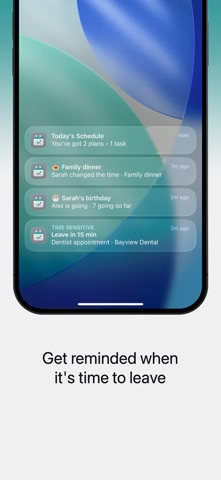
See the weather and drive time on a plan, and get a reminder when it's time to go.
ALWAYS WITH YOU
Keep your next plan on your Lock Screen and Dynamic Island. The details stay with you.
SPEAKS YOUR LANGUAGE
Fully translated into English, Spanish, Portuguese, French, and German. Type a plan in your own words and PlanThat understands it.
PERFECT FOR
• Families
• Couples
• Friend groups
• Busy professionals
• School and sports schedules
• Travel and events
WHY PEOPLE LOVE PLANTHAT
• Everyone stays in sync, so you're not the only one who remembers
• Just type it. "Dinner Friday 7pm" becomes a plan instantly
• Focus Mode shows only what's next, not an endless list. Great for ADHD and busy minds
• One shared timeline instead of scattered group chats
• The same plans on your iPhone, iPad, Mac, and Apple Watch
PLANTHAT+
• Group plan sharing
• Share plans with a link
• RSVP with guest management
• Ava, your planning assistant
• Live weather and drive time
• Live Activities, including "time to leave" reminders
Privacy Policy and Terms of Service:
https://planthat.app/legal-privacy
https://planthat.app/legal-terms