PlanToSim is made and published by
Raul Heredia.
AppBrain is an independent app data site and isn't affiliated with Raul Heredia.
The app name, icon, screenshots and description belong to Raul Heredia and are shown as
published on the App Store.
About PlanToSim
PlanToSim is an utilities app developed by Raul Heredia.
User Ratings
The app has no ratings yet.
App Information
PlanToSim costs $4.99. The app size is 25.40 MB. The latest version available is 1.4. The last update was on July 27, 2026.
Technical Requirements
The app has a content rating of Everyone. The app has been available on the App Store since December 2025.
Description by Raul Heredia(from the App Store)
Share a flight plan from ForeFlight, Garmin Pilot, or FlyQ — and it lands in your simulator's GPS in seconds.
PlanToSim sends your EFB flight plans straight to Microsoft Flight Simulator 2020 and 2024, X-Plane 11 and 12, and the most popular add-on GPS navigators — complete with departures, arrivals, approaches, and airways.
Plan on your iPad. Fly it on your PC. No file copying, no folder digging, no cables.
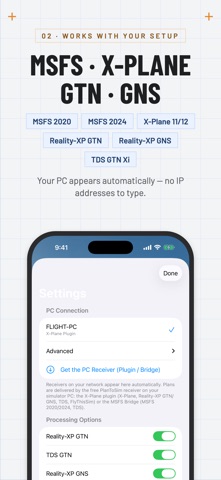
WORKS WITH YOUR SIMULATOR • Microsoft Flight Simulator 2020 & 2024 — native .pln flight plans, delivered by the free PlanToSim MSFS Bridge • X-Plane 11 & 12 — native FMS flight plans, delivered by the free PlanToSim X-Plane plugin • TDS GTN Xi — native procedures (.gfp) • Reality-XP GTN 750/650 (.gfp) • Reality-XP GNS 530/430 (Garmin .fpl) • SimAVIO / FlyThisSim TouchTrainer (beta) — plans land in a GNS 530/430 flight-plan slot
REAL PROCEDURES, INTACT • Full SID, STAR, and approach support — procedures arrive as procedures, not flattened waypoint strings • Waypoint-only files from ForeFlight and Garmin Pilot are matched against the navigation database to restore named procedures and airways (Rebuild Procedures — on by default, one toggle to turn off) • Runway-aware departure and arrival matching • Airway expansion (Victor, Jet, T- and Q-routes) • Cruise and per-fix altitudes carried through
FRESH NAVIGATION DATA • Built-in database: 47,000+ airports, 72,000+ fixes, 1,800+ procedures • Updated every AIRAC cycle — refresh in the app with one tap
FAST, PRIVATE, LOCAL • Your simulator PC appears in the app automatically — no IP addresses to find or type • Transfers over your own Wi-Fi — plans go from your iPad to your PC and nowhere else • No account, no subscription, no tracking, no data collection • Clear delivery confirmation for every transfer — and if your PC can't be reached, the app tells you within seconds and offers one-tap retry
HOW IT WORKS 1. Install the free receiver on your flight-sim PC: the PlanToSim X-Plane plugin or the PlanToSim MSFS Bridge (both linked from the app's Settings). 2. Open PlanToSim — your PC appears automatically. Then share a flight plan from ForeFlight (.fpl), Garmin Pilot, or FlyQ to PlanToSim. 3. Pick your destinations once in Settings — every send converts and delivers automatically.
SIMAVIO NOTE (beta) SimAVIO loads its flight-plan store when it starts. Send your plan first, then start SimAVIO (or close and reopen its panel) — your plan is waiting when you sit down.
One $4.99 purchase covers every simulator and every format — no add-ons, no subscriptions, no unlocks.
REQUIREMENTS • iPhone or iPad with iOS 17.6 or later • A Windows flight-sim PC on the same local network • One free PlanToSim receiver on that PC: the X-Plane plugin or the MSFS Bridge (free downloads, linked in Settings)
Each subscription will automatically renew 3 days before the expiration date for
the same time period. Subscriptions can be cancelled at any time before the renewal.