playBridge is made and published by
Davide Kraehenbuehl.
AppBrain is an independent app data site and isn't affiliated with Davide Kraehenbuehl.
The app name, icon, screenshots and description belong to Davide Kraehenbuehl and are shown as
published on the App Store.
About playBridge
playBridge is a music app developed by Davide Kraehenbuehl.
User Ratings
The app has no ratings yet.
App Information
playBridge is freely available from the App Store. The app size is 5.18 MB. The latest version available is 2.6. The last update was on October 9, 2026.
Technical Requirements
The app has a content rating of Everyone. The app has been available on the App Store since August 2026.
Description by Davide Kraehenbuehl(from the App Store)
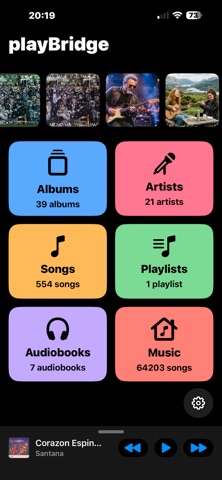
playBridge is a clean, blazing-fast music player for listening to YOUR music: the audio files you keep on your iPhone or iPad, organized simply and without clutter.
No mandatory subscriptions, no ads, no data collection. Just your music.
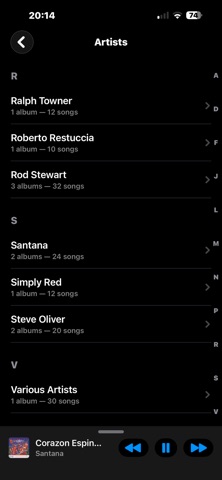
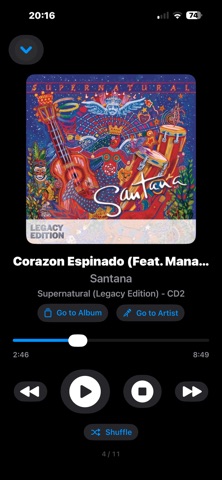
YOUR LIBRARY • Browse by Albums, Artists and Songs • Create and manage your own playlists • Play or shuffle your whole library or a single playlist • Artwork, background playback, and controls from the Lock Screen and headphones • Supported formats: MP3, AAC/M4A, ALAC, FLAC, WAV, AIFF, M4B
ON iPAD An interface designed for the big screen: a sidebar with every section and, next to it, your albums, artists, songs and playlists. Works in portrait and landscape.
AUDIOBOOKS A dedicated section, kept separate from your music: adjustable playback speed (0.5×–1.5×), navigable chapters, and a sleep timer (including "until end of chapter" or a custom duration). Listening always resumes right where you left off.
IN THE CAR WITH CARPLAY playBridge works with CarPlay using a large-button interface that's simple and safe to use while driving — audiobooks included. The Now Playing screen opens automatically for every track, and one tap adds or removes it from the "Auto PlayList" — handy for flagging songs on the fly without taking your eyes off the road.
ADDING YOUR MUSIC Transfer your files from a Mac using Finder or the Files app, or with playBridge Loader, the free Mac companion app that manages your songs and playlists. playBridge Loader is a free download from daniele.ch (it is not on the Mac App Store). Transferred files show up instantly, with no import step. From a Windows PC, playBridge Loader isn't available, but you can still transfer tracks and audiobooks using iTunes (or the Apple Devices app) via "File Sharing", or without any computer at all: upload your files to a cloud service (iCloud Drive, OneDrive, Google Drive...) and move them into the playBridge folder from the Files app on your iPhone or iPad.
APPLE MUSIC TOO (optional) If you have an Apple Music subscription, you can search and play the entire catalog right inside playBridge and collect tracks in a dedicated playlist — alongside your own files, but always kept separate.
BUILT-IN GUIDE A built-in "Help" screen explains every less-obvious feature in a few lines — useful the first time, always there when you need it again.
FREE AND RESPECTFUL playBridge is completely free, ad-free, and collects no personal data. If you'd like, you can support its development with a small optional in-app tip.
Available in English, Italian, French, German, Spanish and Portuguese.
Each subscription will automatically renew 3 days before the expiration date for
the same time period. Subscriptions can be cancelled at any time before the renewal.