Download Android Apps and Games
AppBrain
  • Apps
  • Apps being viewed right now Trending apps today Most popular apps All-time most downloaded apps Top rated apps
  • Intelligence ▾
    Intelligence overview → Track any Android app or your whole market
    Track & analyze
    Keyword Tracker & OptimizerTrack & improve Play rankings App Performance ReportOne-off PDF for any app StatisticsFree Android & Play market stats
    Promote your app
    Featured Apps App Links
  • Intelligence
  • Pricing
  • Dashboard
  • Sign up
  • Log in
Last updated on: 2026-05-28
App Store Apps > Utilities > Plink
Plink icon

Plink

13.7.0
Patriot Systems Limited
5.00
7 reviews
Free

Download from the App Store Android version

About Plink

Plink is an overall app developed by Patriot Systems Limited.

Download Statistics

User Ratings

Plink is rated 5.00 out of 5 stars. The rating is based on 7 ratings.

App Information

Plink is FREE to download. The APK download size is 60.12 MB. The latest version available is 13.7.0. The last update was on May 17, 2026.

Technical Requirements

The app has a content rating of Everyone. The app has been available on Google Play October 2018.

Description
Client and Bureau Access

• Users and Site Managers can access their accounts, view their sites, add new sites and update the site details including Contact details, User details, Zone details, Schedule details and Response details.
Signal and Activation history can also be viewed through the Plink app.
• Users can arm and disarm their panels and control outputs from the Plink app.
• Users can view patrol history and view photos taken by patrols.
• Users and Self Monitoring clients can commission and decommission their sites from the Plink app which turns monitoring on or off at the monitoring station.
• Bureaus and Dealers can access their sites, view recent signal and activation history and update their client accounts.
• Technicians can view live signal history of sites, turn test mode on and off and update account details.
• Technicians can update workorders, add notes, add charges and digitally sign and complete them


First Response

• Users can receive Alarm and Event notifications which can be canceled if the User wants to respond to the event themselves or the User can fall back the event to the station for operator response.
• Users can receive Late to Close notifications and extend the close time, cancel the Late to Close Monitoring or fall back the alarm to the station for operator response


Patrol Response

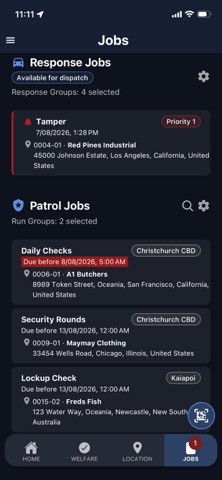
• Patrols can receive patrol job requests from Patriot Monitoring stations, provide an ETA or release the job back to the station if they are unable to accept the Job.
• Patrols can view the job and site instructions, update the status when at the site and when they have left the site and add in notes and response details that are instantly sent back to the operating station.
• Patrols can add photos to a job which are sent back to the monitoring station instantly and be viewed by the station operators.

Patrol Site Checks

• Patrols can scan QR codes and NFC stickers that transmit signals back to the Monitoring Station.
• Patrols and Plink app uses can setup NFC tags from the Plink phone app.

Patrol Digital Run Sheets

• Patrols are provided digital run sheets including sites ordered by time the check is due
• Patrols can check off individual tasks required and codes to be scanned
• Allows Patrols to perform site checks quickly and accurately with all details automatically logged
• Patrols are notified on jobs due or when they are overdue
• Patrols can send and receive details of Patrol runs automatically to and from the Patriot Station

Lone Worker Mode

• Lone Worker mode is available for Patrols, Lone workers and Static Guards.
• Users can be setup with schedules and the Monitoring Station can be notified if the User fails to enable welfare checking before the start of their shift or if they turn off welfare checking during their scheduled shift.
• Users can send a Duress Alarm to Patriot Monitoring Stations.
• GPS locations on both welfare checks and Duress alarms are sent to the Patriot Monitoring Station so their location is available for the operator during response.
• GPS locations can optionally be sent periodically during their shift.

Notes:
The different functions of the Patriot Plink app is configured for the user by the Patriot monitoring station.
Additional Modules may be required to utilize the features listed.
The panels and communicators that can be armed and disarmed & controls are limited to integrated brands. Contact your Monitoring Station or Patriot systems for more information.
Show more Show less

More data about Plink

Price Free to download
Rating 5.00 based on 7 ratings
Ranking Not ranked
Version 13.7.0
App download size 60.1 MB
Suitable for Everyone

Alternative downloads for the Plink app

Monitoring icon Monitoring
New Zealand Computing Solutions
0.0
Free
AI Voice Assistant icon AI Voice Assistant
Yong Zhang
4.6
Free
13 ratings
Fans Cleanerㆍ phone cleaner icon Fans Cleanerㆍ phone cleaner
Red Dragonfly Nework
0.0
Free
Capture ANPR icon Capture ANPR
A R
5.0
Free
1 ratings
File Transfer:PhotoSync Tool icon File Transfer:PhotoSync Tool
凤 袁
4.2
Free
42 ratings
Chat AI & Generator icon Chat AI & Generator
LMM COMPANY
3.7
Free
3 ratings
When - Flip Clock icon When - Flip Clock
磊 岑
4.7
Free
26 ratings
SafeCamApp icon SafeCamApp
Cybrook Inc.
3.8
Free
4 ratings

Changelog of Plink

No changelog data

Developer information for Patriot Systems Limited

Patriot Systems Limited

N/A

Share Plink

Comments on Plink for iOS

We don't have enough comments to show example comments. Please check back later.

App Store Rankings for Plink

This app is not ranked

Technologies used by Plink

Today's trending apps Apps on sale Popular Overall Apps other people are watching Top new apps
Monitoring icon Monitoring
AI Voice Assistant icon AI Voice Assistant
Fans Cleanerㆍ phone cleaner icon Fans Cleanerㆍ phone cleaner
Capture ANPR icon Capture ANPR
File Transfer:PhotoSync Tool icon File Transfer:PhotoSync Tool
Chat AI & Generator icon Chat AI & Generator
When - Flip Clock icon When - Flip Clock
SafeCamApp icon SafeCamApp

Back to top
AppBrain Intelligence premium content

Subscribe now to get full and unlimited access to AppBrain Intelligence. You'll have access to:

  • App Intelligence dashboard (performance timeline, competitor comparison, country rankings, insight cards)
  • Detailed ranking data per app
  • Full timeline per developer
  • Device market shares data per country
1 Month

$75/mo
(billed every month)

SAVE 0%
Subscribe
3 Months

$65/mo
($195 billed every 3 months)

SAVE 13%
Subscribe
1 Year

$57.50/mo
($690 billed every year)

SAVE 23%
Subscribe
Each subscription will automatically renew 3 days before the expiration date for the same time period. Subscriptions can be cancelled at any time before the renewal.

AppBrain is a directory focused on discovering great apps and games. We give statistics, rankings and search options that Google Play and the App Store don't have. All trademarks are owned by their respective owners. AppBrain doesn't offer APKs or binaries, and always lets users install the official version from Google Play or the App Store.

More apps

  • Top Android apps being viewed
  • Tousi TV
  • Rocket Cash - Earning App
  • Lumorae

Android Statistics

  • Android statistics
  • Google Play Developer stats
  • Trending Android Apps
  • Top popular Apps
  • Buy the best Android phone

About AppBrain

  • Contact
  • Privacy
  • Documentation
  • DMCA takedowns
  • Articles
  • Blog
  • Tips to improve your Android promotional campaign
© 2010-2026 - AppBrain