

Pluto: Photo Editor
Pluto: Photo Editor is made and published by Justin Cahoon. AppBrain is an independent app data site and isn't affiliated with Justin Cahoon. The app name, icon, screenshots and description belong to Justin Cahoon and are shown as published on the App Store.
AppBrain's verdict
- Rating on App Store
- 5.00
- 3 ratings
- Last updated
- September 27, 2026
It doesn't have enough ratings yet to judge what users think.
Rankings
App Store top chartsApp Store Rankings for Pluto: Photo Editor
Competitors
Similar apps and more from Justin CahoonAlternatives to Pluto: Photo Editor


More from Justin Cahoon


Releases
Updates seen on the App Store- Version
- 2.9.7
- Launched
- January 2026
No changelog data
User feedback
Ratings and reviews on the App StoreComments on Pluto: Photo Editor for iOS
We don't have enough comments to show example comments. Please check back later.
Technology
Found in the app by AppBrain- Price
- Free
- App size
- 65.5 MB
- Content rating
- Everyone
Technologies used by Pluto: Photo Editor
About the app and developer
About Pluto: Photo Editor
Pluto: Photo Editor is a photo & video app developed by Justin Cahoon.
User Ratings
Pluto: Photo Editor is rated 5.00 out of 5 stars. The rating is based on 3 ratings.
App Information
Pluto: Photo Editor is freely available from the App Store. The app size is 65.50 MB. The latest version available is 2.9.7. The last update was on September 27, 2026.
Technical Requirements
The app has a content rating of Everyone. The app has been available on the App Store since January 2026.
Developer information for Justin Cahoon
Address:
Frequently asked questions about Pluto: Photo Editor
Is Pluto: Photo Editor free?
Yes. Pluto: Photo Editor is free on the App Store.
Is Pluto: Photo Editor still available?
Yes. Pluto: Photo Editor is on the App Store, and the last update we saw was on September 27, 2026.
How large is Pluto: Photo Editor?
Pluto: Photo Editor is 65.50 MB.
Is Pluto: Photo Editor suitable for children?
App Store rates the content of Pluto: Photo Editor as suitable for everyone.
How do people rate Pluto: Photo Editor?
Pluto: Photo Editor scores 5.00 out of 5 stars, from 3 ratings on the App Store.
Who made Pluto: Photo Editor?
Pluto: Photo Editor was developed by Justin Cahoon. It is listed in the photo & video category on the App Store.
What are the best alternatives to Pluto: Photo Editor?
People looking at Pluto: Photo Editor also look at these photo & video apps: Beauty Cam:Magic Photo Editor, Xmas Photo Editor & Poster, Replay15, Status Background, Surreal: Immerse & Share.
Store listing
By Justin Cahoon, from the App Store

Description by Justin Cahoon Written by the developer, not by AppBrain. Click to read.
Clean up a favorite photo, bring your subject into the light, and find a film-inspired look with Pluto. Explore the editing tools without a subscription.
BRUSH AWAY DISTRACTIONS
Paint over an unwanted area and let Magic Eraser generate a cleanup. Review the result before accepting it.
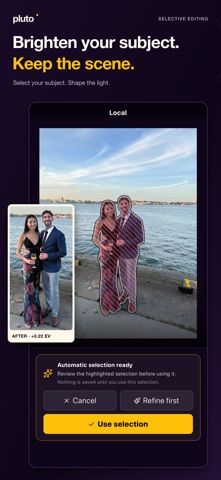
BRIGHTEN YOUR SUBJECT. KEEP THE SCENE.
Start with automatic subject or background selection, or paint a mask yourself. Refine it with Add and Subtract, then adjust Exposure, Saturation, Warmth, and Tint in the selected area. Keep your local adjustments editable.
FIND YOUR FILM LOOK
Explore built-in signatures, adjust their strength, and make a photo feel like yours. Save your own supported look settings as a custom signature to reuse on another photo.
MAKE ROOM FOR YOUR IDEAS
Generative Expand adds space around your photo. Target Replace lets you paint an area and describe what you want to generate there.
FINISH THE DETAILS
Shape individual colors with HSL and add character with grain, softness, vignette, and light leaks. Undo and redo as you work, then reopen local projects to continue editing on the same device.
SAVE AND SHARE
Export your edited photo as a JPEG. Output dimensions depend on the working image and your edits; original formats and all original metadata are not preserved. Teleport transfers a photo to the web editor without synchronizing the editable project.
Cloud AI requires an internet connection and is subject to usage and capacity limits. Local editing does not require a cloud AI request. No paid plan is required for editing tools.
Terms of Use (EULA): https://www.apple.com/legal/internet-services/itunes/dev/stdeula/