AppBrain
AppBrain
  • Apps
  • Apps being viewed right now Trending apps today Most popular apps All-time most installed apps Top rated apps iPhone and iPad apps
  • Intelligence ▾
    Intelligence overview → Track any Android app or your whole market
    Track & analyze
    Keyword Tracker & OptimizerTrack & improve Play rankings App Performance ReportOne-off PDF for any app StatisticsFree Android & Play market stats
    Promote your app
    Featured Apps App Links
  • Intelligence
  • Pricing
  • Dashboard
  • Sign up
  • Log in
App Store Apps > Productivity > PNG to PDF
App profile & analytics · Productivity · Data updated 2026-10-23
PNG to PDF icon

PNG to PDF

by Andy Sutanto · Free · Version 1.0.2
Availability On the App Store since July 2024 ↗
Rating on App Store
4.84/5
31 ratings
Rating
4.84
31 reviews
Best rank
–
not in the top lists
Last updated
October 31, 2024
1.0.2
AppBrain's verdict

It doesn't have enough ratings yet to judge what users think.

PNG to PDF is made and published by Andy Sutanto. AppBrain is an independent app data site and isn't affiliated with Andy Sutanto. The app name, icon, screenshots and description belong to Andy Sutanto and are shown as published on the App Store.

About PNG to PDF

PNG to PDF is a productivity app developed by Andy Sutanto.

What is the rating of PNG to PDF?

PNG to PDF is rated 4.84 out of 5 stars, based on 31 ratings.

Is PNG to PDF free?

PNG to PDF is free. The app size is 8.98 MB. The latest version available is 1.0.2. The last update was on October 31, 2024.

What are the requirements for PNG to PDF?

The app has a content rating of Everyone. The app has been available on the App Store since July 2024.

Description by Andy Sutanto (from the App Store)
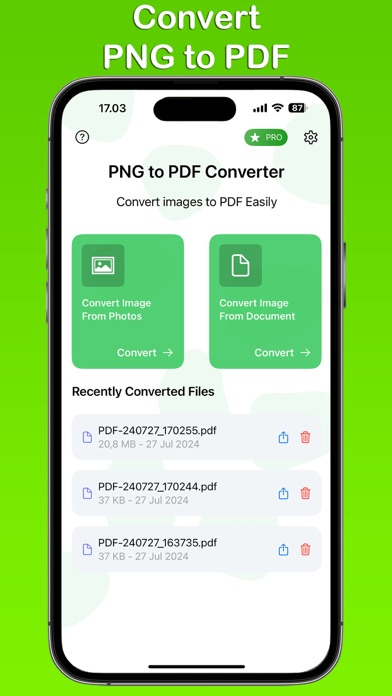
Transform your PNG images into high-quality PDF files with the PNG to PDF Converter app. This user-friendly app allows you to convert multiple images into a single PDF file effortlessly. Whether you need to create professional documents or save personal memories, our app provides a quick and efficient solution.

Key Features:

Multiple Image Conversion: Convert multiple PNG images into a single PDF file.
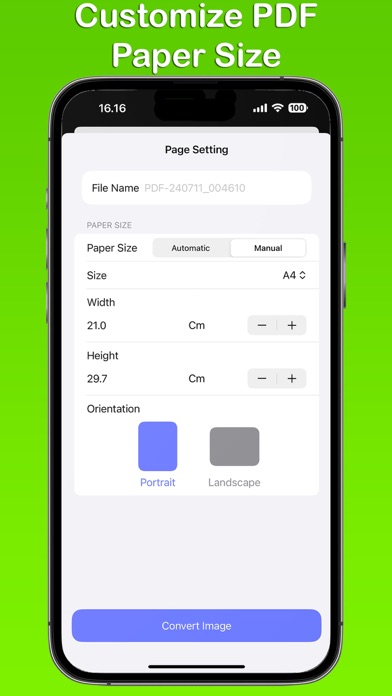
Custom Paper Sizes: Choose from standard paper sizes such as A4, A3, A5, Letter, Legal, or set your own custom size.
Auto or Manual Selection: Easily switch between automatic size selection or manually choose the dimensions that suit your needs.
History: Keep track of your conversions with the built-in history feature, allowing you to quickly access previously converted files.

PNG to PDF Converter app is free. You can use it forever, at no cost. However, PNG to PDF Converter app does offer premium features for its subscribers. If you decide to purchase an upgrade, you will unlock additional features.

Terms of Use: https://kociapp.github.io/PNG-to-PDF/term-of-use
Privacy Policy: https://kociapp.github.io/PNG-to-PDF/privacy-policy
Show more Show less

Screenshots

PNG to PDF Screenshot 1 of 3
PNG to PDF Screenshot 2 of 3
PNG to PDF Screenshot 3 of 3
Screenshots by Andy Sutanto, from the the App Store listing
Official page on the App Store

More from Andy Sutanto

Photo Clearer AI icon Photo Clearer AI
Andy Sutanto
4.3
Free
191 ratings
Sleep Timer: Stop Music Player icon Sleep Timer: Stop Music Player
Andy Sutanto
4.5
Free
185 ratings
Video to MP3 Converter ~Audio icon Video to MP3 Converter ~Audio
Andy Sutanto
4.7
Free
178 ratings
Battery Alarm - Charge Alert icon Battery Alarm - Charge Alert
Andy Sutanto
4.5
Free
160 ratings
Audio Extractor ™ icon Audio Extractor ™
Andy Sutanto
4.6
Free
159 ratings
Music Recorder・Song Recording icon Music Recorder・Song Recording
Andy Sutanto
4.5
Free
142 ratings
Image Resizer - ResizePro icon Image Resizer - ResizePro
Andy Sutanto
4.8
Free
121 ratings
JPG to PDF ™ icon JPG to PDF ™
Andy Sutanto
4.5
Free
119 ratings

Changelog of PNG to PDF

No changelog data

Developer information for Andy Sutanto

Andy Sutanto

Address:

Share PNG to PDF

Comments on PNG to PDF for iOS

We don't have enough comments to show example comments. Please check back later.

App Store Rankings for PNG to PDF

This app is not ranked

Technologies used by PNG to PDF

Today's trending apps Price drops on Google Play Apps other people are watching Top new apps Popular Productivity Apps
More hot apps 🔥
Overview Reviews Rankings Technology
AppBrain Intelligence premium content

Subscribe now to get full and unlimited access to AppBrain Intelligence. You'll have access to:

  • App Intelligence dashboard (performance timeline, competitor comparison, country rankings, insight cards)
  • Detailed ranking data per app
  • Full timeline per developer
  • Device market shares data per country
  • Unlimited keyword tracking
1 Month

$75/mo
(billed every month)

SAVE 0%
Subscribe
3 Months

$65/mo
($195 billed every 3 months)

SAVE 13%
Subscribe
1 Year

$57.50/mo
($690 billed every year)

SAVE 23%
Subscribe
Each subscription will automatically renew 3 days before the expiration date for the same time period. Subscriptions can be cancelled at any time before the renewal.

AppBrain is an app data site, we track rankings, ratings, installs for all apps and games on Google Play and the App Store. AppBrain doesn't host app files or APKs, all install links go directly to the official store. All trademarks are owned by their respective owners. As an Amazon Associate AppBrain earns from qualifying purchases.

More apps

  • Top Android apps being viewed
  • English Uzbek Dictionary
  • View MONOPOLY GO!Chat
  • Juwa 777: Casino Online

App statistics

  • Android statistics
  • Google Play Developer stats
  • Trending Android Apps
  • Trending iOS apps
  • Top popular Apps
  • Buy the best Android phone
  • Buy & sell app businesses

About AppBrain

  • Contact
  • Privacy
  • Documentation
  • DMCA takedowns
  • Articles
  • Blog
  • The AppBrain advertising system
© 2010-2026 - AppBrain