

Pocket Console
Pocket Console is made and published by ADAM MICHAEL OGDEN. AppBrain is an independent app data site and isn't affiliated with ADAM MICHAEL OGDEN. The app name, icon, screenshots and description belong to ADAM MICHAEL OGDEN and are shown as published on the App Store.
AppBrain's verdict
- Last updated
- September 29, 2026
Rankings
App Store top chartsApp Store Rankings for Pocket Console
Competitors
Similar apps and more from ADAM MICHAEL OGDENAlternatives to Pocket Console


More from ADAM MICHAEL OGDEN

Releases
Updates seen on the App Store- Version
- 1.0.0
- Launched
- September 2026
No changelog data
User feedback
Ratings and reviews on the App StoreComments on Pocket Console for iOS
We don't have enough comments to show example comments. Please check back later.
Technology
Found in the app by AppBrain- Price
- Free
- App size
- 7.27 MB
- Content rating
- Everyone
Technologies used by Pocket Console
About the app and developer
About Pocket Console
Pocket Console is an utilities app developed by ADAM MICHAEL OGDEN.
What is the rating of Pocket Console?
Pocket Console has no ratings yet.
Is Pocket Console free?
Pocket Console is free. The app size is 7.27 MB. The latest version available is 1.0.0. The last update was on September 29, 2026.
What are the requirements for Pocket Console?
The app has a content rating of Everyone. The app has been available on the App Store since September 2026.
Developer information for ADAM MICHAEL OGDEN
Address:
Frequently asked questions about Pocket Console
Is Pocket Console free?
Yes. Pocket Console is free on the App Store.
Is Pocket Console still available?
Yes. Pocket Console is on the App Store, and the last update we saw was on September 29, 2026.
How large is Pocket Console?
Pocket Console is 7.27 MB.
Is Pocket Console suitable for children?
App Store rates the content of Pocket Console as suitable for everyone.
Who made Pocket Console?
Pocket Console was developed by ADAM MICHAEL OGDEN. It is listed in the utilities category on the App Store.
What are the best alternatives to Pocket Console?
People looking at Pocket Console also look at these utilities apps: DMX Engineering Cloud, livetoolkit, ArtNet sACN Viewer, RigThis, Pixelerr.
Store listing
By ADAM MICHAEL OGDEN, from the App Store

Description by ADAM MICHAEL OGDEN Written by the developer, not by AppBrain. Click to read.
Most lighting apps on a phone are a remote for something else, or they lack the profiles and the precision that a real console gives you. This one is the console. You patch your lights, program looks and output DMX directly in Pocket Console.
TWO WAYS TO DRIVE IT
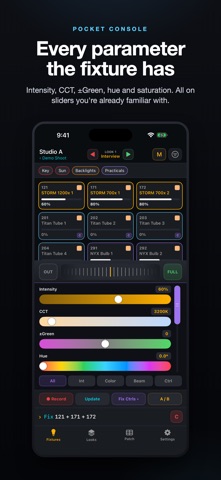
- Touch. Tap or drag to select the lights you want. Intensity, CCT, ±Green, hue, saturation, and every other parameter the fixture has, on sliders you're already familiar with.
- Command line. Type "1 Thru 8 At 45" and eight lights are set without hunting for any of them. It selects as you type, so you can see what you are about to change, and pressing Enter again runs the same line again.
Both write the same values, so use whichever suits the moment.
REAL OUTPUT
- Art-Net and sACN (E1.31), every routed universe at a steady 40 fps.
- sACN multicast or unicast, with a per-source priority you set when you have to win a universe.
- Art-Net broadcast, directed broadcast or unicast.
- Bluetooth straight to a LumenRadio TimoTwo, either a CRMX transmitter or a light with the module already inside. No router and no node needed.
FIXTURES AND PATCH
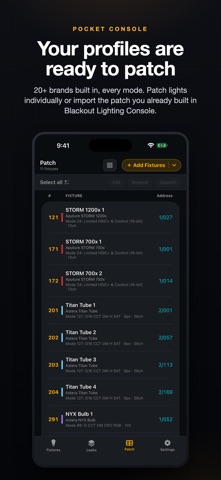
- 20+ brands built in: Aputure, amaran, Astera, ARRI, Nanlux, Nanlite, Litepanels, Godox KNOWLED, Creamsource, Quasar, LiteGear, Kino Flo and more. Every mode of every fixture, taken from the manufacturer's own chart.
- Import the patch you already built in Blackout Lighting Console. Pocket Console matches each profile and patches the lights for you.
- Multi-cell and pixel fixtures, with a drawer for the individual cells.
- Addressing that finds the gaps for you and flags an overlap the moment you make one.
LOOKS, GROUPS AND A/B
- Build groups on the fly.
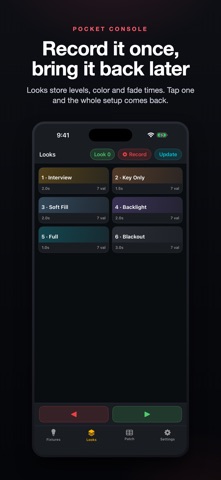
- Record a look with its own fade time and bring the whole setup back with a tap.
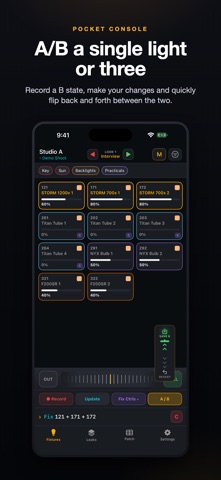
- A/B a single light or three. Hold A/B and the selected lights show what they were. Let go and your change comes back. A/B states are saved per fixture, within the location.
ORGANIZED LIKE A SHOOT
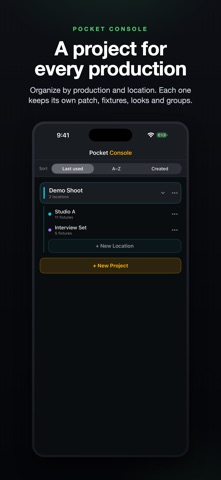
- A project per production and a location per setup, each with its own patch, fixtures, groups and looks.
- Everything is stored on the phone and works with no network at all.
FREE TO PROGRAM
Patching and programming are free. Test and learn the app without spending a dime. A subscription or a lifetime license unlocks live output and starts with a 7-day free trial; the tier sets how many universes you can output at once.
Pocket Console is a phone-only app, built natively in Swift for iOS 17 and later.
Terms of Use (EULA): https://pocketlightingconsole.com/terms.html
Privacy Policy: https://pocketlightingconsole.com/privacy.html