



AppBrain's verdict
Established- Rating on App Store
- 1.50
- 2 ratings
- Last updated
- March 28, 2021
- Size
- 24.3 MB
It doesn't have enough ratings yet to judge what users think.
User feedback
Ratings and reviews on the App StoreComments on Pocket Print for iOS
We don't have enough comments to show example comments. Please check back later.
Store listing
By KuO Inc., from the App StoreDescription by KuO Inc. Written by the developer, not by AppBrain. Click to read.
This application has been pursued functional and convenience as compared to [Mobile Print for brother].
Anytime, anywhere, you can print !
The Great combination of Brother Industries printers(PJ-673, PJ-773, PJ-763FMi, RJ-4040, RJ-3040, RJ-3150) and Pocket Print ,will assist you with your mobile printing.
You can print web pages and files to Brother Industries printers from iPad/iPhone with Pocket Print.
(A connection method is wireless LAN. )
PDF, JPEG, PNG, TIFF, BMP, TXT can be printed.
Furthermore, the file of MS Office can also be printed.
(doc, docx, xls, xlsx, ppt, pptx)
However, there are some caveats.
Look the Note (*1)
[Keyfeatures]
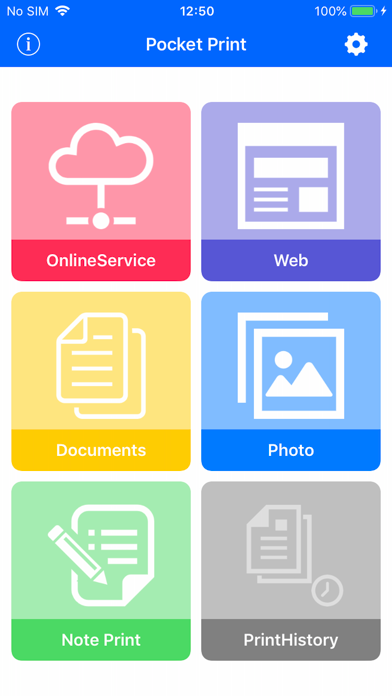
- Print files from iPad/iPhone
Supported file formats: PDF, JPEG , PNG, TIFF, BMP, TXT (Note *1)
- Print the file is being saved to the online service
Supported online service: iCloud, Dropbox, Google Drive
Supported file formats: PDF, JPEG, PNG, TIFF, BMP, TXT (Note *1)
- Print web page
Web authentication is supported. (SSL, Digest, Basic)
- Print photo
- Print note
Print of the input text.
(Does not have the ability to save notes.)
- Print P-touch Templete(RJ-4040、RJ-3050、RJ-3150)
The template created by P-touch Editor can be transmitted.
- Print history
- Print preview
- Printer Setup
- Open-In Print
Print from other apps using Open-In.
- Simple Print (iOS 8 or later) (Note *2)
Print the file you have saved in other applications without launching the Pocket Print by utilizing
the Pocket Print simple print from other applications.
- Print function restriction and lock function
- Layout Print (PJ-673, 773, 763 only)
Supported A5 cut sheet. (PJ-673, 773, 763)
Note (*1)
doc, docx, xls, xlsx, ppt, pptx becomes the simple printing.
However, the file of MS Office may be unable to be printed correctly.
In that case, please print after changing into PDF.
By specification change of iOS, there is a case where it becomes impossible to use this function.
* Printing requires the add-on purchase.
Watermark will be printed if do not buy the add-on.
Please confirm that you can print in this state first before you buy.
* At the time of Adhoc connection, when it is a model without 3G or LTE, Web connection cannot be performed.
(In the case of Wi-Fi model, printer and Internet connection simultaneously is not possible.)
Note (*2)
* Please do the printer setting in the configuration screen before use.
(Necessary in order to apply the purchased add-on in simple print function.)
Please pre-connected to the printer.
-------------------------------------------
■ Price
App download : Free
Add-on feature (release of the watermark) : Pay
- Charging, will be charged to your iTunes account.
- Release the watermark is required for each printer you use.
- After your purchase, refund and cancellation is not possible.
- Please perform the restore if the billing process is not reflected.
-------------------------------------------
Printers Supported
<Brother Industries, Ltd>
・PJ-673
・PJ-773
・RJ-4040
・RJ-3050
・RJ-3150
・RJ-2050
・RJ-2150
・PJ-763MFi
Support OS
・iOS 11~14
Support Device
・ IPhone 6 or later
・ IPad 5 generation or later
[Note]
In the terminal that supports the AirDrop, the Bluetooth will recommend the use of at OFF.
(During the Open-In and simple print,communication with the printer and the iOS device is disconnected.)
Safety and technology
Found in the app by AppBrain- Price
- Free
- App size
- 24.3 MB
- Content rating
- High
Technologies used by Pocket Print
Releases
Updates seen on the App Store- Version
- 2.21
- Launched
- February 2013
No changelog data
Alternatives
Similar apps and more from KuO Inc.Alternatives to Pocket Print





More from KuO Inc.


Rankings
App Store top chartsApp Store Rankings for Pocket Print
About the app and developer
About Pocket Print
Pocket Print is a business app developed by KuO Inc.
User Ratings
Pocket Print is rated 1.50 out of 5 stars. The rating is based on 2 ratings.
App Information
Pocket Print is freely available from the App Store. The app size is 24.34 MB. The latest version available is 2.21. The last update was on March 28, 2021.
Technical Requirements
The app has a content rating of High Maturity. The app has been available on the App Store since February 2013.
Pocket Print is made and published by KuO Inc. AppBrain is an independent app data site and isn't affiliated with KuO Inc. The app name, icon, screenshots and description belong to KuO Inc. and are shown as published on the App Store.
Developer information for KuO Inc.
Address:
Frequently asked questions about Pocket Print
Is Pocket Print free?
Yes. Pocket Print is free on the App Store.
Is Pocket Print still available?
Yes. Pocket Print is on the App Store, and the last update we saw was on March 28, 2021.
How large is Pocket Print?
Pocket Print is 24.34 MB.
Is Pocket Print suitable for children?
App Store gives Pocket Print a high maturity rating. It is meant for adults.
How do people rate Pocket Print?
Pocket Print scores 1.50 out of 5 stars, from 2 ratings on the App Store.
Who made Pocket Print?
Pocket Print was developed by KuO Inc. It is listed in the business category on the App Store.
What are the best alternatives to Pocket Print?
People looking at Pocket Print also look at these business apps: PJ-673 Print, RJ-4040 Print, PrintCentral for iPhone, PrintCentral Pro for iPhone, i-Reporter.