AppBrain
AppBrain
  • Apps
  • Apps being viewed right now Trending apps today Most popular apps All-time most installed apps Top rated apps iPhone and iPad apps
  • Intelligence ▾
    Intelligence overview → Track any Android app or your whole market
    Track & analyze
    Keyword Tracker & OptimizerTrack & improve Play rankings App Performance ReportOne-off PDF for any app StatisticsFree Android & Play market stats
    Promote your app
    Featured Apps App Links
  • Intelligence
  • Pricing
  • Dashboard
  • Sign up
  • Log in
App Store Apps > Utilities > PocketDesk Remote
PocketDesk Remote icon

PocketDesk Remote

0.4.1
ChenYu Ho
0.00
0 reviews
Free

PocketDesk Remote Screenshot 1 of 5
PocketDesk Remote Screenshot 2 of 5
PocketDesk Remote Screenshot 3 of 5
PocketDesk Remote Screenshot 4 of 5
PocketDesk Remote Screenshot 5 of 5
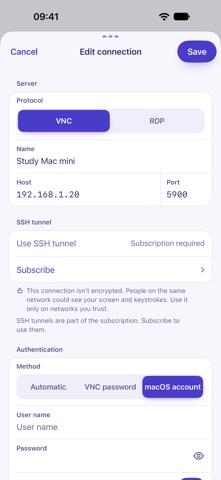
Screenshots by ChenYu Ho, from the the App Store listing
View on the App Store

About PocketDesk Remote

PocketDesk Remote is an utilities app developed by ChenYu Ho.

User Ratings

The app has no ratings yet.

App Information

PocketDesk Remote is freely available from the App Store. The app size is 22.32 MB. The latest version available is 0.4.1. The last update was on November 19, 2026.

Technical Requirements

The app has a content rating of Everyone. The app has been available on the App Store since November 2026.

PocketDesk Remote is made and published by ChenYu Ho. AppBrain is an independent app data site and isn't affiliated with ChenYu Ho. The app name, icon, screenshots and description belong to ChenYu Ho and are shown as published on the App Store.

Description by ChenYu Ho (from the App Store)
PocketDesk Remote lets you use your own computers at home or at work from an iPhone, iPad, or iPhone Duo, over VNC or RDP (Microsoft Remote Desktop Protocol). Reach a Mac with Screen Sharing turned on, a Windows PC with Remote Desktop turned on (Pro, Enterprise, or Education), or a VNC server on Linux.

Features
• RDP connections are always encrypted with TLS. The first time you connect, you check the computer’s certificate fingerprint, and you’re warned if the certificate changes.
• Sign in to RDP with a local account, a Microsoft account, or a domain account
• VNC with no password, a VNC password, or a macOS account
• VNC connections without an SSH tunnel are clearly marked as not encrypted
• Finds computers with Remote Desktop, Screen Sharing, or VNC on your local network, using Bonjour and a scan of your subnet
• Touch mode or trackpad mode, with gestures to click, drag, scroll, and zoom
• A special keys row with Esc, Tab, Ctrl, Alt, ⌘ or Win, arrow keys, and F1–F12, plus shortcuts like Ctrl + Alt + Del and Send text
• Works with a hardware keyboard, trackpad, mouse, and Apple Pencil
• Laptop layout on iPhone Duo: half-fold it and stand it up like a laptop. The remote screen moves to the top half, and the bottom half becomes a trackpad or keyboard you can switch between.
• The remote screen fills the display, with a floating toolbar you can drag, collapse, or tuck against the edge
• Fit to screen or actual size, with pinch to zoom
• Set the resolution and scale for each RDP connection
• Choose which display to view when a VNC server reports more than one
• Portrait, landscape, and multitasking windows on iPad. Rotating or folding doesn’t drop the connection.
• Passwords and private keys stay in this device’s iOS Keychain
• Available in 10 languages, with light and dark appearance

Ads and PocketDesk Plus
PocketDesk Remote is free to use and contains ads. After you tap Disconnect, a full-screen ad from Google may sometimes appear. Ads never appear on the remote screen, and how often they can appear is strictly limited.

PocketDesk Plus is an optional subscription, billed monthly or yearly through the App Store. It removes ads and adds SSH tunnels:
• SSH tunnels encrypt VNC connections. Sign in with a password or an imported Ed25519 or ECDSA private key.
• The first time you connect, you confirm the SSH host key fingerprint. If it changes later, PocketDesk stops the connection.
The yearly plan starts with a 7-day free trial for first-time subscribers, and you’re only charged after the trial ends. The subscription renews automatically until you cancel. Cancel at least 24 hours before it renews, or before the trial ends, and you won’t be charged. Cancel anytime in the App Store. Everything else, including RDP, stays free with or without it.

No account needed. Connections go straight from your device to your computer, never through our servers. Your connection details, passwords, and screen content are never sent to us or included in ad requests.

Before you start: turn on Screen Sharing, Remote Desktop, or a VNC server on the computer you want to reach. PocketDesk Remote is a client only. It doesn’t let anyone control your iPhone or iPad.

Terms of Use: https://pocketdesk.cc/en/terms/
Apple Standard EULA: https://www.apple.com/legal/internet-services/itunes/dev/stdeula/
Privacy Policy: https://pocketdesk.cc/en/privacy/
Show more Show less

More data about PocketDesk Remote

Price Free
Rating No ratings
Ranking Not ranked
Version 0.4.1
App size 22.3 MB
Suitable for Everyone

Changelog of PocketDesk Remote

No changelog data

Developer information for ChenYu Ho

ChenYu Ho

Address:

Share PocketDesk Remote

Comments on PocketDesk Remote for iOS

We don't have enough comments to show example comments. Please check back later.

App Store Rankings for PocketDesk Remote

This app is not ranked

Technologies used by PocketDesk Remote

Frequently asked questions about PocketDesk Remote

Is PocketDesk Remote free?

Yes. PocketDesk Remote is free on the App Store.

Is PocketDesk Remote still available?

Yes. PocketDesk Remote is on the App Store, and the last update we saw was on November 19, 2026.

How large is PocketDesk Remote?

PocketDesk Remote is 22.32 MB.

Is PocketDesk Remote suitable for children?

App Store rates the content of PocketDesk Remote as suitable for everyone.

Who made PocketDesk Remote?

PocketDesk Remote was developed by ChenYu Ho. It is listed in the utilities category on the App Store.

Today's trending apps Price drops on Google Play Popular Utilities Apps Top new apps Apps other people are watching
More hot apps 🔥
AppBrain Intelligence premium content

Subscribe now to get full and unlimited access to AppBrain Intelligence. You'll have access to:

  • App Intelligence dashboard (performance timeline, competitor comparison, country rankings, insight cards)
  • Detailed ranking data per app
  • Full timeline per developer
  • Device market shares data per country
  • Unlimited keyword tracking
  • AI assistant access via MCP (Claude, Cursor or any MCP client)
1 Month

$75/mo
(billed every month)

SAVE 0%
Subscribe
3 Months

$65/mo
($195 billed every 3 months)

SAVE 13%
Subscribe
1 Year

$57.50/mo
($690 billed every year)

SAVE 23%
Subscribe
Each subscription will automatically renew 3 days before the expiration date for the same time period. Subscriptions can be cancelled at any time before the renewal.

AppBrain is an app data site, we track rankings, ratings, installs for all apps and games on Google Play and the App Store. AppBrain doesn't host app files or APKs, all install links go directly to the official store. All trademarks are owned by their respective owners.

More apps

  • Top Android apps being viewed
  • Juwa 2.0 Casino 777 Slots
  • Vegas Sweeps 777 Online Casino
  • MingloTalk: Interactive Story

App statistics

  • Android statistics
  • Google Play Developer stats
  • Trending Android Apps
  • Trending iOS apps
  • Top popular Apps
  • Buy the best Android phone
  • Buy & sell app businesses

About AppBrain

  • Contact
  • Privacy
  • Documentation
  • DMCA takedowns
  • Blog
  • Top Free Games Apps for your iPhone or iPad
© 2010-2026 - AppBrain