

PocketTerm SSH is made and published by 雄 肖. AppBrain is an independent app data site and isn't affiliated with 雄 肖. The app name, icon, screenshots and description belong to 雄 肖 and are shown as published on the App Store.
AppBrain's verdict
- Last updated
- August 6, 2026
Rankings
App Store top chartsApp Store Rankings for PocketTerm SSH
This app is not ranked
Competitors
Similar apps and more from 雄 肖Alternatives to PocketTerm SSH


More from 雄 肖

Releases
Updates seen on the App Store- Version
- 1.0
- Launched
- August 2026
No changelog data
User feedback
Ratings and reviews on the App StoreComments on PocketTerm SSH for iOS
We don't have enough comments to show example comments. Please check back later.
Technology
Found in the app by AppBrain- Price
- Free
- App size
- 13.3 MB
- Content rating
- Everyone
Technologies used by PocketTerm SSH
About the app and developer
About PocketTerm SSH
PocketTerm SSH is an utilities app developed by 雄 肖.
User Ratings
The app has no ratings yet.
App Information
PocketTerm SSH is freely available from the App Store. The app size is 13.26 MB. The latest version available is 1.0. The last update was on August 6, 2026.
Technical Requirements
The app has a content rating of Everyone. The app has been available on the App Store since August 2026.
Developer information for 雄 肖
Address:
Store listing
By 雄 肖, from the App Store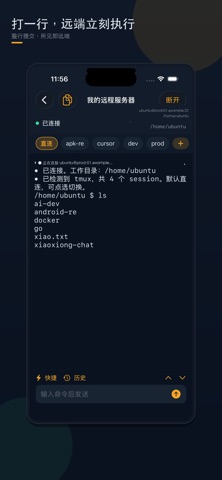


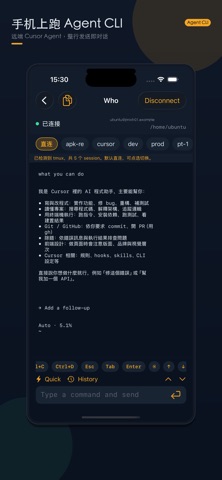

Screenshots by 雄 肖, from the the App Store listing
Description by 雄 肖 Written by the developer, not by AppBrain. Click to read.
PocketTerm is a mobile SSH client for iPhone. Add a host, connect, type a command in the input box, and see remote output right away. An interactive PTY on the direct channel helps you run Agent CLIs and common terminal tools on your own servers.
What you can do
• Add servers with host, port, and username; sign in with password or OpenSSH private key
• Line-oriented input: send a full command and watch results in the terminal view
• Interactive PTY for remote Agent CLIs and common TUIs (depends on what you install on the host)
• Per-server working directory and command history with up/down browse
• Built-in quick commands plus a custom library
• Detect remote tmux: switch, create, and delete sessions from the session bar (delete requires confirm)
• 16 UI languages and a dark Pocket visual style
Security
• Passwords, private keys, and known hosts stay in on-device Keychain
• Host-key TOFU: trust on first use; changed keys need your explicit clear before re-trust
• We don’t run your servers or upload your credentials
Notes
• You need your own SSH-reachable Linux/Unix host and any Agent CLI you already use there
• This is a mobile SSH client—it does not bundle third-party Agent products, and it is not a cloud IDE
Built for developers and operators who need quick remote actions—and Agent sessions—on the go.
What you can do
• Add servers with host, port, and username; sign in with password or OpenSSH private key
• Line-oriented input: send a full command and watch results in the terminal view
• Interactive PTY for remote Agent CLIs and common TUIs (depends on what you install on the host)
• Per-server working directory and command history with up/down browse
• Built-in quick commands plus a custom library
• Detect remote tmux: switch, create, and delete sessions from the session bar (delete requires confirm)
• 16 UI languages and a dark Pocket visual style
Security
• Passwords, private keys, and known hosts stay in on-device Keychain
• Host-key TOFU: trust on first use; changed keys need your explicit clear before re-trust
• We don’t run your servers or upload your credentials
Notes
• You need your own SSH-reachable Linux/Unix host and any Agent CLI you already use there
• This is a mobile SSH client—it does not bundle third-party Agent products, and it is not a cloud IDE
Built for developers and operators who need quick remote actions—and Agent sessions—on the go.