

Pokus: Structured Timer
Pokus: Structured Timer is made and published by ALISTER ALAGON PINEDA. AppBrain is an independent app data site and isn't affiliated with ALISTER ALAGON PINEDA. The app name, icon, screenshots and description belong to ALISTER ALAGON PINEDA and are shown as published on the App Store.
AppBrain's verdict
- Rating on App Store
- 5.00
- 1 ratings
- Last updated
- September 29, 2026
It doesn't have enough ratings yet to judge what users think.
Rankings
App Store top chartsApp Store Rankings for Pokus: Structured Timer
Competitors
Similar apps and more from ALISTER ALAGON PINEDAAlternatives to Pokus: Structured Timer


Releases
Updates seen on the App Store- Version
- 3.0.0
- Launched
- June 2025
No changelog data
User feedback
Ratings and reviews on the App StoreComments on Pokus: Structured Timer for iOS
We don't have enough comments to show example comments. Please check back later.
Technology
Found in the app by AppBrain- Price
- Free
- App size
- 22.8 MB
- Content rating
- Everyone
Technologies used by Pokus: Structured Timer
About the app and developer
About Pokus: Structured Timer
Pokus: Structured Timer is a productivity app developed by ALISTER ALAGON PINEDA.
User Ratings
Pokus: Structured Timer is rated 5.00 out of 5 stars. The rating is based on one rating ratings.
App Information
Pokus: Structured Timer is freely available from the App Store. The app size is 22.77 MB. The latest version available is 3.0.0. The last update was on September 29, 2026.
Technical Requirements
The app has a content rating of Everyone. The app has been available on the App Store since June 2025.
Developer information for ALISTER ALAGON PINEDA
Address:
Frequently asked questions about Pokus: Structured Timer
Is Pokus: Structured Timer free?
Yes. Pokus: Structured Timer is free on the App Store.
Is Pokus: Structured Timer still available?
Yes. Pokus: Structured Timer is on the App Store, and the last update we saw was on September 29, 2026.
How large is Pokus: Structured Timer?
Pokus: Structured Timer is 22.77 MB.
Is Pokus: Structured Timer suitable for children?
App Store rates the content of Pokus: Structured Timer as suitable for everyone.
How do people rate Pokus: Structured Timer?
Pokus: Structured Timer has one rating of 5.00 stars on the App Store.
Who made Pokus: Structured Timer?
Pokus: Structured Timer was developed by ALISTER ALAGON PINEDA. It is listed in the productivity category on the App Store.
What are the best alternatives to Pokus: Structured Timer?
People looking at Pokus: Structured Timer also look at these productivity apps: ADHD Hyperfocus Coach, RingPing - Call Reminder, KBM Cleaning, FlowArc - Pomodoro Timer, HeadsDown.
Store listing
By ALISTER ALAGON PINEDA, from the App Store




Description by ALISTER ALAGON PINEDA Written by the developer, not by AppBrain. Click to read.
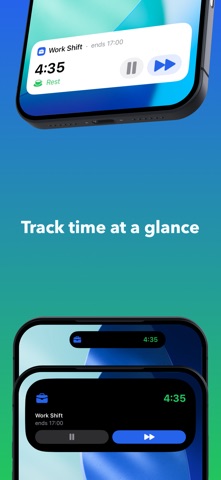
Dismiss a notification? Another one comes. Still going? It keeps reminding you. Pokus stays on your lock screen and Dynamic Island so you can't pretend you didn't see it.
PERSISTENT REMINDERS THAT WORK
- Alerts repeat until you respond — not just once
- Live Activity on your lock screen — always visible
- Dynamic Island shows time remaining
- Can't dismiss, can't ignore, can't forget
ACTIVITY PACING & ENERGY MANAGEMENT
- Structure activity and rest to stay within your energy envelope
- Prevent post-exertional malaise with timed rest periods
- Ideal for ME/CFS, Long COVID, fibromyalgia, and chronic pain
- Gentle but persistent — no more boom and bust cycles
SCREEN BREAKS & EYE CARE
- 20-20-20 rule for eye strain prevention
- Ergonomic break reminders for desk workers
- Microbreak intervals for long screen sessions
BUILT FOR TIME BLINDNESS
- Nagging reminders you genuinely cannot ignore
- Simple interface — no complex planning, just start
- Visual and haptic cues that cut through hyperfocus
- Brain fog friendly
ALWAYS IN VIEW
- Lock screen widget stays visible
- Dynamic Island countdown
- Apple Watch support
- No need to open the app
FLEXIBLE INTERVALS
- Classic 25/5 or fully custom cycles
- Any focus and rest duration you want
- Session time limits to prevent overwork
- One tap to start your break
SET GOALS & STAY ON TRACK
- Set weekly or monthly time targets for any timer or tag
- Track minimum, maximum, or range-based goals
- Get warned before starting a session that would exceed a limit
- See daily progress with charts and pace indicators
ORGANIZE WITH TAGS
- Group timers with color-coded tags
- Link goals to tags for automatic tracking across timers
- Filter sessions and analytics by tag
TRACK YOUR PATTERNS
- Visual charts of focus vs rest time
- Daily, weekly, monthly insights
- See your productivity rhythms and goal progress
- Filter by specific timers or tags
SYNCED EVERYWHERE
- iCloud sync across devices
- Custom timer icons and colors
- Unlimited timers and tags
- Automatic session history
Perfect for:
- Anyone with a chronic illness who needs activity pacing
- People with ADHD and time blindness
- Remote workers who skip breaks
- Students in long study sessions
- Desk workers needing ergonomic reminders
- Anyone who dismisses regular alarms
Try free, then unlock unlimited with a one-time purchase.