




AppBrain's verdict
- Last updated
- November 11, 2026
- Size
- 9.70 MB
User feedback
Ratings and reviews on the App StoreComments on Polycue: Parallel Timers for iOS
We don't have enough comments to show example comments. Please check back later.
Store listing
By Bastian Braeu, from the App StoreDescription by Bastian Braeu Written by the developer, not by AppBrain. Click to read.
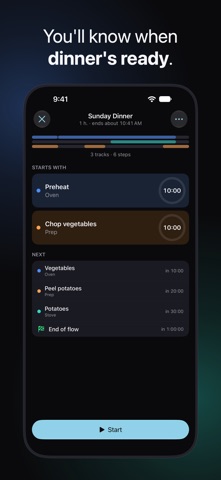
Polycue is a timer for work that runs in parallel. You plan your steps on tracks that share one time axis, tap Start, and Polycue calls out each step as it begins and ends. Your eyes and hands stay on the work.
IDEAS TO START WITH
These are only a few ideas. Polycue fits any routine where several things run at once.
• Cooking: the vegetables and the potatoes, on the table together.
• Mornings: the kids get ready while you pack the bags, and everyone leaves on time.
• Meetings: check-in, updates and the main topic, done in 30 minutes.
• Workouts: squats, push-ups and short rests, with a warm-up and a cool-down.
• Live streams: segments, scene changes and chat moments, in the right order.
• Teaching and training: stations, group work and breaks in one session plan.
WHAT MAKES IT DIFFERENT
Parallel tracks on one time axis
Every track sits on the same timeline, so you see what overlaps and what follows. The total comes from your plan, and the player shows one end time for the whole run. Pause, skip a step or add a minute, and the end time moves with you.
Spoken cues you control
Polycue says a step's name when it starts and, if you want, when it ends: “Oven: Vegetables done. Stove: Potatoes done”. Turn on a heads-up before any step, give a step a shorter spoken name, mute a track, or use tones only. Cues lower your music while they speak, then let it play on.
What You'll Hear
One list shows every sentence of a flow with its time, before you start. Tap a row to hear it.
Keeps going with the screen off
Lock your iPhone and the cues keep playing. A Live Activity on the Lock Screen, and in the Dynamic Island on iPhones that have one, shows the end time, with buttons to pause and skip.
Siri starts your flow
When your hands are busy, say “Start School Morning in Polycue”, and it starts right away, with its cues. Every flow you can start already has a shortcut: tap it in Spotlight or the Shortcuts app, or use it in an automation. “Stop my flow in Polycue” ends it.
Create with AI (Unlimited plan)
Describe a routine in your own words, and Create with AI turns it into a flow with parallel tracks, ready to check and run (Unlimited plan, with your own Claude, OpenAI or Mistral API key from the provider's developer platform). Usage is billed directly by the provider.
ALSO INCLUDED
• Six starter templates, from Sunday Dinner to Live Stream
• Repeat a flow in rounds
• Three tone styles, and a guide to setting up a better voice
• Cues keep playing in other apps. If you close Polycue, the session is still on time when you open it again
• Export and import flows as files
• Undo and redo in the editor
• English and German, including the spoken cues
• VoiceOver and Dynamic Type
PRIVACY
No account and no sign-up. No tracking and no analytics. Your flows and settings stay on your iPhone. Only Create with AI sends something: the text you type, from your iPhone straight to Anthropic (Claude), OpenAI or Mistral, whichever you picked, with your own key.
PRICING
Free: every feature except Create with AI, for one flow.
Unlimited plan: as many flows as you need, plus Create with AI (with your own API key). Choose a monthly or yearly subscription, or a one-time lifetime purchase.
If your subscription ends, nothing is deleted: the top flow in your library keeps working, and the others are locked until you get Unlimited again. Export and delete always work. A lifetime purchase never expires.
Subscriptions renew automatically unless canceled at least 24 hours before the end of the current period. Manage or cancel them in your Apple Account settings.
Terms of Use: https://polycue.b263.io/terms.html
Privacy Policy: https://polycue.b263.io/privacy-policy.html
Safety and technology
Found in the app by AppBrain- Price
- Free
- App size
- 9.70 MB
- Content rating
- Everyone
Technologies used by Polycue: Parallel Timers
Releases
Updates seen on the App Store- Version
- 1.1.0
- Launched
- November 2026
No changelog data
Alternatives
Similar apps and more from Bastian BraeuAlternatives to Polycue: Parallel Timers




Rankings
App Store top chartsApp Store Rankings for Polycue: Parallel Timers
About the app and developer
About Polycue: Parallel Timers
Polycue: Parallel Timers is a productivity app developed by Bastian Braeu.
What is the rating of Polycue: Parallel Timers?
Polycue: Parallel Timers has no ratings yet.
Is Polycue: Parallel Timers free?
Polycue: Parallel Timers is free. The app size is 9.70 MB. The latest version available is 1.1.0. The last update was on November 11, 2026.
What are the requirements for Polycue: Parallel Timers?
The app has a content rating of Everyone. The app has been available on the App Store since November 2026.
Polycue: Parallel Timers is made and published by Bastian Braeu. AppBrain is an independent app data site and isn't affiliated with Bastian Braeu. The app name, icon, screenshots and description belong to Bastian Braeu and are shown as published on the App Store.
Developer information for Bastian Braeu
Address: