

Pomodoro Timer - BubbleFocus
Pomodoro Timer - BubbleFocus is made and published by 荣九 蔡. AppBrain is an independent app data site and isn't affiliated with 荣九 蔡. The app name, icon, screenshots and description belong to 荣九 蔡 and are shown as published on the App Store.
AppBrain's verdict
New- Rating on App Store
- 5.00
- 1 ratings
- Last updated
- October 22, 2026
Pomodoro Timer - BubbleFocus came out 57 days ago. It doesn't have enough ratings yet to judge what users think.
Rankings
App Store top chartsApp Store Rankings for Pomodoro Timer - BubbleFocus
Competitors
Similar apps and more from 荣九 蔡Alternatives to Pomodoro Timer - BubbleFocus


More from 荣九 蔡


Releases
Updates seen on the App Store- Version
- 3.1.0
- Launched
- September 2026
No changelog data
User feedback
Ratings and reviews on the App StoreComments on Pomodoro Timer - BubbleFocus for iOS
We don't have enough comments to show example comments. Please check back later.
Technology
Found in the app by AppBrain- Price
- Free
- App size
- 35.5 MB
- Content rating
- Everyone
Technologies used by Pomodoro Timer - BubbleFocus
About the app and developer
About Pomodoro Timer - BubbleFocus
Pomodoro Timer - BubbleFocus is a productivity app developed by 荣九 蔡.
What is the rating of Pomodoro Timer - BubbleFocus?
Pomodoro Timer - BubbleFocus is rated 5.00 out of 5 stars, based on one rating ratings.
Is Pomodoro Timer - BubbleFocus free?
Pomodoro Timer - BubbleFocus is free. The app size is 35.52 MB. The latest version available is 3.1.0. The last update was on October 22, 2026.
What are the requirements for Pomodoro Timer - BubbleFocus?
The app has a content rating of Everyone. The app has been available on the App Store since September 2026.
Developer information for 荣九 蔡
Address:
Store listing
By 荣九 蔡, from the App Store


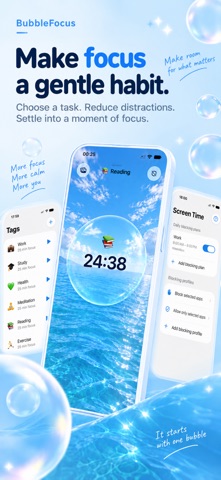
Description by 荣九 蔡 Written by the developer, not by AppBrain. Click to read.
A SIMPLE WAY TO BEGIN
Start with a tap, or enable flip control on a supported iPhone: place it face down to begin, pick it up to pause, and put it down again to continue. Flip control works while the app is open on the home screen.
FIND YOUR OWN RHYTHM
Choose a countdown or use the Pro count-up timer for open-ended work. Pause and resume when you need to. After a session, choose your break and enjoy the floating bubbles before returning to your next task.
SEE WHERE YOUR TIME GOES
Keep your focus history organized with tags. Review completed sessions, then explore trends, a weekly timeline, tag distribution, and a yearly heatmap with Pro. Focus sessions of at least five minutes are saved as valid records.
BUILT FOR EVERYDAY USE
Follow your timer through Live Activities on supported devices. Use light or dark appearance and choose a photo for your home background. No BubbleFocus account is required. Optional iCloud sync keeps focus history and tags in sync; active timers stay on the device where they started.
Alarm alerts are free on supported devices running iOS 26 or later and require system authorization. Adding time to a completed countdown is also free, using "+2 min" in the app.
BUBBLEFOCUS PRO
Pro adds count-up timing, longer sessions up to 180 minutes, complete statistics, unlimited tags, and the Apple Watch companion. Pro is available through a monthly or yearly subscription, or a lifetime purchase. Features that require Pro are marked in the app. Availability of system features depends on your device and OS version.
Subscriptions renew automatically unless canceled at least 24 hours before the end of the current period. Payment is charged to your Apple Account. Manage or cancel your subscription in your App Store account settings. A lifetime purchase does not renew.
BubbleFocus 2.0 is the new name and design of WaterFocus.
Privacy Policy: https://policy.oneleaf.fun/bubblefocus/privacy
Terms of Use: https://www.apple.com/legal/internet-services/itunes/dev/stdeula/