AppBrain
AppBrain
  • Apps
  • Apps being viewed right now Trending apps today Most popular apps All-time most installed apps Top rated apps iPhone and iPad apps
  • Intelligence ▾
    Intelligence overview → Track any Android app or your whole market
    Track & analyze
    Keyword Tracker & OptimizerTrack & improve Play rankings App Performance ReportOne-off PDF for any app StatisticsFree Android & Play market stats
    Promote your app
    Featured Apps App Links
  • Intelligence
  • Pricing
  • Dashboard
  • Sign up
  • Log in
App Store Apps > Productivity > PomoDuo: Pomodoro Focus Timer
PomoDuo: Pomodoro Focus Timer icon

PomoDuo: Pomodoro Focus Timer

2.0.1
Ariel Tyson
5.00
2 reviews
Free

PomoDuo: Pomodoro Focus Timer Screenshot 1 of 6
PomoDuo: Pomodoro Focus Timer Screenshot 2 of 6
PomoDuo: Pomodoro Focus Timer Screenshot 3 of 6
PomoDuo: Pomodoro Focus Timer Screenshot 4 of 6
PomoDuo: Pomodoro Focus Timer Screenshot 5 of 6
PomoDuo: Pomodoro Focus Timer Screenshot 6 of 6
Screenshots by Ariel Tyson, from the the App Store listing
View on the App Store

About PomoDuo: Pomodoro Focus Timer

PomoDuo: Pomodoro Focus Timer is a productivity app developed by Ariel Tyson.

User Ratings

PomoDuo: Pomodoro Focus Timer is rated 5.00 out of 5 stars. The rating is based on 2 ratings.

App Information

PomoDuo: Pomodoro Focus Timer is freely available from the App Store. The app size is 23.16 MB. The latest version available is 2.0.1. The last update was on November 16, 2026.

Technical Requirements

The app has a content rating of Everyone. The app has been available on the App Store since March 2026.

PomoDuo: Pomodoro Focus Timer is made and published by Ariel Tyson. AppBrain is an independent app data site and isn't affiliated with Ariel Tyson. The app name, icon, screenshots and description belong to Ariel Tyson and are shown as published on the App Store.

Description by Ariel Tyson (from the App Store)
PomoDuo is a Pomodoro focus timer built for two. Start a session with a friend and you share one timer: when you focus, they focus; when it's time for a break, you both take it. Knowing someone is working alongside you makes it easier to start and harder to quit. It's a simple form of body doubling, a focus strategy many people with ADHD rely on.

Add friends by username or with your friend link, then pick one and start. Choose exactly how long to focus and rest, to the minute, and PomoDuo keeps both phones in step through every round, pause and break. If one of you pauses, you both pause. To pair with someone just once, share a 6-character code instead.

On iPad and Mac the timer fills the screen, with its controls beside it, and your friends, history and rankings sit side by side.

Studying alone? The timer works on its own too, with Live Activities on your Lock Screen and in the Dynamic Island, so you can pause, resume or stop without opening the app.

On Apple Watch, start, pause and stop a solo session from your wrist, or use Double Tap on supported models. Complications and the Smart Stack keep the time left in view, while your nearby iPhone runs the session and its app blocking.

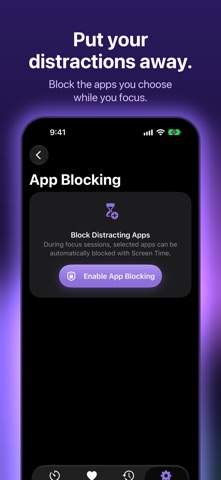
Put distractions away with app blocking on iPhone and iPad. Choose the apps you want out of reach, and PomoDuo blocks them during focus rounds and lifts the block when you pause or finish. It uses Apple's Screen Time, so PomoDuo never sees which apps you pick.

Stay motivated with your history and a friends leaderboard. See your focus minutes, rounds and streak, and how you compare with friends today, this week and all time.

KEY FEATURES:
• Shared focus sessions that keep two phones in sync
• Focus and break lengths you set to the minute
• Optional shared tasks, with you in control of what your partner sees
• Friends by username, friend link or one-time pairing code
• App blocking during focus rounds with Apple's Screen Time
• Live Activities and Dynamic Island controls
• Apple Watch app with complications and Double Tap
• iPad and Mac apps, included with the same purchase
• Focus history with streaks and a weekly chart
• Friends leaderboard for today, this week and all time
• Home Screen widget and Siri Shortcuts
• Full VoiceOver, Dynamic Type and Reduce Motion support

Privacy comes first. There are no ads, no analytics and no tracking. Your session history stays on your iPhone; only your focus totals are shared with the friends you add, and session tasks are shared only if you choose.

PomoDuo is free, with no ads and no in-app purchases.
Show more Show less

More data about PomoDuo: Pomodoro Focus Timer

Price Free
Rating 5.00 based on 2 ratings
Ranking Not ranked
Version 2.0.1
App size 23.2 MB
Suitable for Everyone

Changelog of PomoDuo: Pomodoro Focus Timer

No changelog data

Developer information for Ariel Tyson

Ariel Tyson

Address:

Share PomoDuo: Pomodoro Focus Timer

Comments on PomoDuo: Pomodoro Focus Timer for iOS

We don't have enough comments to show example comments. Please check back later.

App Store Rankings for PomoDuo: Pomodoro Focus Timer

This app is not ranked

Technologies used by PomoDuo: Pomodoro Focus Timer

Frequently asked questions about PomoDuo: Pomodoro Focus Timer

Is PomoDuo: Pomodoro Focus Timer free?

Yes. PomoDuo: Pomodoro Focus Timer is free on the App Store.

Is PomoDuo: Pomodoro Focus Timer still available?

Yes. PomoDuo: Pomodoro Focus Timer is on the App Store, and the last update we saw was on November 16, 2026.

How large is PomoDuo: Pomodoro Focus Timer?

PomoDuo: Pomodoro Focus Timer is 23.16 MB.

Is PomoDuo: Pomodoro Focus Timer suitable for children?

App Store rates the content of PomoDuo: Pomodoro Focus Timer as suitable for everyone.

How do people rate PomoDuo: Pomodoro Focus Timer?

PomoDuo: Pomodoro Focus Timer scores 5.00 out of 5 stars, from 2 ratings on the App Store.

Who made PomoDuo: Pomodoro Focus Timer?

PomoDuo: Pomodoro Focus Timer was developed by Ariel Tyson. It is listed in the productivity category on the App Store.

Apps other people are watching Today's trending apps Price drops on Google Play Top new apps Popular Productivity Apps
More hot apps 🔥
AppBrain Intelligence premium content

Subscribe now to get full and unlimited access to AppBrain Intelligence. You'll have access to:

  • App Intelligence dashboard (performance timeline, competitor comparison, country rankings, insight cards)
  • Detailed ranking data per app
  • Full timeline per developer
  • Device market shares data per country
  • Unlimited keyword tracking
  • AI assistant access via MCP (Claude, Cursor or any MCP client)
1 Month

$75/mo
(billed every month)

SAVE 0%
Subscribe
3 Months

$65/mo
($195 billed every 3 months)

SAVE 13%
Subscribe
1 Year

$57.50/mo
($690 billed every year)

SAVE 23%
Subscribe
Each subscription will automatically renew 3 days before the expiration date for the same time period. Subscriptions can be cancelled at any time before the renewal.

AppBrain is an app data site, we track rankings, ratings, installs for all apps and games on Google Play and the App Store. AppBrain doesn't host app files or APKs, all install links go directly to the official store. All trademarks are owned by their respective owners.

More apps

  • Top Android apps being viewed
  • Mega Photo Pro
  • Sandbox Universe: Space Games
  • Kawaii Winter Live Wallpaper

App statistics

  • Android statistics
  • Google Play Developer stats
  • Trending Android Apps
  • Trending iOS apps
  • Top popular Apps
  • Buy the best Android phone
  • Buy & sell app businesses

About AppBrain

  • Contact
  • Privacy
  • Documentation
  • DMCA takedowns
  • Blog
  • Android Interstitial Ads: Best practices to optimize your app's earnings
© 2010-2026 - AppBrain