

POS SoftSolvIT
POS SoftSolvIT is made and published by FINTECH FOR SOFTWARE SOLUTIONS. AppBrain is an independent app data site and isn't affiliated with FINTECH FOR SOFTWARE SOLUTIONS. The app name, icon, screenshots and description belong to FINTECH FOR SOFTWARE SOLUTIONS and are shown as published on the App Store.
AppBrain's verdict
- Last updated
- October 7, 2026
Rankings
App Store top chartsApp Store Rankings for POS SoftSolvIT
Competitors
Similar apps and more from FINTECH FOR SOFTWARE SOLUTIONSAlternatives to POS SoftSolvIT


More from FINTECH FOR SOFTWARE SOLUTIONS

Releases
Updates seen on the App Store- Version
- 8.5.3 (30)
- Launched
- August 2026
No changelog data
User feedback
Ratings and reviews on the App StoreComments on POS SoftSolvIT for iOS
We don't have enough comments to show example comments. Please check back later.
Technology
Found in the app by AppBrain- Price
- Free
- App size
- 31.3 MB
- Content rating
- Everyone
Technologies used by POS SoftSolvIT
About the app and developer
About POS SoftSolvIT
POS SoftSolvIT is a productivity app developed by FINTECH FOR SOFTWARE SOLUTIONS.
User Ratings
The app has no ratings yet.
App Information
POS SoftSolvIT is freely available from the App Store. The app size is 31.31 MB. The latest version available is 8.5.3 (30). The last update was on October 7, 2026.
Technical Requirements
The app has a content rating of Everyone. The app has been available on the App Store since August 2026.
Developer information for FINTECH FOR SOFTWARE SOLUTIONS
FINTECH FOR SOFTWARE SOLUTIONS
Address:
Store listing
By FINTECH FOR SOFTWARE SOLUTIONS, from the App Store




Description by FINTECH FOR SOFTWARE SOLUTIONS Written by the developer, not by AppBrain. Click to read.
POS SoftSolvIT runs your own Odoo point of sale as a real app on iPhone and iPad.
WORKS OFFLINE, PROPERLY
• Sell, take payment, print and refund with no network at all
• Orders queue on the device and sync automatically on reconnect
• "Wi-Fi connected" is not trusted: the app probes your Odoo server itself, so a dead uplink reads as offline instead of failing mid-sale
• Order and session history fall back to this device's own records when the server is out of reach
PRINT TO ANY NETWORK PRINTER, JUST WITH ITS IP
• Add a printer by typing its IP address and port. No middleware, no vendor box, no cloud service.
• Copies per printer, 1 to 9, printed automatically at payment
• Prep tickets routed by product category, so each station prints only what it makes, each with its own copy count
• Receipt, gift receipt and prep layouts, your logo prepared for thermal paper, plus PDF share
TABLES AND FLOOR PLAN
• Take an order by tapping a table. Floors and tables are drawn from the app and saved on your Odoo server.
• Add order: one table holds as many separate bills as the party needs
• Combine tables into one, and uncombine any of them back out
• Merge one bill into another, or link it, without retyping a line
• Transfer a bill from one table to another
• Two tills on one floor, live. Each sees the other's tables, and a bill is handed over rather than duplicated.
• Table bookings that ask whether the party has arrived before clearing
• Split an order into two, or split a bill between guests
NEW— Finaly EGYPTIAN TAX AUTHORITY eRECEIPTS, NO Odoo module, No Server needed
• Report every sale to the ETA from the till itself, with your own credentials. Off until you turn it on.
• The QR code and the receipt UUID print on the customer's receipt, so the sale can be looked up.
• A test run against ETA's pre-production environment, so you can prove your setup with one of your own products.
ORDERS THAT OUTLIVE THE SESSION
• Carry open orders into the next session when you close: they keep their items and take new numbers
• Save for later, resume a parked draft, or pull another device's draft from Odoo
• Live draft: an order is saved the instant it starts, and every edit re-saves it
• An idle till holds no order at all, so empty zero-total orders never reach your session or your reports
MONEY
• Edit payments after validation (rights-gated): the order is marked EDITED and every change is logged
• Split payment across methods, automatic change, exact-cent tenders
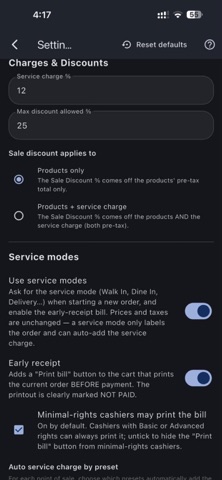
• Service charge, pre-tax sale discount and global discount, with tax refunded proportionally to the correct accounts
SELLING
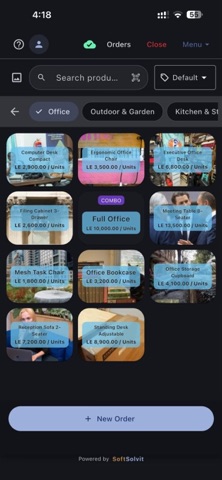
• Category grid, product search, and barcode scanning by camera or hardware scanner
• Variants and combos, priced exactly as Odoo prices them
• Price lists resolved on the device, so prices are right offline
• Order types such as Dine In or Take Out, each with its own automatic service charge
• Fractional quantities, per-line notes, line discount, manual price edit
CONTROL AND REPORTS
• Your Odoo rights decide who may discount, edit a price, delete a line, move cash, open a session or see the expected till
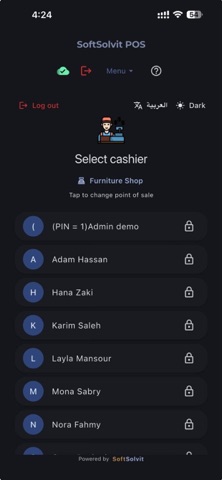
• Cashier PINs, read from Odoo and re-read when they change
• Z-report by payment method with full order detail; closing posts the accounting entry to Odoo, and a close that cannot post says so
What's new in 8.5.3
• Customers: add and edit customers, delivery charges by city, and delivery receipts
• Re-order a past sale in one tap at today's prices
• Merge two bills on the same table, merge saved orders from the cart, and move a bill off the floor to the counter
• Per-cashier rights for Save, Cancel and changing the order type
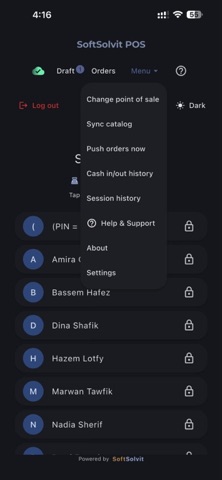
• Fresh Liquid Glass design and a reorganised Menu
• Works with Odoo 18, 19 and 20, with guided setup on first sign-in
• Buyer's name on the Egyptian eReceipt (ETA)
• Orders save instantly offline; more reliable syncing and session closing