

PoseTime
PoseTime is made and published by Matthew Porreca. AppBrain is an independent app data site and isn't affiliated with Matthew Porreca. The app name, icon, screenshots and description belong to Matthew Porreca and are shown as published on the App Store.
AppBrain's verdict
- Rating on App Store
- 3.50
- 2 ratings
- Last updated
- May 1, 2025
- Size
- 145.0 MB
It doesn't have enough ratings yet to judge what users think.
User feedback
Ratings and reviews on the App StoreComments on PoseTime for iOS
We don't have enough comments to show example comments. Please check back later.
Store listing
By Matthew Porreca, from the App Store



Description by Matthew Porreca Written by the developer, not by AppBrain. Click to read.
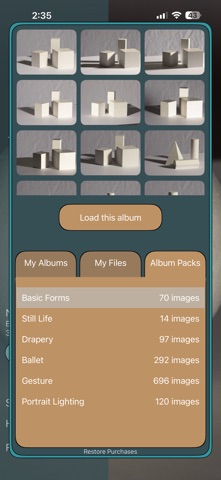
To begin, tap on the box on the left that says “Tap Here To Begin” or the text below it “Now Showing”. This brings up the album view. Select your album, and you can press the Load This Album button to begin with the first photo or select an image from the thumbnails to jump straight to that image. To the right of Now Showing is a button to toggle Shuffled mode on and off.
At the top is the timer, with a ‘play’ button. Tapping anywhere on the timer will fade out the sidebar and begin the clock. Tapping the timer again will pause and bring the sidebar back up.
In the free mode the app will load individual albums from your Photos gallery, so you can place your images in an album such as “Active Poses” or something recognizable and it will show up within PoseTime. All of your albums will load. If you buy the Premium license it unlocks the ability to load image files by selecting folders stored on your device or even in the cloud. It will download the cloud files to your device for you if they are not already local.
Halfway through the timer will play a sound, if you have it enabled, to let you know it is halfway through. There is an ending tick sound as well playing at 3, 2, and 1 seconds remaining before the image smoothly transitions to the next image.
There is also a fairly extensive reference Built In Albums library for Premium which includes hundreds of action and passive poses, basic forms, drapery, portraiture, still life.
The timer in the free mode is set to 10 seconds which is perfect for gesture studies. There are buttons to adjust the timer to 1 minute to 60 minutes (with intermediary steps of 2, 5, 10, 15, 20, and 30 minutes) for more advanced timed studies. These are restricted to Premium.
Key Features:
Flexible timer: 10 seconds in the free mode, up to to 60 minutes per image in Premium mode
Custom timer: Select your own times and remove the defaults if you prefer.
Custom image sources: your own photo gallery albums in free mode, or local and cloud files and built-in albums in Premium mode
Ordered or shuffled playback for variety in all modes
Pinch to zoom, drag to move
Audio cues for halfway and near-end alerts with options to select a variety of built in sounds.
Fully supports split-view for use while drawing on the iPad.
Safety and technology
Found in the app by AppBrain- Price
- Free
- App size
- 145.0 MB
- Content rating
- Everyone
Technologies used by PoseTime
Releases
Updates seen on the App Store- Version
- 1.1
- Launched
- March 2025
No changelog data
Rankings
App Store top chartsApp Store Rankings for PoseTime
About the app and developer
About PoseTime
PoseTime is a graphics & design app developed by Matthew Porreca.
User Ratings
PoseTime is rated 3.50 out of 5 stars. The rating is based on 2 ratings.
App Information
PoseTime is freely available from the App Store. The app size is 145.02 MB. The latest version available is 1.1. The last update was on May 1, 2025.
Technical Requirements
The app has a content rating of Everyone. The app has been available on the App Store since March 2025.
Developer information for Matthew Porreca
Address: