

Poster Printer: Tile Print
Poster Printer: Tile Print is made and published by Ha Do Thi Thu. AppBrain is an independent app data site and isn't affiliated with Ha Do Thi Thu. The app name, icon, screenshots and description belong to Ha Do Thi Thu and are shown as published on the App Store.
AppBrain's verdict
- Rating on App Store
- 4.79
- 14 ratings
- Last updated
- September 15, 2026
It doesn't have enough ratings yet to judge what users think.
Rankings
App Store top chartsApp Store Rankings for Poster Printer: Tile Print
Competitors
Similar apps and more from Ha Do Thi ThuAlternatives to Poster Printer: Tile Print


More from Ha Do Thi Thu






Releases
Updates seen on the App Store- Version
- 1.1.2
- Launched
- April 2026
No changelog data
User feedback
Ratings and reviews on the App StoreComments on Poster Printer: Tile Print for iOS
We don't have enough comments to show example comments. Please check back later.
Technology
Found in the app by AppBrain- Price
- Free
- App size
- 14.4 MB
- Content rating
- Everyone
Technologies used by Poster Printer: Tile Print
About the app and developer
About Poster Printer: Tile Print
Poster Printer: Tile Print is an utilities app developed by Ha Do Thi Thu.
What is the rating of Poster Printer: Tile Print?
Poster Printer: Tile Print is rated 4.79 out of 5 stars, based on 14 ratings.
Is Poster Printer: Tile Print free?
Poster Printer: Tile Print is free. The app size is 14.36 MB. The latest version available is 1.1.2. The last update was on September 15, 2026.
What are the requirements for Poster Printer: Tile Print?
The app has a content rating of Everyone. The app has been available on the App Store since April 2026.
Developer information for Ha Do Thi Thu
Address:
Store listing
By Ha Do Thi Thu, from the App Store

Description by Ha Do Thi Thu Written by the developer, not by AppBrain. Click to read.
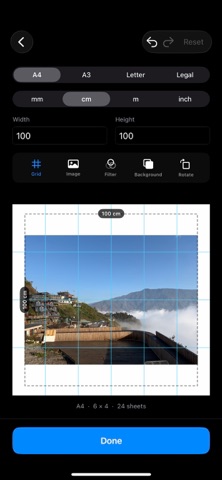
Poster Printer: Tile Print helps you turn any photo into a large printable poster by splitting it into multiple pages. Choose a photo, adjust the layout, preview each page, print, cut, and assemble.
No large-format printer needed.
Features:
• Create large posters from photos
• Split images into printable pages
• Preview tiled poster pages before printing
• Add clean cut guides for easier assembly
• Move, zoom, rotate, and adjust your photo
• Apply filters and background styles
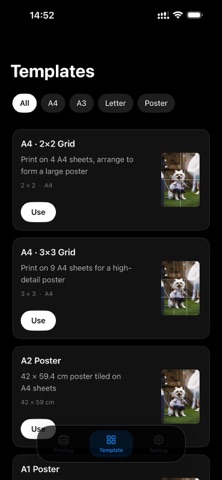
• Use poster templates for faster designs
• Undo, redo, and reset your edits
• Great for home, school, office, crafts, and wall decor
Perfect for:
• Wall art
• Room decor
• Birthday posters
• Party signs
• Classroom posters
• Event banners
• Family photo displays
• Vision boards
• DIY craft projects
Make large posters from your favorite photos in a simple, practical way: choose, edit, preview, print, and assemble.
Some features may require a subscription or in-app purchase.