



AppBrain's verdict
- Rating on App Store
- 5.00
- 3 ratings
- Last updated
- March 13, 2026
- Size
- 3.33 MB
It doesn't have enough ratings yet to judge what users think. Its best ranking is #74 in Top Paid, Utilities in Canada.
User feedback
Ratings and reviews on the App StoreComments on Poster Printer for iOS
We don't have enough comments to show example comments. Please check back later.
Store listing
By HoneyWired LLC, from the App StoreDescription by HoneyWired LLC Written by the developer, not by AppBrain. Click to read.
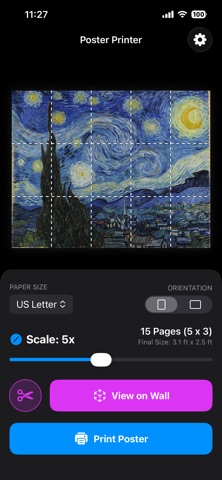
Ever wanted to turn a panoramic photo into a wall mural, or create a life-size cardboard cutout of a friend, pet, or celebrity? Poster Printer by HoneyWired makes it possible using the printer you already own—without the expensive professional printing costs.
Two Powerful Modes:
• Poster Mode: Turn any photo into a massive multi-page wall poster using standard printer paper.
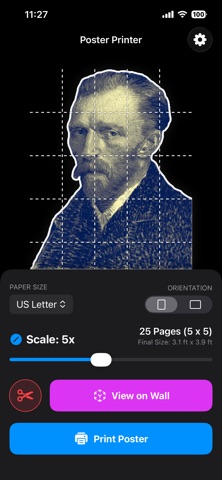
• Standee Mode: Instantly create life-size cutouts. Our AI-powered engine automatically removes the background, adds a professional padded border, and generates a precise dotted cut-line. (Pro Tip: Print on card stock and mount to foam core board for a sturdy, free-standing result!)
How it Works:
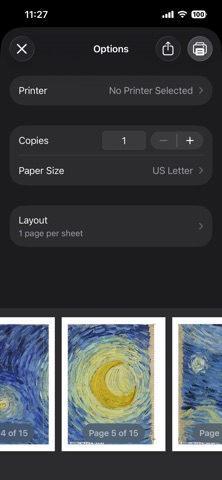
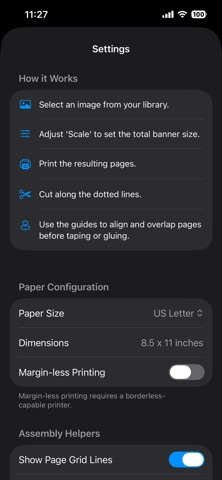
Poster Printer intelligently tiles your images across standard sheets of paper. Simply upload your photo, choose your scale, and print directly from your device or save as a PDF. Our smart assembly guides ensure that when you trim and tape your pages together, the result is seamless and foolproof.
Key Features:
• AR Wall Preview: Want to see how it looks before you print? Tap "View on Wall" to project your life-size poster or cutout directly into your room using Augmented Reality. Check the scale, snap photos, or even record a video of your virtual creation!
• Pro Color Effects & Duo-Tone: Fine-tune your photo's saturation and contrast directly in the app. Want a stylized, modern look? Toggle on Duo-Tone mode to map your image's shadows and highlights to any two custom colors for a striking pop-art aesthetic.
• Ink Saver Mode: Giant wall murals take a lot of ink. Our innovative Ink Saver mode applies a retro CMYK halftone dot effect over your entire poster—maintaining legibility and colors while drastically reducing the physical ink required.
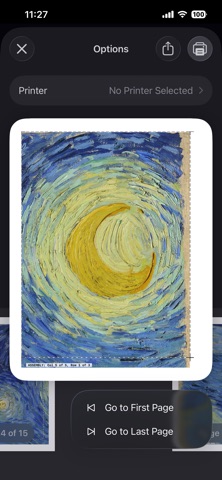
• Smart Assembly Guides: Dropping a stack of 45 printed pages is a nightmare. We automatically print hidden Row and Column labels directly into the overlap margins to make taping your massive poster a breeze.
• Global Paper Support: Print on a massive range of international and standard sizes (US Letter, Legal, Tabloid 11x17, Executive, Half Letter, A3, A4, A5, B4, and B5).
• Margin-less Printing: Seamlessly toggle margin-less printing to eliminate white borders if you are using a borderless-capable photo printer.
• Smooth Precision Scaling: Use our fluid scale slider or enter your exact target dimensions (in inches, feet, cm, or meters) to perfectly scale your images up to 10x width.
• Smart Standee Creator: Automatically isolates subjects, crops the layout to save paper, and lets you customize padding width and border colors (black or white).
• Low-Res Enhancement: Our engine applies high-quality mathematical upscaling and sharpening to ensure your final printed pages look as crisp as possible.
• PDF Export: Save your tiled poster as a PDF file via the print dialog to easily print from your Mac/PC, or share with others.
• Vector Precision: Generates crisp, resolution-independent dotted cut lines and overlap guides (glue tabs) for accurate manual assembly.
Privacy First:
• On-Device AI: Background removal and image processing happen entirely on your device using Apple’s Vision framework. Your photos never leave your phone.
• No Tracking: We don't track your usage or collect your data.
• No Ads: A premium, paid experience with zero interruptions.
Requirements:
Requires an AirPrint-compatible printer for direct printing. PDF export is available for all users via the iOS print dialog.
Safety and technology
Found in the app by AppBrain- Price
- $0.99
- App size
- 3.33 MB
- Content rating
- Everyone
Technologies used by Poster Printer
Releases
Updates seen on the App Store- Version
- 1.8
- Launched
- February 2026
No changelog data
Alternatives
Similar apps and more from HoneyWired LLCMore from HoneyWired LLC


Rankings
App Store top charts- Highest rank
- #74
- Chart
- Top Paid
- Utilities
- Country
- Canada
App Store Rankings for Poster Printer
Top rankings
| Rank | Country | Category | List |
|---|---|---|---|
| 74 | Canada | Utilities | Top Paid |
Ranking history in Canada
About the app and developer
About Poster Printer
Poster Printer is an utilities app developed by HoneyWired LLC.
User Ratings
Poster Printer is rated 5.00 out of 5 stars. The rating is based on 3 ratings.
App Information
Poster Printer costs $0.99. The app size is 3.33 MB. The latest version available is 1.8. The last update was on March 13, 2026.
Technical Requirements
The app has a content rating of Everyone. The app has been available on the App Store since February 2026.
Poster Printer is made and published by HoneyWired LLC. AppBrain is an independent app data site and isn't affiliated with HoneyWired LLC. The app name, icon, screenshots and description belong to HoneyWired LLC and are shown as published on the App Store.
Developer information for HoneyWired LLC
Address: