

PowerOffice Go
PowerOffice Go is made and published by PowerOffice AS. AppBrain is an independent app data site and isn't affiliated with PowerOffice AS. The app name, icon, screenshots and description belong to PowerOffice AS and are shown as published on the App Store.
AppBrain's verdict
- Best rank
- #27
- Top Free, Norway
- Last updated
- October 15, 2026
Rankings
App Store top charts- Highest rank
- #27
- Chart
- Top Free
- Business
- Country
- Norway
App Store Rankings for PowerOffice Go
Top rankings
| Rank | Country | Category | List |
|---|---|---|---|
| 27 | Norway | Business | Top Free |
Ranking history in Norway
Competitors
Similar apps and more from PowerOffice AS








Releases
Updates seen on the App Store- Version
- 26.42.0
- Launched
- November 2021
No changelog data
User feedback
Ratings and reviews on the App StoreComments on PowerOffice Go for iOS
We don't have enough comments to show example comments. Please check back later.
Technology
Found in the app by AppBrain- Price
- Free
- App size
- 223.1 MB
- Content rating
- Everyone
Technologies used by PowerOffice Go
About the app and developer
About PowerOffice Go
PowerOffice Go is a business app developed by PowerOffice AS.
User Ratings
The app has no ratings yet.
App Information
PowerOffice Go is freely available from the App Store. The app size is 223.14 MB. The latest version available is 26.42.0. The last update was on October 15, 2026.
Technical Requirements
The app has a content rating of Everyone. The app has been available on the App Store since November 2021.
Developer information for PowerOffice AS
Address:
Store listing
By PowerOffice AS, from the App Store



Description by PowerOffice AS Written by the developer, not by AppBrain. Click to read.
Dashboard:
Displays a selection of financial reports for your company. Here you can see widgets for Accounts Receivable, Accounts Payable, Revenue, and Expenses. The accounting widgets are clickable, allowing you to see more details. For example, in Accounts Receivable, you can click to see issued invoices.
The dashboard also has a time widget that summarizes the time you have worked, and shows how much work time you have left for the day. You also have quick access to frequently used functions and time registration directly from the dashboard.
Timesheet:
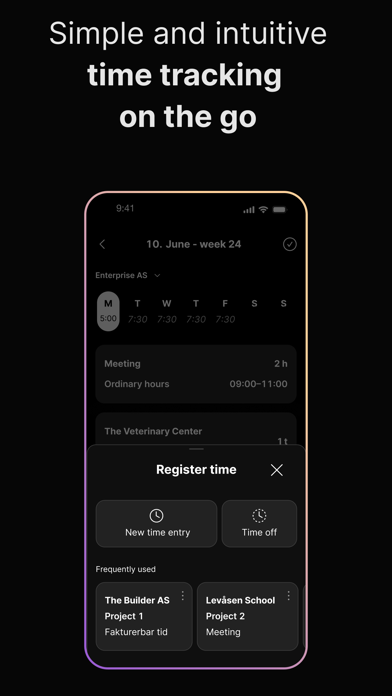
With PowerOffice Go timesheet on your mobile, it is easy to register the hours continuously when you are on the Go.
- Hours with actual time
- Hours with a stopwatch
- Time off (Time in lieu)
- The app remembers your frequently used hours
- Approve hours per day or per week
PowerOffice Go timesheet is closely integrated with PowerOffice Go accounting and payroll. This means that billable hours are invoiced easily, and hours and overtime work is included in the salary calculation completely automatically.
Holiday and leave:
Get a complete overview of your holiday and leave. Plan and register your holiday directly in the app.
- Holiday balance
- Flextime balance
- Absence including sick child days
As a manager, you also get the opportunity to approve absence directly.
Expenses:
Travel expenses
Filling out travel expense claims is simple. Start the claim as you leave home and register receipts, mileage, and allowances. Receipts are scanned for date, amount, and currency. The mileage feature calculates distances, tolls, and ferry fees automatically. Expenses can be submitted and paid immediately after the trip. PowerOffice Go stays updated with current regulations and integrates seamlessly with PowerOffice Go Payroll.
Expenses
With PowerOffice Go, you can easily photograph receipts and send them for bookkeeping and payment. They are scanned for date, amount, and currency.
Pay Slip:
View your pay slip directly on your mobile. The PowerOffice Go app provides an overview of your latest pay, previous salary, and key figures. You can also export the pay slip as a PDF if needed.
Invoices:
Create new sales orders and send invoices directly from the app. This feature allows you to include comments and attachments, to easily share all relevant information with your customers. Editing product lines within the app lets you adjust the invoices to accurately reflect the agreed services or products.
You can also create new customers directly during the invoicing process. Use the search function to automatically retrieve data, or add new customers manually.
Voucher:
The "Voucher" menu allows for easy submission of receipts and other supporting documentation. This documentation is sent into journal entry to be recorded in the accounting. Employees and non-employees can submit documentation and receipts across clients.
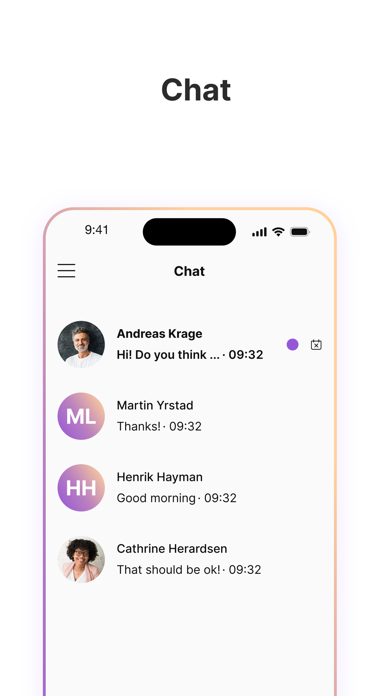
Chat:
Chat with your coworkers and your accountant.
Approval:
Approve an invoice, expenses and other vouchers.
-In journal approval, all approval requests are listed under their respective clients. You can approve directly from this list, or see details to approve, reject, forward or return.
Payment:
You will be notified of approved vouchers that are ready for payment. Turn off the notification from the clients you do not want to be notified of. When you authorise one or more payments, the files are transferred to the bank and paid on the due date.
Documents:
Get an overview of your own and your company's documents that you have access to. View and add new ones directly from your mobile.
In General:
Easy and secure login with Face ID, Touch ID or another screen lock.
New functionality will be included continuously.