

Prayer-Works
Prayer-Works is made and published by Advanced Systems Unlimited, LLC. AppBrain is an independent app data site and isn't affiliated with Advanced Systems Unlimited, LLC. The app name, icon, screenshots and description belong to Advanced Systems Unlimited, LLC and are shown as published on the App Store.
AppBrain's verdict
- Last updated
- March 6, 2024
- Size
- 26.2 MB
User feedback
Ratings and reviews on the App StoreComments on Prayer-Works for iOS
We don't have enough comments to show example comments. Please check back later.
Store listing
By Advanced Systems Unlimited, LLC, from the App Store


Description by Advanced Systems Unlimited, LLC Written by the developer, not by AppBrain. Click to read.
It manages your prayer list by allowing you to either create a prayer directly in your prayer list or by sending a "prayer invite", which is personal text message directly from you to any one you can message from your contact list. When you send the prayer invite message, it does not go through a some third party service or number - it is test message directly from you to them. The person you are asking to pray for doesn't have to be on the Prayer-Works application. You can still pray for them. They can just click the link in the text message and put their prayer request directly on your prayer list.
Add A Prayer to Your List
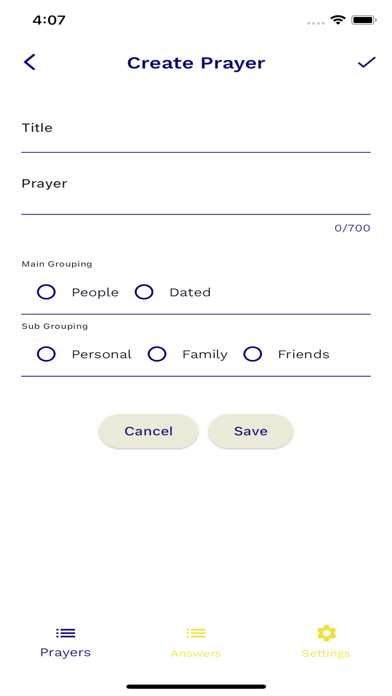
When you create a new prayer to add to your list, you can specify that the prayer is either a “People Prayer” or a “Dated Prayer”. A People Prayer can be for Personal, Family, or Friends. A Dated Prayer is a prayer that has a specific date in the future associated with it.
When you create a new prayer by sending out a Prayer Invite through a text message, the prayer will appear on your list once the person responds and submits a prayer request. In the current version, you have to go to Settings and click "Reload from cloud" to read in any prayer invites that others have replied to. When you send the text message (you can customize it), it says by default, “I would like to commit time to specifically praying for you. Please click the link to privately let me know how I can pray. God bless you.”
How to Pray
When you click on one of your prayer cards in your Prayer Works prayer list, it opens up into a full view of the prayer request. On that card, you have a few options. You can pray for the request and then click the button that says "I Prayed". When you click the "I Prayed" button, it adds to the count of the number of times you prayed, and it closes the prayer card and goes back out to the list.
You could also click the text link that says “I Prayed and Next”, and when you click that link, it marks the prayer that you prayed for (increases the count), and it advances automatically to the next prayer on the list.
You also have the option to use the arrows to just go to the next prayer without marking that you prayed for it at that time. This way you can quickly advance through the list and only mark the ones that you prayed with the “I Prayed and Next” button.
Prayer Works - Prayer List
The prayer list consist of prayer cards for "people prayers" and "dated prayers". Each prayer card has on it the title for the prayer and a couple of lines of text from the prayer. It is not designed to pray from the list but to click on any prayer in the list to open it up to both pray and mark a prayer as prayed.
Each card has two numbers on it marked by a people icon and a person icon. The people icon shows the total prayer count for the number of times other people have prayed for the prayer request. This is for a future feature. The person icon shows the number of times you personally have prayed for that prayer request. The idea is that in the future, you will be able to send a prayer request to other people who are on the app and are friends of yours. And, every time someone prays you can see the count going up on your own prayer request. It lets you know that people are praying for you. Right now, it just helps by tracking how often you have prayed for each prayer on your list.
Safety and technology
Found in the app by AppBrain- Price
- Free
- App size
- 26.2 MB
- Content rating
- Everyone
Technologies used by Prayer-Works
Releases
Updates seen on the App Store- Version
- 1.0.1
- Launched
- March 2024
No changelog data
Alternatives
Similar apps and more from Advanced Systems Unlimited, LLCMore from Advanced Systems Unlimited, LLC


Rankings
App Store top chartsApp Store Rankings for Prayer-Works
About the app and developer
About Prayer-Works
Prayer-Works is a social networking app developed by Advanced Systems Unlimited, LLC.
User Ratings
The app has no ratings yet.
App Information
Prayer-Works is freely available from the App Store. The app size is 26.17 MB. The latest version available is 1.0.1. The last update was on March 6, 2024.
Technical Requirements
The app has a content rating of Everyone. The app has been available on the App Store since March 2024.
Developer information for Advanced Systems Unlimited, LLC
Advanced Systems Unlimited, LLC
Address: