

PreFace: Screen Time Control
PreFace: Screen Time Control is made and published by Ruben Zhou Yang. AppBrain is an independent app data site and isn't affiliated with Ruben Zhou Yang. The app name, icon, screenshots and description belong to Ruben Zhou Yang and are shown as published on the App Store.
AppBrain's verdict
- Last updated
- April 3, 2026
Rankings
App Store top chartsApp Store Rankings for PreFace: Screen Time Control
Competitors
Similar apps and more from Ruben Zhou YangAlternatives to PreFace: Screen Time Control


Releases
Updates seen on the App Store- Version
- 1.0
- Launched
- April 2026
No changelog data
User feedback
Ratings and reviews on the App StoreComments on PreFace: Screen Time Control for iOS
We don't have enough comments to show example comments. Please check back later.
Technology
Found in the app by AppBrain- Price
- Free
- App size
- 43.8 MB
- Content rating
- Everyone
Technologies used by PreFace: Screen Time Control
About the app and developer
About PreFace: Screen Time Control
PreFace: Screen Time Control is a productivity app developed by Ruben Zhou Yang.
User Ratings
The app has no ratings yet.
App Information
PreFace: Screen Time Control is freely available from the App Store. The app size is 43.82 MB. The latest version available is 1.0. The last update was on April 3, 2026.
Technical Requirements
The app has a content rating of Everyone. The app has been available on the App Store since April 2026.
Developer information for Ruben Zhou Yang
Address:
Frequently asked questions about PreFace: Screen Time Control
Is PreFace: Screen Time Control free?
Yes. PreFace: Screen Time Control is free on the App Store.
Is PreFace: Screen Time Control still available?
Yes. PreFace: Screen Time Control is on the App Store, and the last update we saw was on April 3, 2026.
How large is PreFace: Screen Time Control?
PreFace: Screen Time Control is 43.82 MB.
Is PreFace: Screen Time Control suitable for children?
App Store rates the content of PreFace: Screen Time Control as suitable for everyone.
Who made PreFace: Screen Time Control?
PreFace: Screen Time Control was developed by Ruben Zhou Yang. It is listed in the productivity category on the App Store.
What are the best alternatives to PreFace: Screen Time Control?
People looking at PreFace: Screen Time Control also look at these productivity apps: Pushlane: Gamified Planner, ateams, Things 3, Wispr Flow: AI Voice Keyboard, Brainrot: Screen Time Control.
Store listing
By Ruben Zhou Yang, from the App Store



Description by Ruben Zhou Yang Written by the developer, not by AppBrain. Click to read.
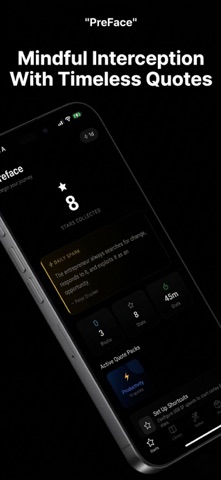
Most app blockers just shut you out. "Preface: Screen Time Control" invites you back to your focus. By turning a simple iOS Automation into a powerful mindfulness tool, Preface intercepts your digital distractions and replaces them with a curated moment of wisdom.
The "Preface" Experience:
Instead of a cold "Blocked" notification, Preface provides a transition. It’s a pause, a moment of reflection that reminds you why you put the phone down, featuring a minimalist design and handpicked quotes from history’s greatest thinkers.
How it Works (Simple 1-Minute Setup):
Preface utilizes the power of iOS Shortcuts & Automations to give you full control over your focus.
Choose Your Distractions: Identify the apps that pull you away from your goals.
Set the Automation: Use our simple, step-by-step guide to link your target apps to Preface via the Shortcuts app.
The Redirection: Every time you instinctively tap a distracting app, Preface will automatically open first, presenting you with a beautiful quote and a chance to breathe.
Key Features:
Intentional Friction: We replace a mindless habit (scrolling) with a conscious choice (reflecting).
Privacy First: Because you use native iOS Automations, Preface never needs to track your "Screen Time" data or monitor your browsing history.
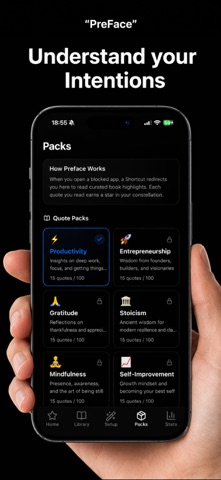
Curated Wisdom: A library of deep, inspiring quotes to help you reset your mindset in seconds.
Minimalist Aesthetics: A clean, distraction-free interface that respects your mental space.