

prefx is made and published by baffe, LLC. AppBrain is an independent app data site and isn't affiliated with baffe, LLC. The app name, icon, screenshots and description belong to baffe, LLC and are shown as published on the App Store.
AppBrain's verdict
- Rating on App Store
- 5.00
- 3 ratings
- Last updated
- June 3, 2026
It doesn't have enough ratings yet to judge what users think.
Rankings
App Store top chartsApp Store Rankings for prefx
Competitors
Similar apps and more from baffe, LLCAlternatives to prefx


Releases
Updates seen on the App Store- Version
- 1.6.9
- Launched
- April 2026
No changelog data
User feedback
Ratings and reviews on the App StoreComments on prefx for iOS
We don't have enough comments to show example comments. Please check back later.
Technology
Found in the app by AppBrain- Price
- Free
- App size
- 24.2 MB
- Content rating
- Medium
Technologies used by prefx
About the app and developer
About prefx
prefx is a photo & video app developed by baffe, LLC.
User Ratings
prefx is rated 5.00 out of 5 stars. The rating is based on 3 ratings.
App Information
prefx is freely available from the App Store. The app size is 24.23 MB. The latest version available is 1.6.9. The last update was on June 3, 2026.
Technical Requirements
The app has a content rating of Medium Maturity. The app has been available on the App Store since April 2026.
Developer information for baffe, LLC
Address:
Store listing
By baffe, LLC, from the App Store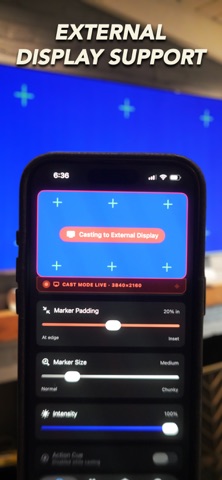




Description by baffe, LLC Written by the developer, not by AppBrain. Click to read.
Prefx transforms your iPhone or iPad and any external display connected via USB-C/HDMI into a high-fidelity, interactive digital prop. Built by baffe, a creative production company, Prefx is the professional on-set tool designed to bridge the gap between live-set interaction and post-production precision.
Interactive Prop Themes
A library of fully customizable modules for every narrative need, governed by a global Clearance Toggle and tunable via the Signature Secret Menu.
• Stitch (Custom UI): Import your own designs or video plates to create a seamless, scrollable custom surface.
• Strike Up (Social Media): Scrollable feeds, profile grids, and realistic interactions for on-camera talent.
• Live Feed: Social broadcast simulation with looping video, scrolling comments, and animated viewer counts.
• Chatterbox: Scripted messenger simulations with adjustable reply timing, on-the-fly actor typing, and instant reset between takes.
• News: Scrollable digital news site with authentic headline and article layouts.
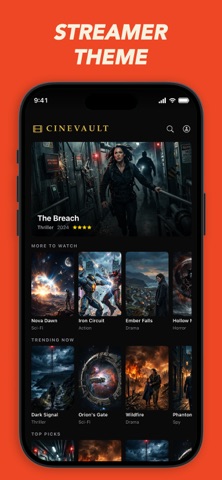
• CineVault: A high-fidelity VOD interface for "watching" content on-camera, now with full external display control, living where it was always meant to: your TV.
Clearance — Hero Mode vs. Villain Mode
One toggle flips every theme for legal clearance.
• Hero Mode: Platform-native typography and iconography for brand-consistent "good guy" devices.
• Villain Mode (True Neutral): 100% brand-neutral interface using open-source Inter typography and Lucide iconography, for antagonists or high-risk clearances.
Professional VFX Tools
• Chroma Key: High-visibility green, blue, and middle-grey backgrounds with optimized luminance for clean keying, fully supported on external displays so you can tune directly on the screen you're shooting against.
• Precision Markers: High-contrast markers for rock-solid matchmoving in After Effects, Mocha, or DaVinci Resolve, with full external display size support.
• Interactive Plates: Move tracking markers in real-time to simulate a live interface for the actor.
• UI Saturation: Desaturate interfaces on the fly to prevent color blowout on set cameras and specific LUTs.
On-Set Utility
• Emissive Lighting: Use any screen as a practical light source. Dial in color temperature with a Kelvin slider or use the RGB wheel for creative effects — now across any display size via external output.
• Status Bar Control: Set time, battery, signal, and wifi to exactly what the scene needs, across any theme, take after take.
• Privacy First: No data collection. No cloud processing. All assets stay local.
• Offline Ready: No internet required once installed.
• Global Support: Full UI in 12 languages.
Why Prefx?
Reduce screen replacements. Simplify legal clearances. Give your actors something real to react to. Your VFX artists and your lawyers will thank you.
Subscription Information
• Unlock all professional screen templates and future updates with a Prefx Pro subscription.
• Plans: Monthly or Annual auto-renewable subscriptions, or a one-time Lifetime License.
• Payment: Charged to your Apple ID account at confirmation of purchase.
• Auto-Renewal: Monthly and Annual plans renew automatically unless canceled at least 24 hours before the end of the current period.
• Manage or cancel anytime via Account Settings on the App Store.
• Previously purchased? Use the Restore Purchases button on the unlock screen.
Developed by baffe, LLC. All templates are original.
Terms of Use: https://www.apple.com/legal/internet-services/itunes/dev/stdeula/
Privacy Policy: https://www.baffefilms.com/privacy