

Presentation Creator
Presentation Creator is made and published by Desygner Pty Ltd. AppBrain is an independent app data site and isn't affiliated with Desygner Pty Ltd. The app name, icon, screenshots and description belong to Desygner Pty Ltd and are shown as published on the App Store.
AppBrain's verdict
EstablishedLoved by users- Rating on App Store
- 4.55
- 173 ratings
- Last updated
- October 7, 2026
Users love it: 4.5 stars from 173 ratings.
Rankings
App Store top chartsApp Store Rankings for Presentation Creator
Competitors
Similar apps and more from Desygner Pty Ltd






Releases
Updates seen on the App Store- Version
- 6.4.2
- Launched
- March 2021
No changelog data
User feedback
Ratings and reviews on the App StoreComments on Presentation Creator for iOS
We don't have enough comments to show example comments. Please check back later.
Technology
Found in the app by AppBrain- Price
- Free
- App size
- 227.7 MB
- Content rating
- Everyone
Technologies used by Presentation Creator
About the app and developer
About Presentation Creator
Presentation Creator is a graphics & design app developed by Desygner Pty Ltd.
What is the rating of Presentation Creator?
Presentation Creator is rated 4.55 out of 5 stars, based on 170 ratings.
Is Presentation Creator free?
Presentation Creator is free. The app size is 227.67 MB. The latest version available is 6.4.2. The last update was on October 7, 2026.
What are the requirements for Presentation Creator?
The app has a content rating of Everyone. The app has been available on the App Store since March 2021.
Developer information for Desygner Pty Ltd
Address:
Store listing
By Desygner Pty Ltd, from the App Store




Description by Desygner Pty Ltd Written by the developer, not by AppBrain. Click to read.
WORKS WITH POWERPOINT
• Open a .pptx file and edit it as real slides, not a flat picture
• Text, images, shapes, charts, layouts and theme colours come through
• Export the finished deck back to PowerPoint (.pptx)
• Charts come back out as real charts, with their data table intact
• Element animations come out with the file and play in PowerPoint
• .pptx files are supported. The older .ppt format is not
PRESENT FROM YOUR IPHONE OR IPAD
• Play your slides full screen with one tap
• Step through with on-screen controls, and see where you are in the deck
• No laptop needed to show your deck
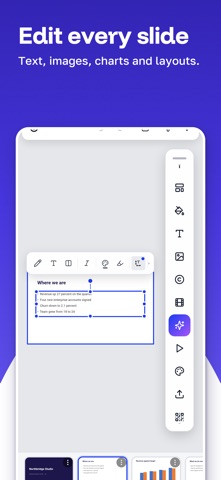
A REAL SLIDE EDITOR
• Start from a designed template or a blank slide
• Change fonts, colours, images, shapes and layouts with simple controls
• Add charts and diagrams to show your numbers
• Add photos from your Photos or from the built-in photo library
• Remove a photo background in one tap
• Add, duplicate and drag slides into a new order
• Open a PDF and edit its pages in the same editor
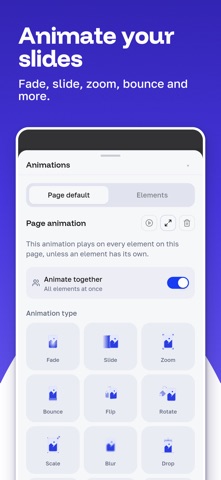
ANIMATE YOUR SLIDES
• Fade, slide, zoom, bounce, flip, rotate and more
• Set one animation for a whole slide, or a different one per element
• Play them in present mode, and take the element ones with you into PowerPoint
TEMPLATES FOR EVERY KIND OF DECK
• Corporate overview and business proposals
• Financial reports and project updates
• Sales and marketing presentations
• Training and development decks
• Lecture notes, student assignments and classroom presentations
Every template is included. There are no locked templates.
AI THAT HELPS YOU FINISH
• Draft or rewrite the text on a slide
• Generate images for your slides using AI credits
BRING IN WHAT YOU ALREADY HAVE
Import from your iPhone or iPad, from Google Drive, Dropbox and OneDrive, or straight from your Photos.
• PowerPoint (.pptx) and PDF files
• Adobe Illustrator (AI) and SVG artwork
WORK TOGETHER
• Share a deck with your team or your class
• Share a workspace so everyone edits the same decks
• Brand kit: save your fonts and colours once, then apply them to every slide
ON EVERY DEVICE
Start a deck on your iPhone and finish it on your iPad or computer. Presentations sync automatically.
EXPORT AND SHARE
• PowerPoint (.pptx)
• PDF, with a print-ready option
• PNG, JPG and SVG
• Share a link so other people can view the deck
• No watermark on your files
WHY PEOPLE CHOOSE PRESENTATION CREATOR
• A real slide editor that opens and saves PowerPoint files
• Present from the phone in your hand
• Templates built for decks, at slide size
• Every template is free
PLANS
Presentation Creator is free to download and use, and every template is included free. Starter, Business and Scale plans raise the allowances and add AI credits, storage and team seats. Prices are shown in the app before you buy. Subscriptions renew automatically unless cancelled at least 24 hours before the end of the current period, and can be managed in your Apple Account settings.
Terms of Service: https://desygner.com/terms
Privacy Policy: https://desygner.com/privacy
PowerPoint is a trademark of Microsoft Corporation. Presentation Creator is published by Desygner Pty Ltd and is not affiliated with Microsoft.
Built in Australia.