

Prime Priorities: ABC Planner
Prime Priorities: ABC Planner is made and published by Richard Forthman. AppBrain is an independent app data site and isn't affiliated with Richard Forthman. The app name, icon, screenshots and description belong to Richard Forthman and are shown as published on the App Store.
AppBrain's verdict
- Rating on App Store
- 5.00
- 2 ratings
- Last updated
- October 9, 2026
It doesn't have enough ratings yet to judge what users think.
Rankings
App Store top chartsApp Store Rankings for Prime Priorities: ABC Planner
Competitors
Similar apps and more from Richard ForthmanAlternatives to Prime Priorities: ABC Planner


Releases
Updates seen on the App Store- Version
- 1.4
- Launched
- August 2026
No changelog data
User feedback
Ratings and reviews on the App StoreComments on Prime Priorities: ABC Planner for iOS
We don't have enough comments to show example comments. Please check back later.
Technology
Found in the app by AppBrain- Price
- Free
- App size
- 5.03 MB
- Content rating
- Everyone
Technologies used by Prime Priorities: ABC Planner
About the app and developer
About Prime Priorities: ABC Planner
Prime Priorities: ABC Planner is a productivity app developed by Richard Forthman.
What is the rating of Prime Priorities: ABC Planner?
Prime Priorities: ABC Planner is rated 5.00 out of 5 stars, based on 2 ratings.
Is Prime Priorities: ABC Planner free?
Prime Priorities: ABC Planner is free. The app size is 5.03 MB. The latest version available is 1.4. The last update was on October 9, 2026.
What are the requirements for Prime Priorities: ABC Planner?
The app has a content rating of Everyone. The app has been available on the App Store since August 2026.
Developer information for Richard Forthman
Address:
Store listing
By Richard Forthman, from the App Store


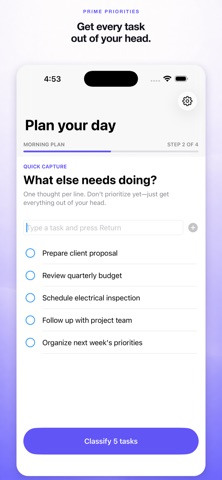


Description by Richard Forthman Written by the developer, not by AppBrain. Click to read.
Start each morning with a short, guided planning ritual:
• Review unfinished and scheduled work
• Capture anything new on your mind
• Classify each task by importance and urgency
• Rank tasks within A, B, and C priorities
• Work from a clean, automatically numbered daily list
Throughout the day, complete a task, keep it open, move it to a future date, or delegate it with a linked follow-up. Edit task titles and optional locations whenever plans change. Aging indicators make repeatedly carried work visible, and the daily review asks whether older tasks are still as important or urgent as they were before.
Optional Apple Reminders integration mirrors task titles, priority labels, due dates, and completion status to a dedicated Prime Priorities list and reads completed-item status back into the app. Open a synced task in Reminders to add destination and travel-time options supported by Apple. Local planning remains available when Reminders access is not granted.
The Focus widget shows your highest-ranked task that is both urgent and important. When focus alerts are enabled, Prime Priorities can remind you hourly until that task is completed, rescheduled, delegated, or reprioritized.
Delegation is available throughout planning and from Today. Save a delegate’s name with a linked follow-up, or share the task through Messages, Mail, or another installed app. Clear definitions and examples explain the difference between Important and Urgent at each decision.
Prime Priorities is designed for both iPhone and iPad, including an expanded three-column layout on iPad.
Your planning data stays on your device. There are no accounts, advertisements, or cross-app tracking. Prime Priorities sends anonymous screen views, app interactions, crash information, and key product outcomes to HeyCatch so the app can be improved. Task titles, locations, reminders, delegation details, and notification contents are not included.
Users can complete the guided review, capture, classification, and ranking steps and preview today’s priorities before subscribing. Prime Priorities Pro unlocks the interactive Today plan and Apple Reminders mirroring. Pro includes a 7-day free trial for eligible new subscribers. After the trial, the subscription renews at the selected monthly or yearly price shown before purchase. Subscriptions automatically renew unless canceled through Apple Account settings.
Terms of Use (EULA): https://www.apple.com/legal/internet-services/itunes/dev/stdeula/