

PrimeLapse - 4K Timelapse
PrimeLapse - 4K Timelapse is made and published by JAN DREBES. AppBrain is an independent app data site and isn't affiliated with JAN DREBES. The app name, icon, screenshots and description belong to JAN DREBES and are shown as published on the App Store.
AppBrain's verdict
- Last updated
- October 1, 2026
- Size
- 21.3 MB
User feedback
Ratings and reviews on the App StoreComments on PrimeLapse - 4K Timelapse for iOS
We don't have enough comments to show example comments. Please check back later.
Store listing
By JAN DREBES, from the App Store



Description by JAN DREBES Written by the developer, not by AppBrain. Click to read.
TWO WAYS TO SHOOT
• Individual Frames: Every shot saved as HEIF, JPEG, ProRAW, or RAW for grading and flexible export.
• Direct Video Timelapse: Frames written straight into an MP4 video file while you shoot, with no separate photo files.
• In-App Rotation: Rotate individual frames directly in the album after capture.
MANUAL PRO CAMERA
• Complete manual control: ISO, shutter speed, manual/auto focus (AF/MF), white balance (presets or Kelvin + tint), and exposure compensation.
• Switch lenses and optical zoom (Ultra Wide, Wide, Tele, Front depending on your iPhone model).
• High resolution: 12 MP or 48 MP where supported.
• Optional GPS location in photo and video metadata.
DIRECT VIDEO TIMELAPSE OPTIONS
• 1080p or 4K resolution.
• 16:9 or 4:3 (portrait-friendly) aspect ratios.
• 24, 25, or 30 fps.
• SDR, HDR, or Apple Log (on supported devices).
NEW: SMART AUDIO & MOTION BLUR
• Background Audio: Keep listening to your music uninterrupted during capture and playback.
• Motion Blur on Export: Add cinematic motion blur when exporting (Pixel Motion Blur on iOS 26+, frame blending on earlier versions).
PRO EXPORT
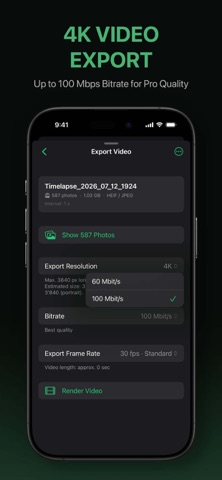
• Render photo-frame projects to HEVC up to 4K in-app.
• High-quality bit rates up to 100 Mbps.
• Frame rates including 12 fps stop-motion, 24, 25, and 30 fps.
• Save directly to Photos or export via Files.
PROJECTS & PREVIEW
• Every timelapse is organized as a dedicated project.
• Advanced Player: Pinch-to-Zoom and pan (playing or paused), live timeline scrubbing, and playback speeds (0.5× / 1× / 2×).
• Correct Portrait Rendering: Portrait frame projects now automatically render and display upright.
• Quick Preview folder for single test shots.
• Multi-select, export, or delete individual frames easily.
• On-device storage overview.
TRIAL & PRIMELAPSE PRO
• Free Trial: Up to 50 frames per project and 10 preview photos.
• PrimeLapse Pro: Unlocks up to 3,600 individual frames per recording, unlimited Direct Video timelapses, and unlimited preview shots.
*Note: Feature availability such as 48 MP, ProRAW, and Apple Log depends on your iPhone hardware model.
Safety and technology
Found in the app by AppBrain- Price
- Free
- App size
- 21.3 MB
- Content rating
- Everyone
Technologies used by PrimeLapse - 4K Timelapse
Releases
Updates seen on the App Store- Version
- 0.87
- Launched
- August 2026
No changelog data
Alternatives
Similar apps and more from JAN DREBESAlternatives to PrimeLapse - 4K Timelapse


More from JAN DREBES

Rankings
App Store top chartsApp Store Rankings for PrimeLapse - 4K Timelapse
About the app and developer
About PrimeLapse - 4K Timelapse
PrimeLapse - 4K Timelapse is a photo & video app developed by JAN DREBES.
What is the rating of PrimeLapse - 4K Timelapse?
PrimeLapse - 4K Timelapse has no ratings yet.
Is PrimeLapse - 4K Timelapse free?
PrimeLapse - 4K Timelapse is free. The app size is 21.27 MB. The latest version available is 0.87. The last update was on October 1, 2026.
What are the requirements for PrimeLapse - 4K Timelapse?
The app has a content rating of Everyone. The app has been available on the App Store since August 2026.
Developer information for JAN DREBES
Address:
Frequently asked questions about PrimeLapse - 4K Timelapse
Is PrimeLapse - 4K Timelapse free?
Yes. PrimeLapse - 4K Timelapse is free on the App Store.
Is PrimeLapse - 4K Timelapse still available?
Yes. PrimeLapse - 4K Timelapse is on the App Store, and the last update we saw was on October 1, 2026.
How large is PrimeLapse - 4K Timelapse?
PrimeLapse - 4K Timelapse is 21.27 MB.
Is PrimeLapse - 4K Timelapse suitable for children?
App Store rates the content of PrimeLapse - 4K Timelapse as suitable for everyone.
Who made PrimeLapse - 4K Timelapse?
PrimeLapse - 4K Timelapse was developed by JAN DREBES. It is listed in the photo & video category on the App Store.
What are the best alternatives to PrimeLapse - 4K Timelapse?
People looking at PrimeLapse - 4K Timelapse also look at these photo & video apps: Interval Pro: Timelapse Camera, Manual Camera App: Pro Lens, Fotio: Film Exposure Meter, OrnaMark – Jewellery Watermark, Silhouette Editor.