

Printer App: Scan & Print PDF
Printer App: Scan & Print PDF is made and published by GITU Limited. AppBrain is an independent app data site and isn't affiliated with GITU Limited. The app name, icon, screenshots and description belong to GITU Limited and are shown as published on the App Store.
AppBrain's verdict
- Last updated
- May 6, 2024
- Size
- 6.33 MB
User feedback
Ratings and reviews on the App StoreComments on Printer App: Scan & Print PDF for iOS
We don't have enough comments to show example comments. Please check back later.
Store listing
By GITU Limited, from the App Store

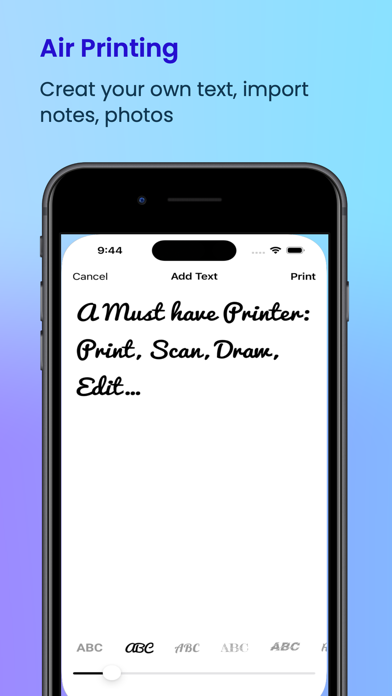

Description by GITU Limited Written by the developer, not by AppBrain. Click to read.
Printer App: Print & Scan PDF supports more than 5000 printer models like Brother, Canon, Dell, Epson, HP, Kyocera, Lenovo, Lexmark, NRG, Oki, Olivetti, Panasonic, RICOH, Samsung, Sharp, Toshiba, Xerox and more
GENERAL
An easy-to-use all-in-one Printer and Scanner, as well as Text editor and Drawing tool.
PRINT DOCUMENTS from FILES
Printer Pro & Scanner App allows you to print any previously saves document and file.
PRINT PHOTOS from LIBRARY
Print any Photo from your iPhone or iPad Library.
SCAN and PRINT
The App has a built-in scanner that uses your device’camera to scan documents.
Edit and add filters to your scanned documents before printing them. With just a few clicks scan documents and iprint them directly from your iPhone or iPad.
TAKE ANY PHOTOS and PRINT
Take beautiful picture using your device Camera within the App and print them instantly.
PRINT CUSTOM TEXT
Type your own text within the app and send it to your printer.
DRAW and PRINT
Use your imagination and create amazing drawings them send to your printer directly from your Printer Pro & Scanner App. You may also use your Apple Pencil.
PRINT EMAILS AND ATTACHMENTS
Use the App to print any email as well as any received attachment from your favorite Mail app
NOTE
Printer Pro supports literally any AirPrint enabled printers.
PREMIUM SUBSCRIPTIONS (Monthly & Yearly)
Access Unlimited Print outs, Scans and access the Text Editor and Drawing tools.
The user can choose either monthy (with 3-days trial) or yearly auto renewing subscriptions.
Your Apple ID Account will be charged as soon as you confirm your selected Subscription. Your Subscription will automatically renew at least 24-hours before the end of the current billing period. The user may cancel the Subscription at any time.
Support: support@gitu.us
Privacy: https://www.gitu.us/printer-privacy/
Terms: https://www.gitu.us/printer-terms/
Safety and technology
Found in the app by AppBrain- Price
- Free
- App size
- 6.33 MB
- Content rating
- Everyone
Technologies used by Printer App: Scan & Print PDF
Releases
Updates seen on the App Store- Version
- 2.0.0
- Launched
- March 2023
No changelog data
Alternatives
Similar apps and more from GITU LimitedAlternatives to Printer App: Scan & Print PDF




More from GITU Limited



Rankings
App Store top chartsApp Store Rankings for Printer App: Scan & Print PDF
About the app and developer
About Printer App: Scan & Print PDF
Printer App: Scan & Print PDF is an utilities app developed by GITU Limited.
What is the rating of Printer App: Scan & Print PDF?
Printer App: Scan & Print PDF has no ratings yet.
Is Printer App: Scan & Print PDF free?
Printer App: Scan & Print PDF is free. The app size is 6.33 MB. The latest version available is 2.0.0. The last update was on May 6, 2024.
What are the requirements for Printer App: Scan & Print PDF?
The app has a content rating of Everyone. The app has been available on the App Store since March 2023.
Developer information for GITU Limited
Address:
Frequently asked questions about Printer App: Scan & Print PDF
Is Printer App: Scan & Print PDF free?
Yes. Printer App: Scan & Print PDF is free on the App Store.
Is Printer App: Scan & Print PDF still available?
Yes. Printer App: Scan & Print PDF is on the App Store, and the last update we saw was on May 6, 2024.
How large is Printer App: Scan & Print PDF?
Printer App: Scan & Print PDF is 6.33 MB.
Is Printer App: Scan & Print PDF suitable for children?
App Store rates the content of Printer App: Scan & Print PDF as suitable for everyone.
Who made Printer App: Scan & Print PDF?
Printer App: Scan & Print PDF was developed by GITU Limited. It is listed in the utilities category on the App Store.
What are the best alternatives to Printer App: Scan & Print PDF?
People looking at Printer App: Scan & Print PDF also look at these utilities apps: Print Master :Print & Scan PDF, Printer Scanner Creator, Air Printer App Smart Print, WritePDF, Splitee - Split Bills & Trips.