

PrintKit: AirPrint & Scanner
PrintKit: AirPrint & Scanner is made and published by Muhammad Zikaria. AppBrain is an independent app data site and isn't affiliated with Muhammad Zikaria. The app name, icon, screenshots and description belong to Muhammad Zikaria and are shown as published on the App Store.
AppBrain's verdict
- Last updated
- August 23, 2026
- Size
- 7.78 MB
User feedback
Ratings and reviews on the App StoreComments on PrintKit: AirPrint & Scanner for iOS
We don't have enough comments to show example comments. Please check back later.
Store listing
By Muhammad Zikaria, from the App Store



Description by Muhammad Zikaria Written by the developer, not by AppBrain. Click to read.
PrintKit turns your iPhone and iPad into a complete pocket print studio. Send PDFs, Word documents, photos, contacts, spreadsheets, and web pages wirelessly to any AirPrint-enabled printer — no drivers, no cables, no hassle.
Whether you're printing an invoice on the go, a boarding pass before a flight, or a photo grid for your fridge, PrintKit handles it in seconds.
———————————————————
ONE APP. EVERY FORMAT.
———————————————————
- PDF documents
- Word (.docx) and text files
- Photos from your camera roll
- Contacts and address cards
- Excel and CSV spreadsheets
- Web pages and articles
———————————————————
CREATE BEFORE YOU PRINT
———————————————————
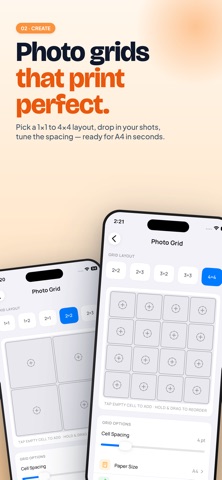
- Photo Grids & Collages — 1×1, 2×2, 3×3, up to 4×4 layouts
- Custom cell spacing and paper size (A4, Letter, more)
- Portrait or landscape orientation
- Drag and reorder photos with a tap
———————————————————
SCAN, SIGN & WATERMARK
———————————————————
- Camera-to-print document scanner
- Automatic edge detection and perspective correction
- Shadow removal for clean, crisp scans
- Add signatures to PDFs in seconds
- Stamp confidential watermarks on any document
———————————————————
POCKET PRINT STUDIO (PRO)
———————————————————
- Holiday templates — Halloween, Christmas, Birthdays, Father's Day & more
- Business card designer with modern and classic styles
- Unlimited watermarks and signatures
- Priority access to new templates
———————————————————
WHY USERS LOVE PRINTKIT
———————————————————
- Works with any AirPrint printer — HP, Canon, Epson, Brother, Xerox and thousands more
- Clean, intuitive interface designed for iPad and iPhone
- Quick Print shortcuts for your most-used file types
- Print history so you never lose a job
- No account required to get started
Subscription Info
Payment will be charged to your iTunes account at confirmation of purchase. Subscriptions automatically renew unless auto-renew is turned off at least 24 hours before the end of the current period.
Manage your subscription and turn off auto-renew in your Account Settings after purchase.
Terms of Use: https://stechza.org/terms/
Privacy Policy: https://stechza.org/privacy/
Safety and technology
Found in the app by AppBrain- Price
- Free
- App size
- 7.78 MB
- Content rating
- Everyone
Technologies used by PrintKit: AirPrint & Scanner
Releases
Updates seen on the App Store- Version
- 1.0.3
- Launched
- May 2026
No changelog data
Alternatives
Similar apps and more from Muhammad ZikariaAlternatives to PrintKit: AirPrint & Scanner


More from Muhammad Zikaria


Rankings
App Store top chartsApp Store Rankings for PrintKit: AirPrint & Scanner
About the app and developer
About PrintKit: AirPrint & Scanner
PrintKit: AirPrint & Scanner is an utilities app developed by Muhammad Zikaria.
User Ratings
The app has no ratings yet.
App Information
PrintKit: AirPrint & Scanner is freely available from the App Store. The app size is 7.78 MB. The latest version available is 1.0.3. The last update was on August 23, 2026.
Technical Requirements
The app has a content rating of Everyone. The app has been available on the App Store since May 2026.
Developer information for Muhammad Zikaria
Address: