

PrintPaper is made and published by Kai Chen. AppBrain is an independent app data site and isn't affiliated with Kai Chen. The app name, icon, screenshots and description belong to Kai Chen and are shown as published on the App Store.
AppBrain's verdict
- Last updated
- June 23, 2026
Rankings
App Store top chartsApp Store Rankings for PrintPaper
Competitors
Similar apps and more from Kai ChenAlternatives to PrintPaper


More from Kai Chen


Releases
Updates seen on the App Store- Version
- 1.0
- Launched
- June 2026
No changelog data
User feedback
Ratings and reviews on the App StoreComments on PrintPaper for iOS
We don't have enough comments to show example comments. Please check back later.
Technology
Found in the app by AppBrain- Price
- $9.99
- App size
- 9.90 MB
- Content rating
- Everyone
Technologies used by PrintPaper
About the app and developer
About PrintPaper
PrintPaper is an education app developed by Kai Chen.
User Ratings
The app has no ratings yet.
App Information
PrintPaper costs $9.99. The app size is 9.90 MB. The latest version available is 1.0. The last update was on June 23, 2026.
Technical Requirements
The app has a content rating of Everyone. The app has been available on the App Store since June 2026.
Developer information for Kai Chen
Address:
Frequently asked questions about PrintPaper
Is PrintPaper free?
No. PrintPaper costs $9.99 on the App Store.
Is PrintPaper still available?
Yes. PrintPaper is on the App Store, and the last update we saw was on June 23, 2026.
How large is PrintPaper?
PrintPaper is 9.90 MB.
Is PrintPaper suitable for children?
App Store rates the content of PrintPaper as suitable for everyone.
Who made PrintPaper?
PrintPaper was developed by Kai Chen. It is listed in the education category on the App Store.
What are the best alternatives to PrintPaper?
People looking at PrintPaper also look at these education apps: LingoBlink: Language Alerts, VPN App for iPhone, Pisheru Vocabulary, Offline AI, Manage My Dojo, Live Lingo - Live Translator.
Store listing
By Kai Chen, from the App Store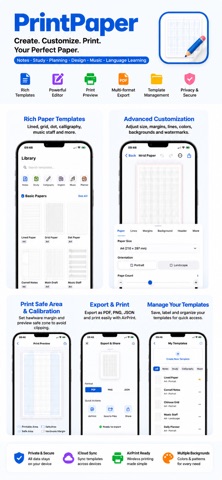


Description by Kai Chen Written by the developer, not by AppBrain. Click to read.
Start with a built-in paper template or create your own by adjusting paper size, margins, line spacing, colors, background, watermark, headers and footers. When your template is ready, export it as PDF, PNG or JSON, or print it directly with AirPrint.
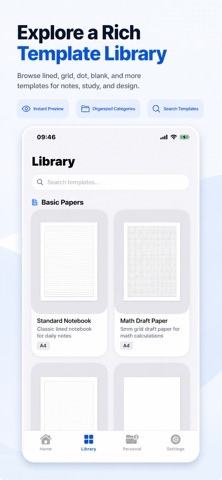
【Built-in Paper Templates】
PrintPaper includes a wide range of practical and professional paper templates:
Basic Paper: lined paper, grid paper, dot paper, blank paper and vertical line paper.
Study Templates: Cornell notes, handwriting practice sheets and student note paper.
Design & Drafting: isometric grid paper, perspective grid paper, hexagon grid paper and storyboard paper.
Calligraphy & Languages: Chinese character grids, Tian Zi grid, Mi Zi grid, nine-square grid, Genkoyoushi paper and other writing practice layouts.
Planner Templates: daily planning pages with priority, task list, shopping list and goal sections.
Music Paper: music staff paper for practice, notation and composition.
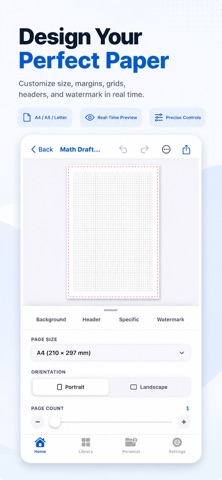
【Advanced Custom Editor】
Customize every detail with real-time preview:
Choose A4, A5, Letter and other paper sizes.
Create custom paper width and height in millimeters.
Switch between portrait and landscape layout.
Adjust top, bottom, left and right margins.
Reserve binding or hole-punch margins.
Choose solid, dashed or dotted line styles.
Customize line color, opacity, width and spacing.
Add major grid lines every N cells.
Set background color, pattern and opacity.
Add title, name, date and class fields.
Configure page numbers and their position.
Add custom watermark text with adjustable opacity and placement.
【My Templates & Tags】
Save frequently used settings as your own templates.
Add templates to favorites.
Access recently used templates.
Organize templates with custom tags.
Rename, edit and delete saved templates.
Export and import JSON template files.
【Export & Print】
PrintPaper supports multiple output options:
Export high-quality PDF files.
Export high-resolution PNG images.
Export JSON template settings.
Print wirelessly with AirPrint.
Share to Files, Mail, cloud drives or note-taking apps.
【Print Safe Area & Hardware Margin】
Different printers may have physical non-printable margins. PrintPaper lets you configure hardware margins and preview the print safe area in the editor, helping you avoid clipped or misaligned output.
【Perfect For】
Students taking notes.
Parents printing handwriting sheets for kids.
Teachers creating worksheets.
Designers sketching layouts and perspective drawings.
Music learners printing staff paper.
Planner users creating custom planning pages.
Language learners practicing English, Chinese, Japanese or other handwriting systems.
PrintPaper helps you create, save, share and print paper templates exactly the way you need them.
What’s New
PrintPaper is now available.
Create customizable printable paper templates with built-in templates, real-time editing, PDF export, PNG export, JSON import and export, AirPrint support, hardware margin settings and print safe area preview.