

PrintSize: DPI Calculator
PrintSize: DPI Calculator is made and published by 26 Branding Agency Inc. AppBrain is an independent app data site and isn't affiliated with 26 Branding Agency Inc. The app name, icon, screenshots and description belong to 26 Branding Agency Inc. and are shown as published on the App Store.
AppBrain's verdict
- Last updated
- September 30, 2026
- Size
- 31.7 MB
User feedback
Ratings and reviews on the App StoreComments on PrintSize: DPI Calculator for iOS
We don't have enough comments to show example comments. Please check back later.
Store listing
By 26 Branding Agency Inc., from the App Store


Description by 26 Branding Agency Inc. Written by the developer, not by AppBrain. Click to read.
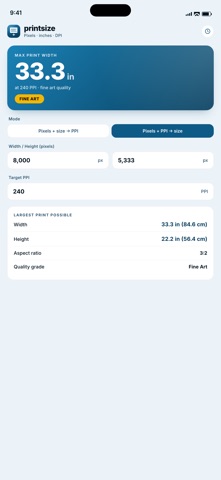
It works both directions. Give it the pixel dimensions and the size you want printed, and it returns the effective PPI with a quality grade. Give it the pixel dimensions and a target PPI, and it returns the largest print you can make at that quality.
WHAT YOU CAN DO
- Enter the pixel width and height of your file, from a camera, a scan or an export.
- Mode one: enter the size you want printed and read the PPI you will actually get.
- Mode two: enter a target PPI and read the maximum size you can print at it.
- Work in inches, centimetres or millimetres.
- Pick from twelve common sizes: 4x6, 5x7, 8x10, 8.5x11 Letter, 11x14, 11x17 Tabloid, 16x20, 20x30, 24x36, and A4, A3 and A2.
- Read the grade for the PPI you get in mode one: museum at 360 PPI and above, fine art from 300, standard from 200, and wall art below that.
- Tap a preset and its size fills in, converted to the unit you are working in.
- Watch the answer update as you type.
ABOUT THE EFFECTIVE PPI
When the aspect ratio of your file does not match the aspect ratio of the paper, the two axes give different PPI figures. PrintSize reports the lower of the two as the effective PPI, because the limiting axis is what you will see. It is the honest number, not the flattering one.
A WORKED EXAMPLE
A 3000 by 2000 pixel file printed at 12 by 8 inches gives 250 PPI, graded standard. Ask for 300 PPI instead, and the largest print you can make is 10 by 6.67 inches.
WHO IT IS FOR
Photographers ordering prints, designers checking a client file before it goes to press, anyone framing something for a wall, and anyone who has been told a file is too low resolution and wants to know exactly how low.
PRIVACY
No accounts, no analytics, no network requests. Nothing you type leaves the device.
Safety and technology
Found in the app by AppBrain- Price
- $2.99
- App size
- 31.7 MB
- Content rating
- Everyone
Technologies used by PrintSize: DPI Calculator
Releases
Updates seen on the App Store- Version
- 1.0.1
- Launched
- May 2026
No changelog data
Alternatives
Similar apps and more from 26 Branding Agency Inc.More from 26 Branding Agency Inc.


Rankings
App Store top chartsApp Store Rankings for PrintSize: DPI Calculator
About the app and developer
About PrintSize: DPI Calculator
PrintSize: DPI Calculator is a photo & video app developed by 26 Branding Agency Inc.
User Ratings
The app has no ratings yet.
App Information
PrintSize: DPI Calculator costs $2.99. The app size is 31.72 MB. The latest version available is 1.0.1. The last update was on September 30, 2026.
Technical Requirements
The app has a content rating of Everyone. The app has been available on the App Store since May 2026.
Developer information for 26 Branding Agency Inc.
Address:
Frequently asked questions about PrintSize: DPI Calculator
Is PrintSize: DPI Calculator free?
No. PrintSize: DPI Calculator costs $2.99 on the App Store.
Is PrintSize: DPI Calculator still available?
Yes. PrintSize: DPI Calculator is on the App Store, and the last update we saw was on September 30, 2026.
How large is PrintSize: DPI Calculator?
PrintSize: DPI Calculator is 31.72 MB.
Is PrintSize: DPI Calculator suitable for children?
App Store rates the content of PrintSize: DPI Calculator as suitable for everyone.
Who made PrintSize: DPI Calculator?
PrintSize: DPI Calculator was developed by 26 Branding Agency Inc. It is listed in the photo & video category on the App Store.