

Prism: Focus Task Manager
Prism: Focus Task Manager is made and published by Trajectory Labs, LLC. AppBrain is an independent app data site and isn't affiliated with Trajectory Labs, LLC. The app name, icon, screenshots and description belong to Trajectory Labs, LLC and are shown as published on the App Store.
AppBrain's verdict
- Last updated
- July 28, 2026
- Size
- 34.8 MB
User feedback
Ratings and reviews on the App StoreComments on Prism: Focus Task Manager for iOS
We don't have enough comments to show example comments. Please check back later.
Store listing
By Trajectory Labs, LLC, from the App Store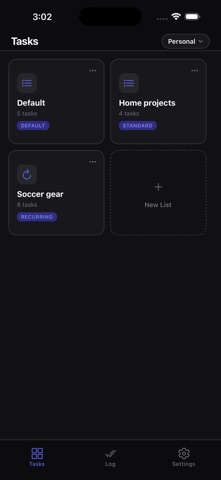


Description by Trajectory Labs, LLC Written by the developer, not by AppBrain. Click to read.
Prism is built on a simple idea: you don't have one to-do list, you have several — work, personal, that side project — and they shouldn't all live in the same pile. So Prism organizes everything into Task Lists, and gives each one its own Focus mode.
TASK LISTS — Create a list for each part of your life. You always have a Default list to start with, and can add up to 8 total. Rename them, reorder your tasks with a drag, and move a task from one list to another whenever priorities shift.
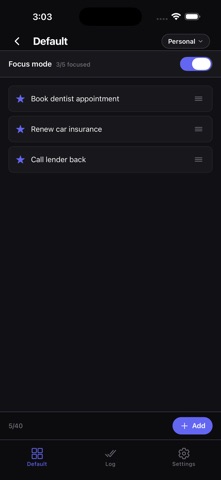
FOCUS MODE — Star the handful of tasks that actually matter right now, then flip Focus mode on to see just those. Each list has its own Focus limit (1–10), so "focused" means something different for a big project list versus a quick errands list.
RECURRING LISTS — For the stuff you repeat — a weekly packing list, recurring chores — check items off as you go, then tap Reset to start the next cycle fresh. Recurring lists don't clutter your Log with the same items week after week.
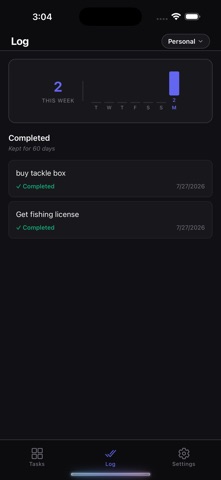
LOG — A record of what you've actually accomplished. Browse your completion history, restore a task if you archived it by mistake, and see your weekly momentum at a glance.
KEY FEATURES
• Task Lists — Organize tasks by area of your life, not one giant pile. Up to 8 lists, each with its own type and Focus limit.
• Focus mode — Star what matters, then filter down to just that. No auto-magic guessing what you should work on — you decide, per list.
• Recurring checklists — Built for routines you repeat. Check off, reset, repeat.
• Smart capture — Add multiple tasks at once by separating them with commas, "and," or line breaks. Prism splits them instantly.
• Due dates & reminders — Pin deadlines to tasks and set push notification reminders up to 30 days in advance.
• Drag-to-reorder — Reprioritize any list with a long-press drag, in or out of Focus mode.
• Weekly chart — See how many tasks you've completed each day over the last week. Progress you can actually feel.
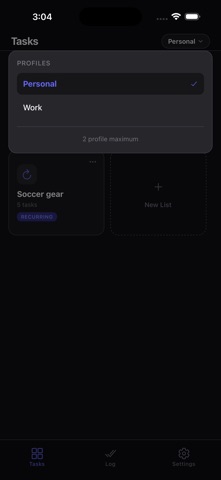
• Multiple profiles — Switch between entirely separate sets of task lists for different areas of your life, without mixing them together.
• Dark & light modes — A clean, minimal design that works in any light.
Prism is for anyone who ends the day with more on their list than when they started — and wants that to change.
Focus on what matters.
Safety and technology
Found in the app by AppBrain- Price
- Free
- App size
- 34.8 MB
- Content rating
- Everyone
Technologies used by Prism: Focus Task Manager
Releases
Updates seen on the App Store- Version
- 1.1
- Launched
- June 2026
No changelog data
Alternatives
Similar apps and more from Trajectory Labs, LLCAlternatives to Prism: Focus Task Manager




Rankings
App Store top chartsApp Store Rankings for Prism: Focus Task Manager
About the app and developer
About Prism: Focus Task Manager
Prism: Focus Task Manager is a productivity app developed by Trajectory Labs, LLC.
What is the rating of Prism: Focus Task Manager?
Prism: Focus Task Manager has no ratings yet.
Is Prism: Focus Task Manager free?
Prism: Focus Task Manager is free. The app size is 34.82 MB. The latest version available is 1.1. The last update was on July 28, 2026.
What are the requirements for Prism: Focus Task Manager?
The app has a content rating of Everyone. The app has been available on the App Store since June 2026.
Developer information for Trajectory Labs, LLC
Address: