

Private Scan: Document Scanner
Private Scan: Document Scanner is made and published by Vishut Dhar. AppBrain is an independent app data site and isn't affiliated with Vishut Dhar. The app name, icon, screenshots and description belong to Vishut Dhar and are shown as published on the App Store.
AppBrain's verdict
- Last updated
- October 22, 2026
Rankings
App Store top chartsApp Store Rankings for Private Scan: Document Scanner
Competitors
Similar apps and more from Vishut DharAlternatives to Private Scan: Document Scanner





More from Vishut Dhar


Releases
Updates seen on the App Store- Version
- 1.18
- Launched
- July 2026
No changelog data
User feedback
Ratings and reviews on the App StoreComments on Private Scan: Document Scanner for iOS
We don't have enough comments to show example comments. Please check back later.
Technology
Found in the app by AppBrain- Price
- Free
- App size
- 40.2 MB
- Content rating
- Everyone
Technologies used by Private Scan: Document Scanner
About the app and developer
About Private Scan: Document Scanner
Private Scan: Document Scanner is a productivity app developed by Vishut Dhar.
What is the rating of Private Scan: Document Scanner?
Private Scan: Document Scanner has no ratings yet.
Is Private Scan: Document Scanner free?
Private Scan: Document Scanner is free. The app size is 40.21 MB. The latest version available is 1.18. The last update was on October 22, 2026.
What are the requirements for Private Scan: Document Scanner?
The app has a content rating of Everyone. The app has been available on the App Store since July 2026.
Developer information for Vishut Dhar
Address:
Frequently asked questions about Private Scan: Document Scanner
Is Private Scan: Document Scanner free?
Yes. Private Scan: Document Scanner is free on the App Store.
Is Private Scan: Document Scanner still available?
Yes. Private Scan: Document Scanner is on the App Store, and the last update we saw was on October 22, 2026.
How large is Private Scan: Document Scanner?
Private Scan: Document Scanner is 40.21 MB.
Is Private Scan: Document Scanner suitable for children?
App Store rates the content of Private Scan: Document Scanner as suitable for everyone.
Who made Private Scan: Document Scanner?
Private Scan: Document Scanner was developed by Vishut Dhar. It is listed in the productivity category on the App Store.
What are the best alternatives to Private Scan: Document Scanner?
People looking at Private Scan: Document Scanner also look at these productivity apps: LocalScan by devk061, LocalScan: PDF Scanner, ScanMate: PDF Scanner, Cangjie Dictionary - WHPH.net, PDF Scanner - Scany.
Store listing
By Vishut Dhar, from the App Store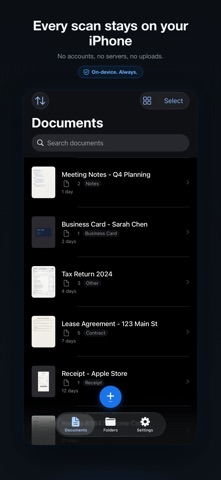




Description by Vishut Dhar Written by the developer, not by AppBrain. Click to read.
THE PRIVATE ONE
PrivateScan never sends your documents to a server for processing. Scanning, filters, text recognition, and even smart naming all run on your device, using Apple frameworks and an optional downloadable model. The app keeps your documents, their names, and their text on your device unless you send them. It does send anonymous usage and crash reports so we can fix crashes and improve it; they never include your documents, their names, their text or their images, and you can turn them off in Settings > Privacy.
SCAN ANYTHING
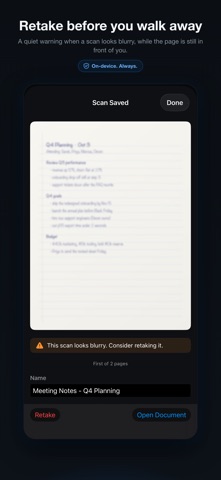
Point the camera at a page and PrivateScan finds the edges, straightens the result, and cleans it up. Scan books as open spreads and split them into facing pages, capture whiteboards without glare, compose ID cards and passports onto a single page for free, and import photos or PDFs. Keep everything organized in folders with color labels.
SIGN AND EDIT
Draw a signature once and place it on any page. Reorder, split, and combine documents. Rescue bad lighting with enhance, black & white, grayscale, and whiteboard filters.
FIND ANY DOCUMENT
Search is free for everyone and reads every scanned word, so a receipt, a contract, or a letter is one search away, even offline. Premium unlocks the extracted text itself: view it, copy it, export it, and embed it in your PDFs so they are searchable in any reader. Premium also adds smart naming, which titles each scan for you, so receipts stop being called "Scan 47". On an iPhone or iPad with enough memory, a small model that runs on your device names receipts and invoices once its 1.8 GB download is in place. Apple's text recognition names every other scan, and every scan on other devices. Translate extracted text without it leaving your device.
EXPORT ANY WAY YOU WORK
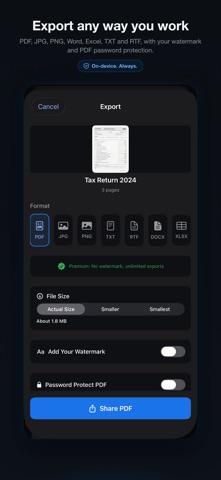
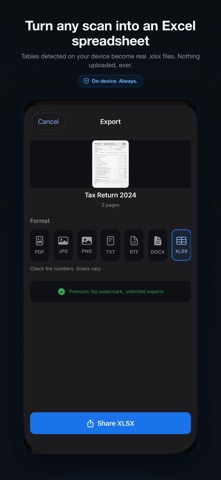
PDF, JPG, PNG, Word, Excel, TXT, and RTF, with file size presets, your own watermark, and password protected PDFs. Word and Excel exports build real .docx and .xlsx files entirely on your device, so even your editable documents never touch a server. Excel export finds the tables in a scan and turns them into rows and columns you can edit. Excel export requires iOS 26.
LOCK IT DOWN
Turn on the app lock and PrivateScan asks for Face ID, Touch ID, or your passcode when it opens. Files are protected with iOS data protection so they stay encrypted while your device is locked. A privacy shield hides your documents in the app switcher.
YOUR DEVICES, YOUR CLOUD
iCloud sync is off by default. Turn it on and your documents sync through your own private iCloud, protected by your Apple Account. We run no servers and could not read your documents if we wanted to.
ONE PRICE, FOREVER
Scanning is free. A single purchase unlocks premium: text extraction, smart naming, Word and Excel export, password protected PDFs, exports without watermarks, and no limits on pages or exports. No subscription. Buy it once, own it forever, share it with your family through Family Sharing.
Your documents stay on your device. The privacy policy says exactly what the anonymous reports carry and how to turn them off: https://freedom-terminal.com/privatescan/privacy/