

Private Voice Notes
Private Voice Notes is made and published by Myworkingmemory LLC. AppBrain is an independent app data site and isn't affiliated with Myworkingmemory LLC. The app name, icon, screenshots and description belong to Myworkingmemory LLC and are shown as published on the App Store.
AppBrain's verdict
- Last updated
- June 12, 2026
Rankings
App Store top chartsApp Store Rankings for Private Voice Notes
Competitors
Similar apps and more from Myworkingmemory LLCMore from Myworkingmemory LLC


Releases
Updates seen on the App Store- Version
- 1.0
- Launched
- June 2026
No changelog data
User feedback
Ratings and reviews on the App StoreComments on Private Voice Notes for iOS
We don't have enough comments to show example comments. Please check back later.
Technology
Found in the app by AppBrain- Price
- $1.29
- App size
- 2.08 MB
- Content rating
- Everyone
Technologies used by Private Voice Notes
About the app and developer
About Private Voice Notes
Private Voice Notes is an utilities app developed by Myworkingmemory LLC.
User Ratings
The app has no ratings yet.
App Information
Private Voice Notes costs $1.29. The app size is 2.08 MB. The latest version available is 1.0. The last update was on June 12, 2026.
Technical Requirements
The app has a content rating of Everyone. The app has been available on the App Store since June 2026.
Developer information for Myworkingmemory LLC
Address:
Store listing
By Myworkingmemory LLC, from the App Store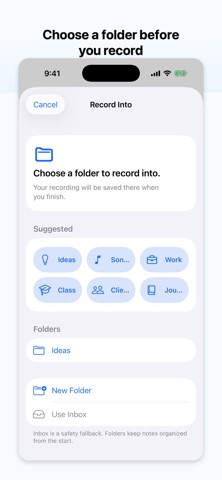


Description by Myworkingmemory LLC Written by the developer, not by AppBrain. Click to read.
• Folder-first voice recorder: choose where each recording belongs before your record, so every voice note starts organized.
• Local-first by design. Your recordings stay on your device.
• Create folders for ideas, songs, classes, clients, projects, journals, interviews, lectures, or anything you want to find again. Then record directly into the right folder.
• No messy recording list.
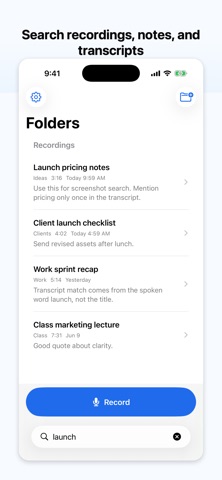
• Search recording titles, notes, and transcripts so you can find the spoken idea.
• Transcribe recordings on device when supported by your device, language, and iOS. If on-device transcription is not available, the app does not fall back to cloud transcription.
• Lock private folders with device authentication. Use them for recordings you prefer to keep out of your normal folder list.
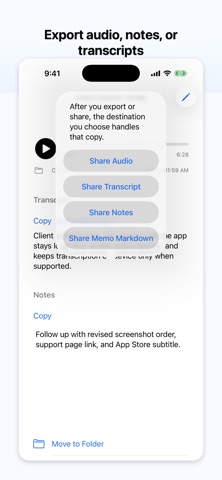
• Share or export audio, notes, or transcripts when you want to move a recording somewhere else.
• We cannot recover lost recordings.
• Private folders are protected by device authentication.
Terms of Use: https://myworkingmemory.ai/privatevoicenotes-terms.html
Privacy Policy: https://myworkingmemory.ai/privatevoicenotes-privacy.html