AppBrain
AppBrain
  • Apps
  • Apps being viewed right now Trending apps today Most popular apps All-time most installed apps Top rated apps iPhone and iPad apps
  • Intelligence ▾
    Intelligence overview → Track any Android app or your whole market
    Track & analyze
    Keyword Tracker & OptimizerTrack & improve Play rankings App Performance ReportOne-off PDF for any app StatisticsFree Android & Play market stats
    Promote your app
    Featured Apps App Links
  • Intelligence
  • Pricing
  • Dashboard
  • Sign up
  • Log in
App Store Apps > Navigation > Pro Altimeter - Barometric+GPS
App profile & analytics · Navigation · Data updated 2026-10-03
Pro Altimeter - Barometric+GPS icon

Pro Altimeter - Barometric+GPS

by Craig Hunter · $0.99 · Version 1.1.4
Availability On the App Store since November 2014 ↗
Rating on App Store
3.82/5
39 ratings
Rating
3.82
39 reviews
Best rank
#29
Top Paid, Navigation, United States
Last updated
August 25, 2026
1.1.4
AppBrain's verdict Established

It doesn't have enough ratings yet to judge what users think. Its best ranking is #29 in Top Paid, Navigation in United States.

Pro Altimeter - Barometric+GPS is made and published by Craig Hunter. AppBrain is an independent app data site and isn't affiliated with Craig Hunter. The app name, icon, screenshots and description belong to Craig Hunter and are shown as published on the App Store.

About Pro Altimeter - Barometric+GPS

Pro Altimeter - Barometric+GPS is a navigation app developed by Craig Hunter.

User Ratings

Pro Altimeter - Barometric+GPS is rated 3.82 out of 5 stars. The rating is based on 39 ratings.

App Information

Pro Altimeter - Barometric+GPS costs $0.99. The app size is 614.00 kB. The latest version available is 1.1.4. The last update was on August 25, 2026.

Technical Requirements

The app has a content rating of Everyone. The app has been available on the App Store since November 2014.

Description by Craig Hunter (from the App Store)
Pro Altimeter uses the high-fidelity barometric pressure sensor in iOS devices to measure and compute altitude.

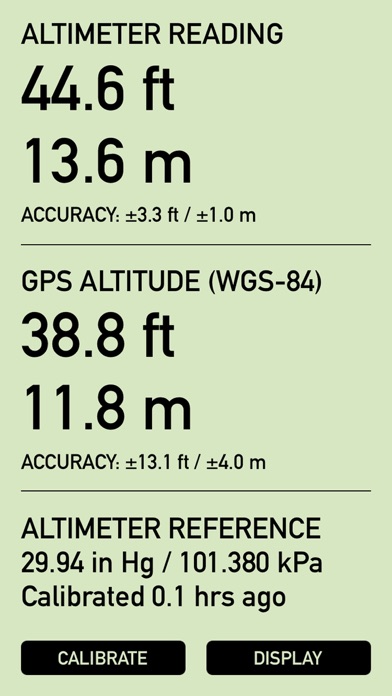
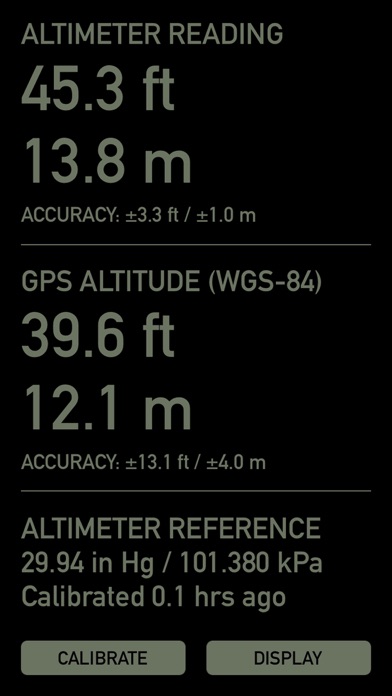
Pro Altimeter has a dead simple interface. Barometric altitude and GPS altitude are displayed in large easy to read numbers, showing units of both feet and meters, and giving realtime accuracy estimates from the hardware. At bottom are calibration and display mode buttons. The display offers a highly-readable daytime mode with black digits on an LCD-green background, and a reversed night mode that is easy on the eyes in dark conditions. That's it!

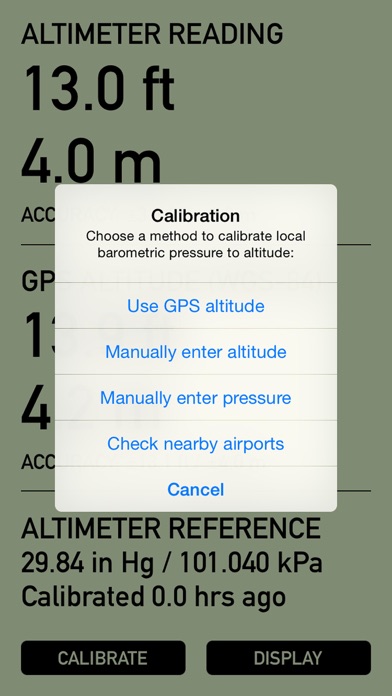
Proper calibration is necessary to measure altitude from barometric pressure (this is why a pilot "dials in" the cockpit altimeter before taking off). Pro Altimeter offers four different methods for calibration -- choose the easiest and most convenient:

1. Use GPS altitude. This method correlates the measured local barometric pressure with the altitude measured by GPS. This method can be used when your device has a clear line of sight to the sky and a reliable GPS fix with good accuracy.

2. Manually enter altitude. This method correlates the measured local barometric pressure with known altitude from landmarks, elevation benchmarks, trail markers, topo maps, land surveys, etc. Altitude can be entered in feet or meters.

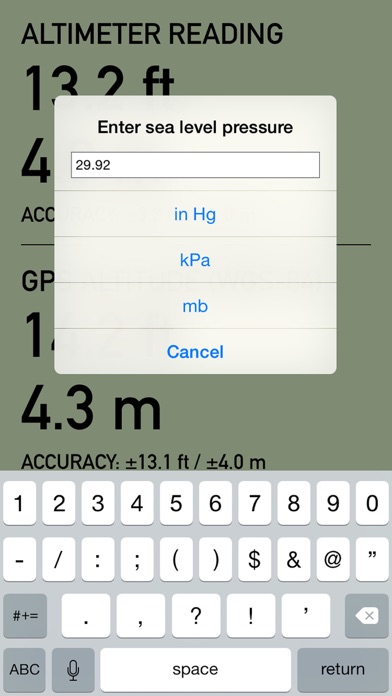
3. Manually enter pressure. If you have a weather station, weather report, or METAR report with equivalent sea level pressure for a nearby location, this can be used to correlate local barometric pressure to altitude. Pressure can be entered with units of inches Hg, kPa, or mb.

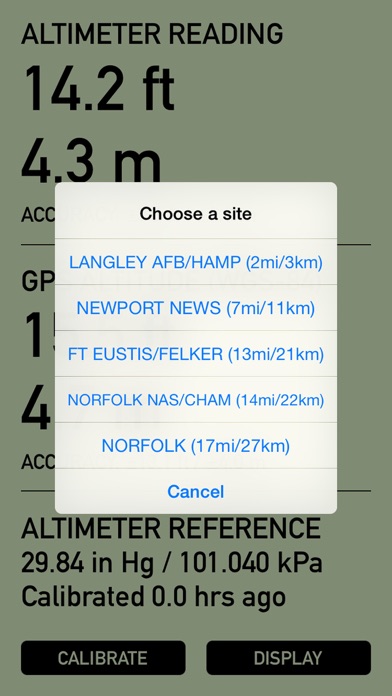
4. Check local airports. With the tap of a button, Pro Altimeter will locate the five closest airports within 100 miles (160km) of your present location anywhere in the world, and pull in METAR data. From that list of five, pick the airport of your choice and Pro Altimeter will import pressure data for calibration.

Once calibrated, Pro Altimeter keeps track of the time since its last calibration. Because weather and local barometric pressure change over time, the app will warn you when 6 hours have elapsed since the last calibration by flashing the "CALIBRATE" button. You should calibrate as frequently as practical -- for example, on a hike, calibrate whenever you pass a trail marker or elevation benchmark. But at a minimum, calibrate at least every 6 hours or whenever weather changes in your area.

Pro Altimeter is intended for iOS devices with a built-in barometric pressure sensor (iPhone 6 and later, iPad Air 2 and later, iPad mini 4 and later, and iPad Pro). On older devices without a barometric pressure sensor, only GPS altitude and accuracy will be displayed.

If you have an Apple Watch, check out the new Pro Altimeter for Watch and get all this same functionality on your wrist!
Show more Show less

Screenshots

Pro Altimeter - Barometric+GPS Screenshot 1 of 5
Pro Altimeter - Barometric+GPS Screenshot 2 of 5
Pro Altimeter - Barometric+GPS Screenshot 3 of 5
Pro Altimeter - Barometric+GPS Screenshot 4 of 5
Pro Altimeter - Barometric+GPS Screenshot 5 of 5
Screenshots by Craig Hunter, from the the App Store listing
Official page on the App Store

Alternatives to Pro Altimeter - Barometric+GPS
DroneSense icon DroneSense
DroneSense INC
4.6
Free
32 ratings
Density Altitude + icon Density Altitude +
Rate Of Climb Industries
4.8
$3.99
1.0K ratings
GPS 2 IP icon GPS 2 IP
Angus Oliver
4.2
$7.99
15 ratings
Light Pollution Map icon Light Pollution Map
Jurij Stare
4.1
$4.99
46 ratings
Lat/Long icon Lat/Long
Zlatko Blagus
1.0
$0.99
1 ratings
Gov PerDiem icon Gov PerDiem
Visual Soft Inc.
1.2
Free
39 ratings
Scenic Map icon Scenic Map
GrangerFX
4.7
Free
3 ratings

More from Craig Hunter

Theodolite icon Theodolite
Craig Hunter
4.7
$8.99
904 ratings
Theodolite HD icon Theodolite HD
Craig Hunter
4.7
$8.99
136 ratings
Pro Compass icon Pro Compass
Craig Hunter
4.3
$1.99
73 ratings
Nav Camera icon Nav Camera
Craig Hunter
4.0
$3.99
34 ratings
Wx for iPhone icon Wx for iPhone
Craig Hunter
4.3
$2.99
27 ratings
Theodolite for Watch icon Theodolite for Watch
Craig Hunter
4.2
$1.99
20 ratings
Pro Compass for Watch icon Pro Compass for Watch
Craig Hunter
4.2
$1.99
20 ratings
Wx for iPad icon Wx for iPad
Craig Hunter
3.2
$3.99
5 ratings

Changelog of Pro Altimeter - Barometric+GPS

No changelog data

Developer information for Craig Hunter

Craig Hunter

Address:

Share Pro Altimeter - Barometric+GPS

Comments on Pro Altimeter - Barometric+GPS for iOS

We don't have enough comments to show example comments. Please check back later.

App Store Rankings for Pro Altimeter - Barometric+GPS

Top rankings

Rank Country Category List
29 United States Navigation Top Paid
29 Iran Navigation Top Paid
73 Canada Navigation Top Paid
69 India Navigation Top Paid
72 Indonesia Navigation Top Paid
75 Finland Navigation Top Paid
86 Slovakia Navigation Top Paid
89 Czech Republic Navigation Top Paid
96 Norway Navigation Top Paid

Ranking history in United States

Ranking history
Subscribe to see full ranking history in this country
AppBrain offers valuable information about your app and those of your competitors. Join AppBrain for free and claim this app to view more ranking data, view history etc.
I'm the developer of this app

Technologies used by Pro Altimeter - Barometric+GPS

Frequently asked questions about Pro Altimeter - Barometric+GPS

Is Pro Altimeter - Barometric+GPS free?

No. Pro Altimeter - Barometric+GPS costs $0.99 on the App Store.

Is Pro Altimeter - Barometric+GPS still available?

Yes. Pro Altimeter - Barometric+GPS is on the App Store, and the last update we saw was on August 25, 2026.

How large is Pro Altimeter - Barometric+GPS?

Pro Altimeter - Barometric+GPS is 614.00 kB.

Is Pro Altimeter - Barometric+GPS suitable for children?

App Store rates the content of Pro Altimeter - Barometric+GPS as suitable for everyone.

How do people rate Pro Altimeter - Barometric+GPS?

Pro Altimeter - Barometric+GPS scores 3.82 out of 5 stars, from 39 ratings on the App Store.

Who made Pro Altimeter - Barometric+GPS?

Pro Altimeter - Barometric+GPS was developed by Craig Hunter. It is listed in the navigation category on the App Store.

What are the best alternatives to Pro Altimeter - Barometric+GPS?

People looking at Pro Altimeter - Barometric+GPS also look at these navigation apps: DroneSense, Density Altitude +, GPS 2 IP, Light Pollution Map, Lat/Long.

Price drops on Google Play Popular Navigation Apps Apps other people are watching Top new apps Today's trending apps
DroneSense icon DroneSense
Density Altitude + icon Density Altitude +
GPS 2 IP icon GPS 2 IP
Light Pollution Map icon Light Pollution Map
Lat/Long icon Lat/Long
Gov PerDiem icon Gov PerDiem
Scenic Map icon Scenic Map
Overview Alternatives Reviews Rankings Technology
AppBrain Intelligence premium content

Subscribe now to get full and unlimited access to AppBrain Intelligence. You'll have access to:

  • App Intelligence dashboard (performance timeline, competitor comparison, country rankings, insight cards)
  • Detailed ranking data per app
  • Full timeline per developer
  • Device market shares data per country
  • Unlimited keyword tracking
1 Month

$75/mo
(billed every month)

SAVE 0%
Subscribe
3 Months

$65/mo
($195 billed every 3 months)

SAVE 13%
Subscribe
1 Year

$57.50/mo
($690 billed every year)

SAVE 23%
Subscribe
Each subscription will automatically renew 3 days before the expiration date for the same time period. Subscriptions can be cancelled at any time before the renewal.

AppBrain is an app data site, we track rankings, ratings, installs for all apps and games on Google Play and the App Store. AppBrain doesn't host app files or APKs, all install links go directly to the official store. All trademarks are owned by their respective owners.

More apps

  • Top Android apps being viewed
  • GO Keyboard Lite - Many Theme
  • EDGE Lighting -LED Borderlight
  • Aa Fonts: Fancy Font Keyboard

App statistics

  • Android statistics
  • Google Play Developer stats
  • Trending Android Apps
  • Trending iOS apps
  • Top popular Apps
  • Buy the best Android phone
  • Buy & sell app businesses

About AppBrain

  • Contact
  • Privacy
  • Documentation
  • DMCA takedowns
  • Articles
  • Blog
  • Free App-Ads.Txt Validation
© 2010-2026 - AppBrain