

Procore
Procore is made and published by Procore Technologies, Inc. AppBrain is an independent app data site and isn't affiliated with Procore Technologies, Inc. The app name, icon, screenshots and description belong to Procore Technologies, Inc. and are shown as published on the App Store.
AppBrain's verdict
EstablishedLoved by users- Rating on App Store
- 4.65
- 46,432 ratings
- Last updated
- October 12, 2026
Users love it: 4.6 stars from 46,432 ratings.
Rankings
App Store top chartsApp Store Rankings for Procore
Competitors
Similar apps and more from Procore Technologies, Inc.Alternatives to Procore



More from Procore Technologies, Inc.



Releases
Updates seen on the App Store- Version
- 2026.1007
- Launched
- June 2010
No changelog data
User feedback
Ratings and reviews on the App StoreComments on Procore for iOS
We don't have enough comments to show example comments. Please check back later.
Technology
Found in the app by AppBrain- Price
- Free
- App size
- 796.8 MB
- Content rating
- Everyone
Technologies used by Procore
About the app and developer
About Procore
Procore is a business app developed by Procore Technologies, Inc.
What is the rating of Procore?
Procore is rated 4.65 out of 5 stars, based on 46 thousand ratings.
Is Procore free?
Procore is free. The app size is 796.82 MB. The latest version available is 2026.1007. The last update was on October 12, 2026.
What are the requirements for Procore?
The app has a content rating of Everyone. The app has been available on the App Store since June 2010.
Developer information for Procore Technologies, Inc.
Address:
Store listing
By Procore Technologies, Inc., from the App Store




Description by Procore Technologies, Inc. Written by the developer, not by AppBrain. Click to read.
GROUNDBREAK TO CLOSEOUT
From first drawings review to final sign-off, Procore keeps your whole team connected, your documents current, and your project moving — no matter where the work takes you.
CAPTURE AND DOCUMENT
- Annotate photos the moment you take them
- Auto-stamp every photo with GPS location, date, and direction
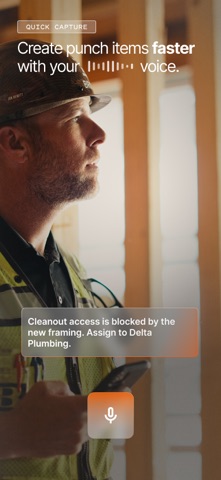
- Turn any photo into a punch item, observation, or RFI in seconds
- Capture full 360° room views natively — no extra app required
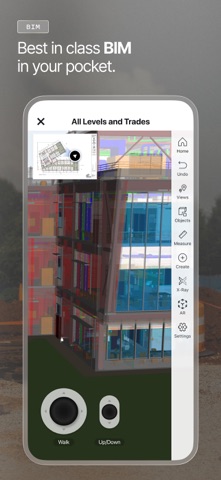
SEE YOUR PROJECT IN 3D
- Stream gigabyte-scale models on any device
- View live RFI, submittal, and inspection status on the model
- Drop 3D pins to add exact spatial context to every issue
ACCESS YOUR DRAWINGS, ALWAYS CURRENT
- Access every revision — offline or online, always synced
- Mark up drawings with the full annotation toolkit
- Scan QR codes to see every open item by location
EXECUTE ON-SITE
- Track punch lists and observations with Ball in Court accountability
- Submit, track, and respond to RFIs from the field
- Log daily reports — weather, crew, equipment, and notes
MANAGE YOUR RESOURCES
- Request labor and equipment
- Check daily crew and schedule assignments
- Log labor and equipment hours with Grid Time Entry — an intuitive, Excel-style grid
- Track material inventory, log receipts, and note defects
MANAGE FINANCIALS FROM THE FIELD
- Approve commitments from your device — no desk required (Open Beta)
TRUSTED BY THE INDUSTRY
- 3M+ construction projects worldwide
- 2M+ construction professionals in 150+ countries
- Available in 13+ languages
Download for free. An active Procore subscription is required. Mobile features vary based on Procore subscription.